
Description
Reviews (14 cached)
Annoying app, You have to turn on this effect ... FOR EVERY NEW YOUTUBE you starts .. Forget About IT!
Doesn't do anything. Doesn't add a button to YouTube, doesn't have any graphic equaliser options in the extensions menu. Useless.
Cannot use. Does not work. I do not understand. I went to FAQ, read instructions on website. I still do not understand. If it works, fine, but it doesn't. So 1 star since I can't go lower DO NOT USE THIS EXTENSION!!!! USE AT OWN DISCRETION!!! iF PROBLEM PERSISTS FOR 7 DAYS OR MORE, CONTACT LOCAL IT FOR ASSISTANCE FIRST, THE COMPANY DOES NOT CARE ABOUT YOU...
Unfortunatly it has absolutly no effect
I can't even open it, I can't use, I don't find it anywhere and I did everything that says on the page and in the Chrome web store, can someone help me?
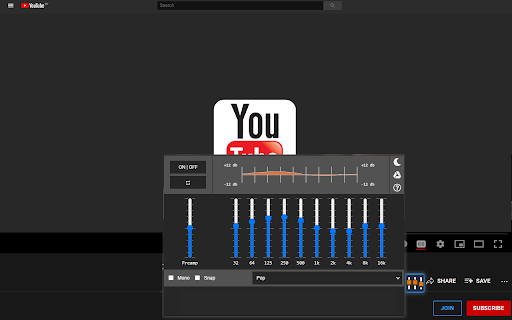
Too few sliders, especially for bass. Presets don't save too.
Settings not saved
The review of 2 stars is not final. As I am the first to review the app... Well How about a switch or light that indicates if the app is turned on? Some songs it has a pronounced effect while the next song ,often in the same genre, Will show no audible effects. I find myself clicking the on off button to no noticeable effect. Yes a preset is on and... then a few clicks later it will turn on. sometimes with over boosted levels that is non musical and harsh. Next song I find myself clicking the on off button again. A lot of these peaks and valleys are from the source material and as of now I have limited time in the app. But isn't the point of a general EQ and preamp to allow one to set a baseline volume and adjust and correct rarely when the source material requires it? As of 21 October 2021 I am unable to use this for my needs. Yet It looks good when it opens and it closes nicely. Did I mention at times it will not open? Again this is first time use details and I have now shut down and restarted Chrome and YouTube a couple times hoping this is the fix..... Then just did a restart and it is still buggy. The bugs....I am not confident that this will be useful and I mentally Swat at the bugs. So this wasn't ready for release quite yet. HELP?
it doesn't work on brave
not bad so far.
This equalizer easyly could have 5 stars BUT I can't save my own presets. Works truely fine, just fix that. My rating 3/5
everything works fine and as intended, just wish there was a save feature for equaliser options.
I can't get presets to automatically set. The extension only responds if I set the individual sliders. When it is set manually, the audio response good, but it's bothersome to reset them every time.
I was able to set it for the first musical piece, but not completely. The popup goes off to the side where some of the higher levels are not accessible. For the second piece, the popup wouldn't open. It does help me, though. I am a cellist coming back to playing after a long break due to covid and having no classes. Without this equalizer, the cello part is overwhelmed by the violins and violas, so I just can't hear what the cellists are playing. It's a difficult piece for me since it doesn't seem to speak to me from the sheet music, so it really helps to be able to hear what I am supposed to be producing on my instrument.
Permissions (2)
Permissions
Details
| Version | 3.0.2 |
| Updated | Jan 31, 2025 |
| Size | 335KiB |
| First Seen | Mar 22, 2026 |
More by Free Apps





Popular in fun





Popular Extensions




