
Netwrix Password Secure
v26.3.101.34065 Updated Mar 24, 2026 1.48MiB
⚠️Requests 2 sensitive permissions ✅Recently updated
Description
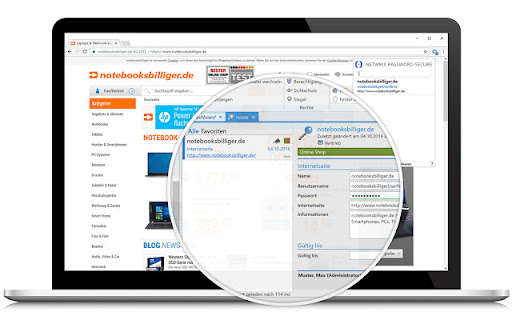
With the browser extension of the award-winning password management solution Netwrix Password Secure, all employees can log in securely on the web and retrieve their required credentials directly in the browser.
• ALL PASSWORDS AT YOUR FINGERTIPS: This browser extension helps you log in to websites and other web-based tools. Netwrix Password Secure automatically logs you in with the credentials you have stored. Personal or shared account? If you have multiple credentials saved for one website, Netwrix Password Secure automatically suggests the matches for you to choose from.
• NO MORE TYPING, SEARCHING, OR "FORGOT YOUR PASSWORD?": Simply visit the desired website, and you will be logged in immediately! Whether e-mail address, password, or customer number – the browser extension automatically fills the fields for you.
• REGISTER QUICKLY AND SECURELY: New password required? With Netwrix Password Secure, you can generate a new password in the browser extension and use it directly for the registration! The new credentials are transferred securely to Netwrix Password Secure. Netwrix Password Secure scans possible login fields to capture them for the next login.
• LOG IN SECURELY EVERYWHERE: Your passwords are wherever your Netwrix Password Secure is! Once signed in to the Netwrix Password Secure extension in your browser, you can log in securely to all your websites.
– – –
PLEASE NOTE: This extension can only be used if your employer uses Netwrix Password Secure. If you do not yet have a Netwrix Password Secure account, you can register after Netwrix Password Secure has been installed and test it for 30 days free of charge. For more information, visit our website: https://netwrix.com/go/ps-product-en
Reviews (1 cached)
★★★☆☆2026-01-14
Matthias S.
Can't login after Chrome release Version 144.0.7559.60. Error: cannot read properties of null (reading $type)
Permissions (11)
Permissions
activeTabℹ Can access the current tab when you click the extension clipboardWriteℹ Can write to your clipboard identityℹ Can use your Google account identity nativeMessagingℹ Can communicate with programs on your computer notificationsℹ Can show desktop notifications privacyℹ Can change privacy-related browser settings storageℹ Can store data locally in your browser tabsℹ Can see your open tabs and their URLs webNavigationℹ Can monitor navigation events webRequestℹ Can observe and analyze network traffic webRequestAuthProvider
Details
| Version | 26.3.101.34065 |
| Updated | Mar 24, 2026 |
| Size | 1.48MiB |
| First Seen | Mar 26, 2026 |
More by Netwrix Corporation


Popular in workflow

Adobe Acrobat: PDF edit, convert, sign tools
by Adobe Inc.
331M
★ 4.40
workflow
331M
★ 4.40
workflow

Chrome Remote Desktop
by Chrome Remote Desktop Release Managers
38M
★ 3.14
workflow
38M
★ 3.14
workflow

Microsoft Single Sign On
by Microsoft
36M
★ 2.27
workflow
36M
★ 2.27
workflow

MetaMask
by metamask
13M
★ 2.68
workflow
13M
★ 2.68
workflow

Free VPN for Chrome - VPN Proxy VeePN
by www.veepn.com
12M
★ 4.51
workflow
12M
★ 4.51
workflow
Popular Extensions
Adobe Acrobat: PDF edit, convert, sign tools
by Adobe Inc.
331M
★ 4.40
workflow
331M
★ 4.40
workflow

Grammarly: AI Writing Assistant and Grammar Checker App
by Grammarly
42M
★ 4.50
communication
42M
★ 4.50
communication
Chrome Remote Desktop
by Chrome Remote Desktop Release Managers
38M
★ 3.14
workflow
38M
★ 3.14
workflow
Microsoft Single Sign On
by Microsoft
36M
★ 2.27
workflow
36M
★ 2.27
workflow

Cisco Webex Extension
by cisco.chromestore
23M
★ 2.34
social
23M
★ 2.34
social