
⚠️Not updated in over a year
Description
An add-on extension to pair with Eyal282's Duelingbook Extension "Dueling Book Unlock" (Requires Unlock version 9.3 or later.)
https://chrome.google.com/webstore/detail/dueling-book-unlock/ledilndbpllicfccmdhblnfbodkndjnl
As of 2.1.3, the legacy method options are no longer available. I was using imgur to host the images necessary for those options, but since then imgur has decided to delete any posts older than a year on "inactive accounts". I was considering using a different image hosting site, but there's every chance that hypothetical new site could pull the same stunt. Sorry.
FULL ART METHOD:
- Upload a full card png as the image of a monster, spell or trap on Duelingbook using the "Browse Image" option (Pendulum tickbox is unneeded for this but should be harmless if ticked). The image must include the card in its entirety, including the card border, frame, effect box etc.
- Go to the end of your custom card's effect on Duelingbook's card maker and hit enter to start a new line.
- Type "This is a custom card." and save the card.
If you did everything correctly, the image will have expanded back to its original size and will cover the entire card, not just the art square.
Attributes:
- "DREAM-Attribute."
ADDITIONAL FEATURES (still work):
- You can give monsters custom types by adding the sentence "This card is Something-type" to your card's text.
Big thanks to Eyal for the Unlock extension AND for helping me create this add-on extension, and to Kyrie Devles for creative input and encouragement.
If any issues crop up, please let me know so I can fix them in a later update.
VERSION HISTORY:
1.1 - Added Circuit Monsters.
1.2 - Added Dark Synchro Monsters
1.2.1 - Various bug fixes, better compatibility with newest DB Unlock version.
2.0.0 - New and improved method of custom card upload. Bug fixes.
2.0.1 - Bug fix for new Duelingbook update that prevented the full-art command from functioning correctly.
2.1.0 - Added custom types feature.
2.1.1 - Various bug fixes.
2.1.2 - UI bug fix.
2.1.3 - Unfortunate removal of legacy method options
LEGACY METHOD (these no longer work):
This part of the add-on is a simpler process gives players the ability to customise their custom cards with custom frames, colors, and attributes contributed to this extension by myself and a few others from the Yugioh community! A list of the phrases you can use is in your card effects to use these particular custom assets is below. Do NOT try to use multiple frames at the same time, it won't work. Same advice also applies to custom attributes if more than the one mentioned are added.
Frames:
- "This card is a POSITIVE Circuit Monster."
(You can swap "Positive" for "NEGATIVE" or CONNECT")
- "This card is a Dark Synchro Monster"
- "This card is an Evolve Monster."
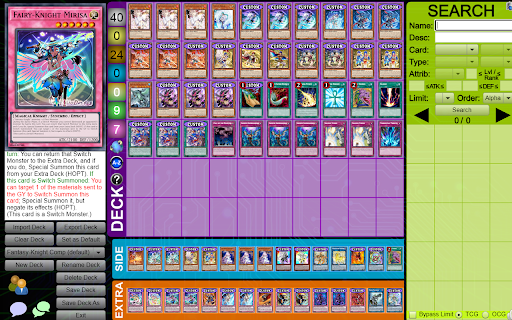
- "This card is a Switch Monster."
- "This card is a Token."

Reviews
Loading reviews...
Permissions (3)
Permissions
scriptingℹ Can inject scripts into web pages tabsℹ Can see your open tabs and their URLs webNavigationℹ Can monitor navigation events
Details
| Version | 2.1.3 |
| Updated | Jan 14, 2025 |
| Size | 29.32KiB |
| First Seen | Mar 21, 2026 |
Popular in fun

Custom Cursor for Chrome™
by BLife Team LLC
5M
★ 4.67
fun
5M
★ 4.67
fun

Google Meet Enhanced Experience
by niritshlif
1M
★ 3.36
fun
1M
★ 3.36
fun

SuperNova SWF Enabler
by Tactics Technology LLC
400K
★ 2.04
fun
400K
★ 2.04
fun

Custom Cursor Trails
by BLife Team LLC
300K
★ 4.30
fun
300K
★ 4.30
fun

Cursor Style – Custom Mouse Cursors & Trails for Chrome™
by Oleksii Semeniuk
200K
★ 4.79
fun
200K
★ 4.79
fun
Popular Extensions

Adobe Acrobat: PDF edit, convert, sign tools
by Adobe Inc.
330M
★ 4.40
workflow
330M
★ 4.40
workflow

Chrome Remote Desktop
by Chrome Remote Desktop Release Managers
38M
★ 3.14
workflow
38M
★ 3.14
workflow

Cisco Webex Extension
by cisco.chromestore
24M
★ 2.34
social
24M
★ 2.34
social

Kami for Google Chrome™
by Kami
17M
★ 4.56
education
17M
★ 4.56
education

Read&Write for Google Chrome™
by Texthelp
17M
★ 3.44
accessibility
17M
★ 3.44
accessibility