
Cesturefy: Navigate, operate, and browse faster with mouse gestures
by Diredocks
v0.1.5 Updated Mar 21, 2026 284KiB
✅Recently updated
Description
Still your favorite gesture extension, now on Chromium-based browsers
Cesturefy is a Chromium adaptation of the popular Robbendebiene/Gesturefy mouse gesture extension originally for Firefox, bringing the same smooth gesture control to Chrome, Edge, and other Chromium-based browsers.
Features
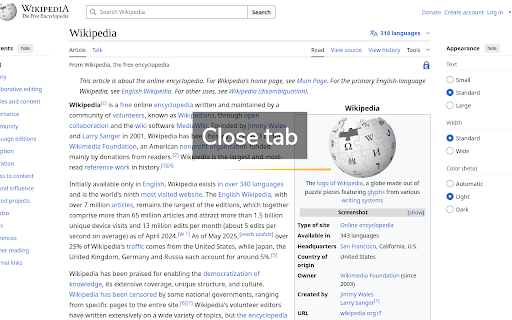
- Mouse gestures (moving the mouse while holding the left, middle, or right button)
- Rocker gestures (left-click while holding the right mouse button and vice versa)
- Wheel gestures (scroll wheel while holding the left, middle, or right button)
- 79 different predefined commands
- Provides special commands like popup, multi purpose and cross add-on command
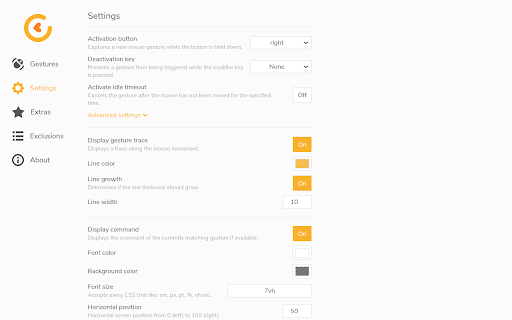
- Customizable gesture trace and status information style
- Light, dark and highcontrast theme
Limitations
- Cesturefy does not work on Chrome internal pages like chrome://extensions or other restricted pages. This is due to browser security restrictions.
- The page must be partially loaded to perform gestures.
- Gestures cannot be properly performed inside iframe pages, because Chrome does not provide the mozInnerScreenX/Y API.
- On Linux and macOS, right-click menu gestures require a double click to trigger. Chrome does not support the browserSettings.contextMenuShowEvent API.

Reviews (1 cached)
★★★☆☆2026-03-18
Drevor Tugdale
Works well except there is an issue with click hit boxes not working if the Rocking Gesture is turned on. A good example is on a google search result page if you wanted to see just video results clicking "video" does nothing. If you click the top most of the hit box it works. Caused me a couple of hours of frustration.
Permissions (12)
Permissions
activeTabℹ Can access the current tab when you click the extension bookmarksℹ Can read and modify your bookmarks clipboardReadℹ Can read from your clipboard clipboardWriteℹ Can write to your clipboard downloadsℹ Can manage and monitor downloads notificationsℹ Can show desktop notifications scriptingℹ Can inject scripts into web pages search sessionsℹ Can access recently closed tabs and windows storageℹ Can store data locally in your browser tabsℹ Can see your open tabs and their URLs userScripts
Details
| Version | 0.1.5 |
| Updated | Mar 21, 2026 |
| Size | 284KiB |
| First Seen | Mar 29, 2026 |
Popular in workflow

Adobe Acrobat: PDF edit, convert, sign tools
by Adobe Inc.
331M
★ 4.40
workflow
331M
★ 4.40
workflow

Chrome Remote Desktop
by Chrome Remote Desktop Release Managers
38M
★ 3.14
workflow
38M
★ 3.14
workflow

Microsoft Single Sign On
by Microsoft
36M
★ 2.27
workflow
36M
★ 2.27
workflow

MetaMask
by metamask
13M
★ 2.68
workflow
13M
★ 2.68
workflow

Free VPN for Chrome - VPN Proxy VeePN
by www.veepn.com
12M
★ 4.51
workflow
12M
★ 4.51
workflow
Popular Extensions
Adobe Acrobat: PDF edit, convert, sign tools
by Adobe Inc.
331M
★ 4.40
workflow
331M
★ 4.40
workflow

Grammarly: AI Writing Assistant and Grammar Checker App
by Grammarly
42M
★ 4.50
communication
42M
★ 4.50
communication
Chrome Remote Desktop
by Chrome Remote Desktop Release Managers
38M
★ 3.14
workflow
38M
★ 3.14
workflow
Microsoft Single Sign On
by Microsoft
36M
★ 2.27
workflow
36M
★ 2.27
workflow

Cisco Webex Extension
by cisco.chromestore
23M
★ 2.34
social
23M
★ 2.34
social