
⚠️Not updated in over 2 years
Description
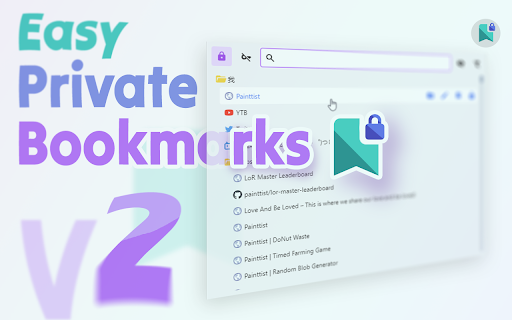
Quickly and easily lock a bookmark in its original place. Locked bookmarks sync across devices just like normal bookmarks. This extension allows you to password protect your bookmarks so they are kept private, but still allows easy access from the bookmarks bar, as long as you remember your password.
To use this in Incognito mode, you need to enable it first:
- Go to chrome://extensions
- Find the extension, click Details
- Toggle the button "Allow in Incognito" to allow the extension to run in incognito mode.
Warning: no password recovery
[FAQ]:
Q: I have just updated to version 2.0 and my old locked links can't be recognized or unlocked?
A: Sorry for the inconvenience. Please don't modify those bookmarks. We have fixed the auto migrate bug in version 2.1. After updating to version 2.1. Go to the Options page (Right click on the icon -> Options) And then use the Manual Migrate feature to migrate those old links.
[Patch Notes]
v2.1.0
- Complete Bookmark Editing Features
- Adding Folder
- Changing Bookmark Title & URL
- Changing Folder Title
- Deleting Bookmarks & Folders
- Critical Bug Fixes
- Added Manual Migration
- UI improvements to better display remaining time of temp. key
- Many UX/UI detail improvements
## v2.0.0
- Rewrote from ground up to `revive` the codebase
- The old codebase refused to compile :/
- But now I can use great tools to super-charge my workflow :D
- Improves locking safety.
- The public & private key process wasn't fully implemented, now it is! :D
- And hence the migration required :/
- Adding Current Tab as Bookmark
- Adds `Peeking`. No more manually decrypting to see the link title!
- Many UI/UX refinements. Better color consistency & read-ability improvements
- Adds Icon (Favicon) preview for all URLs! :D
## v1.0.0
- First version!
- Locking Bookmarks
- Filteirng Bookmarks
- Searching Bookmarks


Reviews (9 cached)
★☆☆☆☆2026-03-22
J J
no use
★☆☆☆☆2026-02-08
Arthur
When I set a password for some website, then I remove the extensions from the Chrome, then I add the extension again, but I can not unlock with my original previous password, why?
★☆☆☆☆2025-11-01
Steve Kurtas
This software was confusing and irritating to me. I switched to "Simple Private Bookmark".
★☆☆☆☆2025-07-12
Dale Sherman
This thing blows, NO instructions on how to save bookmarks. I'm giving up and looking elsewhere.
★☆☆☆☆2025-07-11
Simon Rasmussen
Horrible lack of instructions and functionality.
★★★☆☆2025-12-16
Daniel T
Please provide support to lock folders with bookmarks instead one by one. The tool looks great, thanks
★★★☆☆2025-07-16
zimo Lu
Folders cannot be locked
★★★☆☆2024-10-10
R.I.P isdead
it doesnt make anysense if u lock a bookmark it shouldnt be able to delete it :/
★★★☆☆2024-08-17
Vealq
No option to lock folders.
Permissions (3)
Permissions
activeTabℹ Can access the current tab when you click the extension bookmarksℹ Can read and modify your bookmarks storageℹ Can store data locally in your browser
Details
| Version | 2.1.0 |
| Updated | Mar 8, 2023 |
| Size | 71.04KiB |
| First Seen | Mar 29, 2026 |
More by Painttist

Popular in workflow

Adobe Acrobat: PDF edit, convert, sign tools
by Adobe Inc.
331M
★ 4.40
workflow
331M
★ 4.40
workflow

Chrome Remote Desktop
by Chrome Remote Desktop Release Managers
38M
★ 3.14
workflow
38M
★ 3.14
workflow

Microsoft Single Sign On
by Microsoft
36M
★ 2.27
workflow
36M
★ 2.27
workflow

MetaMask
by metamask
13M
★ 2.68
workflow
13M
★ 2.68
workflow

Free VPN for Chrome - VPN Proxy VeePN
by www.veepn.com
12M
★ 4.51
workflow
12M
★ 4.51
workflow
Popular Extensions
Adobe Acrobat: PDF edit, convert, sign tools
by Adobe Inc.
331M
★ 4.40
workflow
331M
★ 4.40
workflow

Grammarly: AI Writing Assistant and Grammar Checker App
by Grammarly
42M
★ 4.50
communication
42M
★ 4.50
communication
Chrome Remote Desktop
by Chrome Remote Desktop Release Managers
38M
★ 3.14
workflow
38M
★ 3.14
workflow
Microsoft Single Sign On
by Microsoft
36M
★ 2.27
workflow
36M
★ 2.27
workflow

Cisco Webex Extension
by cisco.chromestore
23M
★ 2.34
social
23M
★ 2.34
social