Browser Lock - Chrome Lock Browser | Browser-Lock.com icon

Browser Lock - Chrome Lock Browser | Browser-Lock.com

by arlinesingleton340

v1.0.11 Updated Nov 24, 2025 2.12MiB
CWS
7K
Users
★ 4.68
574 reviews
#6801
of 148.2K
tools
#1323 of 45.9K
Highly rated

Description

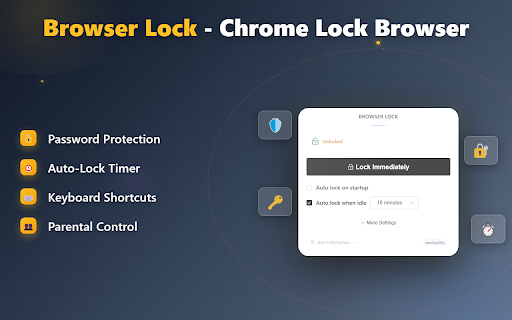
Keep Your Browsing Private, Secure, and Truly Yours – Effortlessly with Browser Lock Every time you walk away from your computer—at home or at work—you leave your most personal information just one click away from prying eyes. Your browsing sessions contain your emails, confidential work, private photos, and sensitive conversations. In shared spaces, busy households, or unpredictable office interruptions, relying solely on device locks or OS profiles doesn’t always shield your privacy. Browser Lock gives you seamless, always-on control—letting you safeguard your unique online world. --- **Why Privacy Matters: Day-to-Day Realities** How often do you step away from your laptop for just a minute, only to realize your open tabs are exposed? Whether it’s family sharing a computer, coworkers walking by, friends borrowing your device, or simply grabbing a drink—your web content can be seen by anyone. OS-level locking is clunky and sometimes impossible; Browser Lock fills the gap, letting you secure the browser instantly and automatically. --- **What Makes Browser Lock Different? Your Smart Security Partner** - Password-protect your Chrome browser—no complex setup required. - Auto-lock after inactivity: set your own timer for peace of mind. - Parental control mode: keep kids safe from unwanted content when you’re not around. - Locks without closing your work: resume right from where you left off after unlocking. - No cloud required, no sensitive data leaves your device—privacy by design. - Supports families, home offices, students, and professionals alike. --- **Everyday Scenarios: Real Benefits for Real People** - At home, you walk away to cook, and your emails/tabs remain private from other family members. - In the office, stepping out for a coffee, Browser Lock automatically secures client documents and private correspondence. - Public spaces—coworking or libraries—ensure strangers can’t snoop if you’re briefly distracted. - For parents, childproof your browser with one click—gain peace of mind when sharing devices. --- **Why Choose Browser Lock? The Clear Value** - Prevents information leaks, accidental clicks, and curious eyes - Saves time—no need to log out or reset sessions each time - Works quietly in the background, giving you seamless privacy - Distinct advantage over generic OS locking or user switching (quicker, more targeted, no session loss) - Extremely lightweight, no drain on system resources --- **Ready to Take Control? Install Browser Lock Now** Safeguard your browsing world—whether you care about confidentiality, parental oversight, or just peace of mind. Join thousands who trust Browser Lock for hassle-free, always-on web privacy. Install now and experience security without compromise!
Browser Lock - Chrome Lock Browser | Browser-Lock.com screenshot 1Browser Lock - Chrome Lock Browser | Browser-Lock.com screenshot 2

Reviews (16 cached)

★☆☆☆☆2026-02-23
TR L

The auto-lock feature does not work for many times(it works sometimes). Even when it works, it automatically lock the browser after 10minutes inactivity whereas I've set the inactivity time for 5mins. Can you fix this?

★☆☆☆☆2025-11-22
cyber security

Good, But password enter face open later when use 1or 2 min then passowrd requirded this make more aggresive

★☆☆☆☆2025-10-15
Joy Roy

V Bad. Tab Restore Issue

★★☆☆☆2026-02-25
XenosVoid

The set up was rather simple; there were no issues in this regard. However, upon entering the password to open Brave, the tabs I had in groups remained but the grouping was removed entirely. All the tabs were uniform in separation, which wasted my time grouping them yet again. I had a similar issue with the other extension under similar conditions which kept the grouping intact but the names of groups were erased. Browser: Brave.

★★★☆☆2026-03-26
Kripa Nair

It's good but sometimes when i enter the passcode the web doesn't open so i need to restart it otherwise it's okay

★★★☆☆2026-03-24
faysal al mamun

helpful

★★★☆☆2026-03-02

Good enough

★★★☆☆2026-02-18
Faizan Hussain

very good app. I will dont pop up another window to review the again though.

★★★☆☆2025-11-22
Yuvraj Yadav

good

★★★☆☆2025-11-22
Rahat Hussain

Fine

★★★☆☆2025-11-20
Benjamin Kaali

good but why does it refresh tabs upon unlocking..it should leave the tabs the way they were without refreshing pages since most unsaved work gets lost

★★★☆☆2025-11-07
dell computer

good

★★★☆☆2025-10-21
Tamilaaran SNanthagopan

I Surely Say this is Good, But some bugs, asking password twice sometimes, no more lock customizors(like when only in startup first, while switching tabs), and this will be more good if a bit good UI.

★★★☆☆2025-10-09
Waise Ebrahimi

good not perfect--- AUTO locks during GOOGLE MEET VIDEO calls when switch between chrome Tabs also its annoying because it asks for Passcode twice.

★★★☆☆2025-10-08
Cruzor Blade

It asks for password two times when first launch of chrome..and it has a slight lag every time you open chrome...like chrome opens first and then after a sec the password promt appears..

★★★☆☆2025-10-01
Hafiz

good

Permissions (4)

Permissions

idle Can detect when you're away from the computer storage Can store data locally in your browser tabs Can see your open tabs and their URLs windows

Details

Version 1.0.11
Updated Nov 24, 2025
Size 2.12MiB
First Seen Mar 29, 2026