
Description
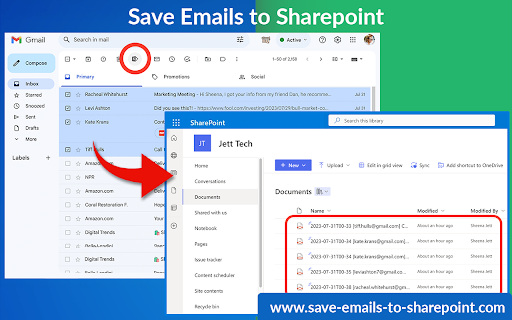
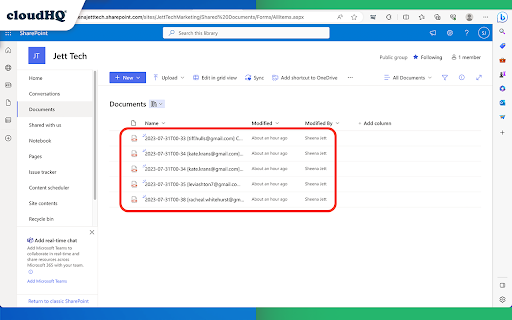
This extension allows you to save your Gmail messages or labels directly to Microsoft 365 SharePoint with just one click.
This tool offers various functionalities like saving individual emails or in batches, archiving all emails at once, continuous automatic saving, and organization-wide email backup.
Here’s what you can do:
- Save individual emails, or in batches
- Label backup
- Archive all your emails
- Continuously save emails automatically
- Setup email backup
Here is how to use this extension:
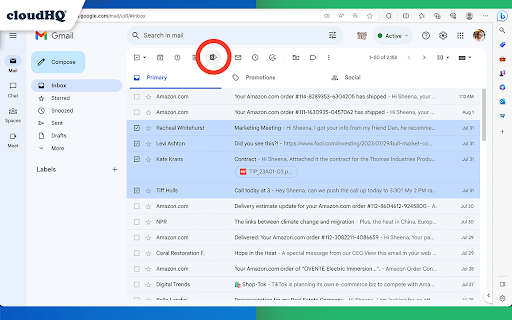
1. Select the emails you want to save.
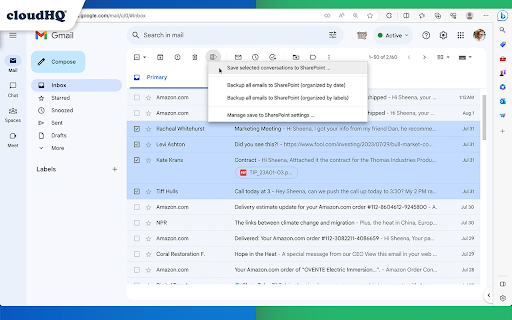
2. Click on the "Save Emails to SharePoint" icon, and select the SharePoint Site, Document Library, and folder.
3. Choose the email export options.
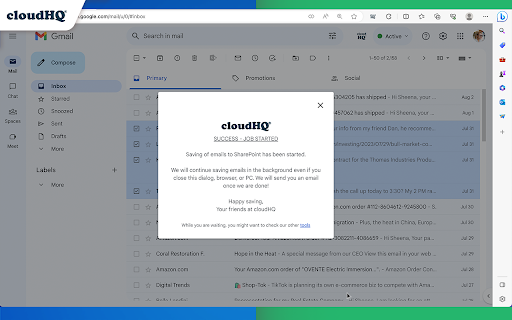
4. Click on "Save".
Key features:
- save any email to a folder in SharePoint Document Library
- save entire Gmail label to a folder in SharePoint Document Library
- setup real time backup of entire Gmail account to a folder in your SharePoint Document Library
Choose your saving preferences:
- Consolidate email conversations into a single document or separate them
- Decide whether to place attachments within the email body or in separate files
- Save your emails in various file formats
- Customize the way your files are named to suit your organizational needs
By saving Gmail emails to Microsoft SharePoint, you gain:
* Enhanced Information Security:
Keep your sensitive email information secure and managed within SharePoint’s robust platform.
* Streamlined File Management:
Organize your emails seamlessly alongside your SharePoint documents.
cloudHQ. Helping your productivity, one click at a time.
Visit our Website: https://www.save-emails-to-sharepoint.com/
Explore Pricing: https://www.save-emails-to-sharepoint.com/pricing
Need Help? Support Page: https://support.cloudhq.net/?s=sharepoint
Discover Insights. Blog: https://blog.cloudhq.net/
Google Workspace, Google Sheets, Google Drive, Google Alerts and Gmail are trademarks of Google LLC. Use of this trademark is subject to Google Permissions.
cloudHQ is trademark of cloudHQ LLC. https://www.cloudhq.net/trademark
Reviews
Loading reviews...
Permissions (3)
Permissions
background scriptingℹ Can inject scripts into web pages storageℹ Can store data locally in your browser
Details
| Version | 1.0.2.2 |
| Updated | Nov 27, 2025 |
| Size | 594KiB |
| First Seen | Mar 29, 2026 |
More by cloudHQ

Gmail™ Email Templates by cloudHQ
by cloudHQ
200K
★ 4.17
communication
200K
★ 4.17
communication

Save Emails as PDF by cloudHQ
by cloudHQ
100K
★ 4.26
workflow
100K
★ 4.26
workflow

Multi Email Forward by cloudHQ
by cloudHQ
80K
★ 4.08
communication
80K
★ 4.08
communication

Auto BCC for Gmail™ by cloudHQ
by cloudHQ
60K
★ 4.24
communication
60K
★ 4.24
communication

Backup and Sync Google Drive to other clouds
by cloudHQ
50K
★ 4.24
workflow
50K
★ 4.24
workflow
Popular in workflow

Adobe Acrobat: PDF edit, convert, sign tools
by Adobe Inc.
331M
★ 4.40
workflow
331M
★ 4.40
workflow

AdBlock — block ads across the web
by AdBlock
63M
★ 4.48
workflow
63M
★ 4.48
workflow

迅雷下载支持
by Shenzhen Xunlei Network Technology Co., Ltd.
59M
★ 2.77
workflow
59M
★ 2.77
workflow

Adblock Plus - free ad blocker
by eyeo GmbH
41M
★ 4.39
workflow
41M
★ 4.39
workflow

Chrome Remote Desktop
by Chrome Remote Desktop Release Managers
39M
★ 3.14
workflow
39M
★ 3.14
workflow
Popular Extensions
Adobe Acrobat: PDF edit, convert, sign tools
by Adobe Inc.
331M
★ 4.40
workflow
331M
★ 4.40
workflow
AdBlock — block ads across the web
by AdBlock
63M
★ 4.48
workflow
63M
★ 4.48
workflow
迅雷下载支持
by Shenzhen Xunlei Network Technology Co., Ltd.
59M
★ 2.77
workflow
59M
★ 2.77
workflow

Grammarly: AI Writing Assistant and Grammar Checker App
by Grammarly
42M
★ 4.50
communication
42M
★ 4.50
communication
Adblock Plus - free ad blocker
by eyeo GmbH
41M
★ 4.39
workflow
41M
★ 4.39
workflow