Desktop US Weather Radar icon

Desktop US Weather Radar

by GMaps Gaier

v1.3 Updated Jul 25, 2015 59.64KiB
CWS
7K
Users
★ 3.46
94 reviews
#7616
of 168K
news
#32 of 998
⚠️Not updated in over 2 years

Description

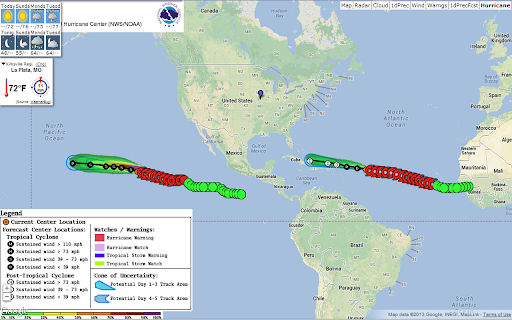
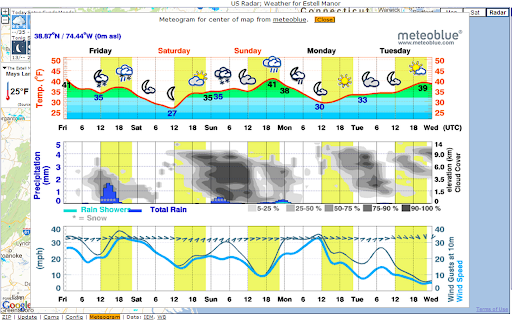
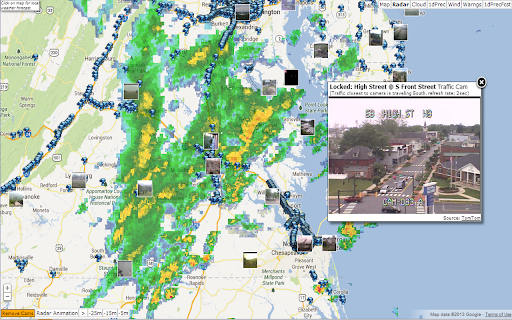
Desktop App: US Weather Radar, Weather and Precipitation Forecast, Meteograms, Alerts, Webcams, Traffic, Clouds, KML overlay and much more. US Weather Radar provides comprehensive information about the present and future weather conditions via Radar overlays and animation, weather forecast, precipitation forecast, alerts, webcams, meteograms, forecast video, cloud overlay, traffic, charts, KML overlay support for additional information and much more. The US Weather Radar desktop app works as stand-alone program separately from the Chrome browser which you can move to the optimal position to have your weather always under control. It also remembers its position and size. Overlays include ★ Animated radar images ★ Animated precipitation forecast ★ 1 hour precipitation ★ 24 hour precipitation ★ 1 day precipitation forecast ★ New: 1 hour minutely precipitation forecast and 48h details ★ Hurricanes ★ Wind barbs ★ Clouds ★ Warnings ★ Traffic cams Additional features: ★ 8 day forecast ★ Precipitation alarm ★ Temperature profile overlay ★ New: Show local Tweets related to the weather ★ 48h forecast icons with many detailed information ★ Alerts ★ Reads forecast, alerts, ... via text-to-speech on certain browsers ★ Lightnings overlay ★ Vertical Radar Cross section ★ Storm Reports ★ Location history ★ Weather charts ★ 1h,2h,4h precipitation flows ★ Weather Time Machine For daily forecast information hover over the weather icons. To get a forecast for a point on the map just click on the location on the map. Configuration and more features like meteograms are available from the menu in the lower left. You can also control US Weather Radar with keys: " ": start/stop radar animation "c": show webcams "m"; show meteogram "z": enter new zipcode for weather forecast "!": open configuration Uses ads in case of larger displays to fund the cost we have for data feed, ... - feel free to subscribe to remove ads and receive more frequent forecasts.
Desktop US Weather Radar screenshot 1Desktop US Weather Radar screenshot 2Desktop US Weather Radar screenshot 3Desktop US Weather Radar screenshot 4Desktop US Weather Radar screenshot 5

Reviews (18 cached)

★☆☆☆☆2019-09-30
Mike B

Downloaded and tried to open, just to find out this is no longer free and usable without some sort of API. I don't want to create an API, just for this. Uninstalling this app.

★☆☆☆☆2017-07-23
Jerrod Kaplan

After selecting a location a stupid arrow points at literally nothing and says "click install to continue" or something. Nothing to click on. Clicking anywhere removes the arrow and shows the previous screen. Useless, uninstalling.

★☆☆☆☆2017-05-13
Tom Horton

Worked well for a while, then quite and I can't get it to run again.

★☆☆☆☆2016-09-10
Rafael Moreno

Ads

★☆☆☆☆2016-07-31
Sean Fimmel

One third of the screen is an ad. Really!?!

★☆☆☆☆2016-06-02
IRA

No option or Hybrid Map option.

★☆☆☆☆2015-09-09
Stephen OBrien

Not good.

★☆☆☆☆2015-06-11
Lori-Ann Griffith

Would download then it waid to add and no add appeared. Very frustrating and disappointing looked like a good one too. Not

★☆☆☆☆2014-05-30
M C Morgan

adware

★★☆☆☆2017-05-30
Clifton Castleman

Can't zoom in, poor image quality - and no way to find your location easily.

★★☆☆☆2016-04-13
Al Shemonia

Ads take up the right 1/4 of the screen.

★★☆☆☆2015-12-19
Bryan Cady

Massive addspace on side covers map color key. Would be great without the adds, but if they need them at least put them in a spot that is not needed.

★★☆☆☆2015-07-12
Alex Castellanos

Just downloaded this and I am already going to delete this because of the ad space that is very generous on the right side. wasted my time. none of the screenshots showed this. Hope this helps others who also do not like this.

★★☆☆☆2015-04-20
Mike Hancock

its meh. works but not worth more then 3 stars

★★☆☆☆2015-02-14
david w pinkston

too big

★★☆☆☆2014-05-28
Roen Wainscoat

Had ads!

★★★☆☆2018-11-04
s f

Was OK before it required to get a GoogleMap API key due to price hike on Google's side which made it unaffordable for the creator to continue maintaining the App the way it was before. Uninstalled.

★★★☆☆2015-07-16
Gary Raygor

Works good on my Android, on my laptop it crashes as soon as it opens up.

Permissions (3)

Permissions

app.window storage Can store data locally in your browser webview

Details

Version 1.3
Updated Jul 25, 2015
Size 59.64KiB
First Seen Mar 30, 2026