
⚠️Requests 1 sensitive permission
Description
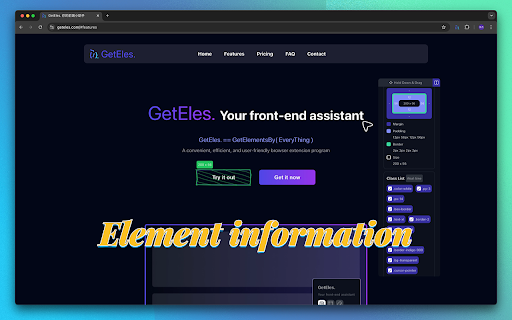
"GetEles." is your front-end assistant, inspired by the getElementBy* functions in JavaScript. It can help you:
🔍 Retrieve webpage information, such as title, description, and color scheme;
📂 Scan web resources; if needed, you can download them for learning purposes, but make sure to respect copyright issues;
📐 Access detailed information about elements, including width, height, margin, padding, and border. You’ll also see the element's class list and inline styles. You can select classes or apply custom styles directly, with changes appearing in real time;
📏 Measure distances between elements. To do this, select an element to view its details, switch to "measure mode" and move your mouse to see distances between elements.
🌲 The feature automatically detects the DOM structure of the selected element. You can hover to view the node and click to switch, allowing you to more accurately retrieve element information.
🪄 Scan the styles of an element and convert them into Tailwind classes. You can also copy the converted element code.
🎨 You can also customize "GetEles." with a variety of border color options, allowing you to set your favorite color for the extension.
⚡ Monitor webpage performance to quickly understand your site's status. Track key metrics in real-time, such as load time, resource usage, and rendering speed, to help optimize performance.
⌨️ We’ve also prepared convenient keyboard shortcuts for users, such as:
[Alt/⌥ Option + Shift + G]: Activate
[Alt/⌥ Option + Shift + C]: Switch module
[Alt/⌥ Option + Shift + X]: Pause usage
[Alt/⌥ Option + Left Click]: Lock measurement
You can try "GetEles." on the website https://geteles.com. To use "GetEles." on other websites, you need to pay.
In the future, we plan to add even more fun and useful features. We hope that, with "GetEles." you'll finish your work faster and more efficiently!
For questions or support, feel free to email at waynefung1992@gmail.com


Reviews
Loading reviews...
Permissions (4)
Permissions
activeTabℹ Can access the current tab when you click the extension storageℹ Can store data locally in your browser tabsℹ Can see your open tabs and their URLs webRequestℹ Can observe and analyze network traffic
Details
| Version | 1.4.1 |
| Updated | Jul 26, 2025 |
| Size | 450KiB |
| First Seen | Mar 30, 2026 |
More by WayneFung


Popular in developer

GoFullPage - Full Page Screen Capture
by GoFullPage
10M
★ 4.89
developer
10M
★ 4.89
developer

TouchEn PC보안 확장
by 라온시큐어
8M
★ 1.33
developer
8M
★ 1.33
developer

React Developer Tools
by Meta
5M
★ 3.95
developer
5M
★ 3.95
developer

Meta Pixel Helper
by Meta
4M
★ 3.91
developer
4M
★ 3.91
developer

ColorZilla
by colorzilla.com
4M
★ 4.59
developer
4M
★ 4.59
developer
Popular Extensions

Adobe Acrobat: PDF edit, convert, sign tools
by Adobe Inc.
331M
★ 4.40
workflow
331M
★ 4.40
workflow

AdBlock — block ads across the web
by AdBlock
63M
★ 4.48
workflow
63M
★ 4.48
workflow

迅雷下载支持
by Shenzhen Xunlei Network Technology Co., Ltd.
59M
★ 2.77
workflow
59M
★ 2.77
workflow

Grammarly: AI Writing Assistant and Grammar Checker App
by Grammarly
42M
★ 4.50
communication
42M
★ 4.50
communication

Adblock Plus - free ad blocker
by eyeo GmbH
41M
★ 4.39
workflow
41M
★ 4.39
workflow