
✅Highly rated
Description
Translate, save, and boost your vocabulary while you browse.
WordsMine lets you translate with a double-click, save words to your personal word bank, and review with flashcards using spaced repetition. It works across websites, YouTube subtitles, and PDFs/eBooks, so learning fits your browsing, not the other way around.
Never look up twice.
It’s easy to forget a word you looked up a few days ago—when it appears again, you search again, and the cycle repeats. WordsMine breaks the loop: saved vocabulary is auto-highlighted whenever you meet it across the web, with quick meanings in context so you keep reading and keep learning.
What you can do
• Translate instantly: Double-click, select text, or hover over a word while holding the Ctrl/Command key to get inline translations for words and phrases easily.
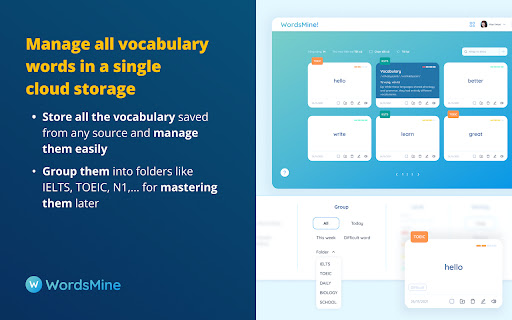
• Save anything: Add words/phrases from webpages, YouTube captions, and PDF/eBooks to your word bank.
• Review smarter: Turn saves into flashcards with spaced repetition to retain faster, longer.
• Learn in context: See examples, highlight previously saved words on pages, and mark “hard” words.
• Works everywhere: Web, PDF reader, YouTube; syncs across devices.
• Multilingual support: Bi-directional lookup across 120+ languages.
Languages
Languages (bidirectional): English, Vietnamese, Japanese, Korean, Chinese (Simplified/Traditional), Spanish, French, German, Thai, Indonesian, Hindi, Arabic, Portuguese, Russian, Turkish — 120+ in total.
Perfect for
Students, test prep (IELTS/TOEIC/SAT), professionals upskilling on technical terms, and lifelong learners.
Privacy & control
Toggle translation popups, manage saved words, and customize review—your learning, your pace.
Recognition
50+ recognitions and awards from local and global organizations, including Google for Startups, Microsoft for Startups, Qualcomm, and UNDP.
What’s new
Sep-Dec 2025
• New features for Youtube translation, stability fixes and performance improvements.
Support
Need WordsMine work on your favorite sites? Visit the Support section on this page.



Reviews (5 cached)
★☆☆☆☆2025-10-10
bodhi shin
pretty nice except it changes youtube 2 lines caption into one line which is unacceptable for me. so I deleted it. please do the core function well instead of adding stupid functions like auto translate youtube.
★☆☆☆☆2024-01-29
Thắngg
i can't sign in to my google account. please fix it
★☆☆☆☆2023-11-29
Hiền
not optimize, the auto-translate on youtube is very uncomfortable, hope to have a button to turn off that pop-up
★☆☆☆☆2021-10-22
Bergg Uscha
- word list resets - words are not being saved
★★☆☆☆2023-09-12
Damian Z
Only few languages available (and more of them are like korean, chinese, japan), no option to provide the meaning of english word in english, loads a lot of time... Didn't met my expectations at all. Maybe for asian people.
Permissions (3)
Permissions
activeTabℹ Can access the current tab when you click the extension contextMenusℹ Can add items to the right-click menu storageℹ Can store data locally in your browser
Details
| Version | 10.0.9 |
| Updated | Feb 14, 2026 |
| Size | 837KiB |
| First Seen | Mar 29, 2026 |
Popular in education

Google Translate
by google-translate-chrome-extension-owners
38M
★ 4.24
education
38M
★ 4.24
education

Kami for Google Chrome™
by Kami
19M
★ 4.56
education
19M
★ 4.56
education

EndNote Click
by EndNote Click
5M
★ 4.06
education
5M
★ 4.06
education

Equatio - Math made digital
by Texthelp
5M
★ 3.89
education
5M
★ 3.89
education

Promethean® Screen Share
by classflow
4M
★ 2.98
education
4M
★ 2.98
education
Popular Extensions

Adobe Acrobat: PDF edit, convert, sign tools
by Adobe Inc.
331M
★ 4.40
workflow
331M
★ 4.40
workflow

AdBlock — block ads across the web
by AdBlock
63M
★ 4.48
workflow
63M
★ 4.48
workflow

迅雷下载支持
by Shenzhen Xunlei Network Technology Co., Ltd.
59M
★ 2.77
workflow
59M
★ 2.77
workflow

Grammarly: AI Writing Assistant and Grammar Checker App
by Grammarly
42M
★ 4.50
communication
42M
★ 4.50
communication

Adblock Plus - free ad blocker
by eyeo GmbH
41M
★ 4.39
workflow
41M
★ 4.39
workflow