
⚠️Requests 1 sensitive permission ⚠️Very few reviews for its user base
Description
This extension is designed for use by directors or scorers of bridge tournaments on Bridge Base Online, who wish to extract the detailed results from BBO for publication on a bridge club's website.
This extension extracts the results and hand records from a BBO matchpoint or cross-imp pairs tournament, a Swiss Pairs or Swiss Teams tournament, or a match between two Teams of Four. It stores the result as a CSV file and PBN file in the browser's Downloads folder. Full ranking, scorecard, and traveller details are extracted. Makeable contracts and optimum contracts/scores are calculated automatically and included in the PBN file. A free web app (BBOtoXML), at dds.bridgewebs.com/bbotoxml, is then used to convert the spreadsheet into an XML file for upload to a bridge results website. Conversion from BBO names to full player names can now be carried out in the BBO Extractor or at a later stage in the BBOtoXML web app. The latter is the recommended method.
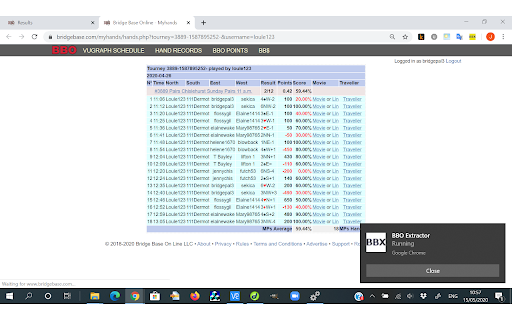
To start the process, navigate to a BBO tournament page, as displayed in the screenshot, and click on the extension's icon (a BBX symbol). For the extension to be able to access the BBO scorecards and travellers you must be logged in to "Hand Records" with a BBO account (any valid account will suffice, it does not have to be an account used in the tournament). If you are not logged in you will be prompted to do so. The icon will change colour when the startup is successful.
For a typical sized tournament, the process will run for a couple of minutes, as it paces retrieval of traveller pages in order to avoid loading BBO. If a retrieval produces an error response it is automatically retried. At the end of the process the results and hand records are saved as a CSV file and PBN file respectively, in the browser's Downloads folder. Makeable contracts and optimum contracts/scores are calculated automatically and included in the PBN file. If you want to terminate the extraction process before it is complete, click on the BBX icon a second time.
If a names conversion file is open in a separate tab the process can use this to convert BBO usernames into real names. The names file should have a .txt extension, and can be opened in the browser tab by entering Ctrl+O and browsing to locate and open the file. Make sure that the tournament's results tab is in the foreground before clicking on the BBX icon. Note that to use the name conversion functionality you must manually enable "Allow access to File URLs" in the extension details. To do this, click on the chrome browser menu button, and select "More Tools/Extensions". Click on the "Details" button of the BBO Extractor entry and scroll down to find the "Allow access to File URLs" setting, then move the slider to the On position. The names file must be in the following format:
#names
bboname,firstname,surname,ID
where bboname is a user's name on BBO, followed by first name and surname of the user in separate fields. The ID field is optional and, if present, is the ID of the player (e.g. EBU national ID)



Reviews
Loading reviews...
Permissions (5)
Permissions
cookiesℹ Can read and modify browser cookies notificationsℹ Can show desktop notifications scriptingℹ Can inject scripts into web pages storageℹ Can store data locally in your browser webNavigationℹ Can monitor navigation events
Details
| Version | 1.4.12 |
| Updated | Aug 5, 2025 |
| Size | 47.44KiB |
| First Seen | Mar 24, 2026 |
More by John Goacher

Popular in entertainment

Netflix Party is now Teleparty
by Netflix Party
10M
★ 4.11
entertainment
10M
★ 4.11
entertainment

AHA Music - Song Finder for Browser
by AHA Music
1M
★ 4.23
entertainment
1M
★ 4.23
entertainment

Watch2Gether
by Watch2Gether
900K
★ 3.53
entertainment
900K
★ 3.53
entertainment

FetchV - Video Downloader for m3u8 & hls
by idxF
600K
★ 4.90
entertainment
600K
★ 4.90
entertainment

Equalizer for Chrome browser
by Equalizer - AudioStudio
500K
★ 4.62
entertainment
500K
★ 4.62
entertainment
Popular Extensions

Adobe Acrobat: PDF edit, convert, sign tools
by Adobe Inc.
331M
★ 4.40
workflow
331M
★ 4.40
workflow

AdBlock — block ads across the web
by AdBlock
63M
★ 4.48
workflow
63M
★ 4.48
workflow

迅雷下载支持
by Shenzhen Xunlei Network Technology Co., Ltd.
59M
★ 2.77
workflow
59M
★ 2.77
workflow

Grammarly: AI Writing Assistant and Grammar Checker App
by Grammarly
42M
★ 4.50
communication
42M
★ 4.50
communication

Adblock Plus - free ad blocker
by eyeo GmbH
41M
★ 4.39
workflow
41M
★ 4.39
workflow