
⚠️Not updated in over 2 years
Description
NOTE! As of v2.0.0 the extension is purposely split into a Browser Extension with minimal functionality and a Web Extension that does the rest as described below. The Browser Extension will load a Web Extension of your choice, which in turn is also responsible for managing plugins. The recommended Web Extension comes with a default Plugin Manager. In order to load additional plugins, you can open the Plugin Manager by right-clicking a Blockly workspace and going into Options > Plugin Manager.
Functionality available:
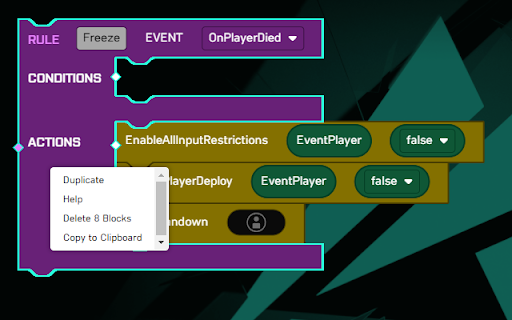
- Open Documentation
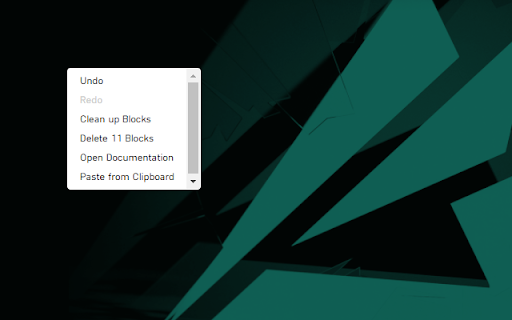
- Copy to Clipboard
- Paste from Clipboard
- Add/Remove Comment
- Show Inputs Vertically/Horizontally
- Expand/Collapse Block
- Expand/Collapse All Blocks
- Add Blocks from the Context-menu
- Toggle Distraction-Free Mode
- Toggle Toolbox
- Jump to Subroutine
- Import/Export Blocks from/to JSON
- Export Blocks to SVG[1] and PNG
- Multiple selection by holding down SHIFT[2][3]:
- Drag selection as one
- Export selection to SVG[1] and PNG
- Copy/Paste selection to/from clipboard
- Plugin system
[1] The SVG still contains all other blocks, it is only focused on the selected portion! If you only intended to share a selection, copy/paste it to a clean workspace first.
[2] CTRL is used by Blockly to detach a block when dragging, hence SHIFT was used.
[3] Most actions from the context-menu do not support multiple selections yet and will only be performed on the last selected block.
Reviews
Loading reviews...
Permissions (1)
Permissions
storageℹ Can store data locally in your browser
Details
| Version | 2.0.0 |
| Updated | May 4, 2023 |
| Size | 116KiB |
| First Seen | Mar 31, 2026 |
Popular in developer

GoFullPage - Full Page Screen Capture
by GoFullPage
10M
★ 4.89
developer
10M
★ 4.89
developer

TouchEn PC보안 확장
by 라온시큐어
8M
★ 1.33
developer
8M
★ 1.33
developer

React Developer Tools
by Meta
5M
★ 3.95
developer
5M
★ 3.95
developer

Meta Pixel Helper
by Meta
4M
★ 3.91
developer
4M
★ 3.91
developer

ColorZilla
by colorzilla.com
4M
★ 4.59
developer
4M
★ 4.59
developer
Popular Extensions

Adobe Acrobat: PDF edit, convert, sign tools
by Adobe Inc.
331M
★ 4.40
workflow
331M
★ 4.40
workflow

AdBlock — block ads across the web
by AdBlock
62M
★ 4.48
workflow
62M
★ 4.48
workflow

迅雷下载支持
by Shenzhen Xunlei Network Technology Co., Ltd.
59M
★ 2.77
workflow
59M
★ 2.77
workflow

Grammarly: AI Writing Assistant and Grammar Checker App
by Grammarly
42M
★ 4.50
communication
42M
★ 4.50
communication

Adblock Plus - free ad blocker
by eyeo GmbH
41M
★ 4.39
workflow
41M
★ 4.39
workflow