
⚠️Very few reviews for its user base
Description
Capo is a tool to help web developers understand the how optimal the ordering of <head> elements are. Inefficient ordering can impede the browser and lead to slower user-perceived performance.
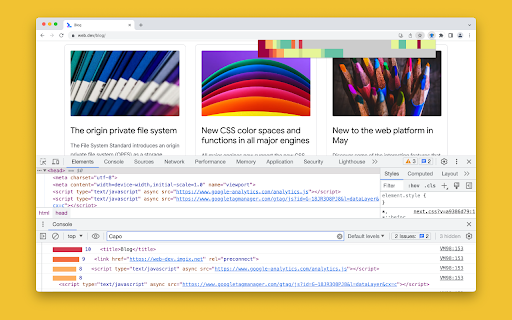
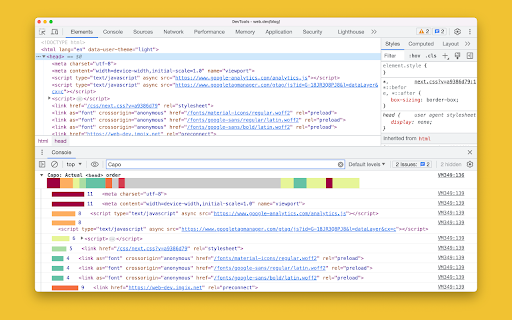
To use, click the extension icon to preview the <head> element visualization, which also triggers additional debugging info to be logged to the console. Also, click any item in the preview to see its additional info in the console.
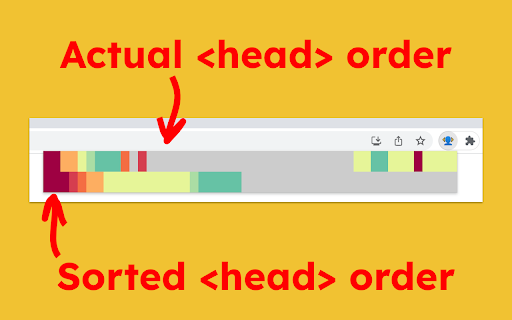
The top row of colors corresponds to the actual ordering of <head> elements, from red to blue in descending order of urgency, with grey being least urgent. The bottom row of colors corresponds to the sorted <head> elements, if everything were to be ordered by urgency. You can eyeball the differences between these two rows to get a sense for how well optimized the <head> is and which elements are out of place.

Reviews
Loading reviews...
Permissions (3)
Permissions
activeTabℹ Can access the current tab when you click the extension scriptingℹ Can inject scripts into web pages storageℹ Can store data locally in your browser
Details
| Version | 2.1.0 |
| Updated | Feb 24, 2026 |
| Size | 38.84KiB |
| First Seen | Mar 31, 2026 |
Popular in developer

GoFullPage - Full Page Screen Capture
by GoFullPage
10M
★ 4.89
developer
10M
★ 4.89
developer

TouchEn PC보안 확장
by 라온시큐어
8M
★ 1.33
developer
8M
★ 1.33
developer

React Developer Tools
by Meta
5M
★ 3.95
developer
5M
★ 3.95
developer

Meta Pixel Helper
by Meta
4M
★ 3.91
developer
4M
★ 3.91
developer

ColorZilla
by colorzilla.com
4M
★ 4.59
developer
4M
★ 4.59
developer
Popular Extensions

Adobe Acrobat: PDF edit, convert, sign tools
by Adobe Inc.
331M
★ 4.40
workflow
331M
★ 4.40
workflow

AdBlock — block ads across the web
by AdBlock
62M
★ 4.48
workflow
62M
★ 4.48
workflow

迅雷下载支持
by Shenzhen Xunlei Network Technology Co., Ltd.
59M
★ 2.77
workflow
59M
★ 2.77
workflow

Grammarly: AI Writing Assistant and Grammar Checker App
by Grammarly
42M
★ 4.50
communication
42M
★ 4.50
communication

Adblock Plus - free ad blocker
by eyeo GmbH
41M
★ 4.39
workflow
41M
★ 4.39
workflow