
⚠️Not updated in over 2 years
Description
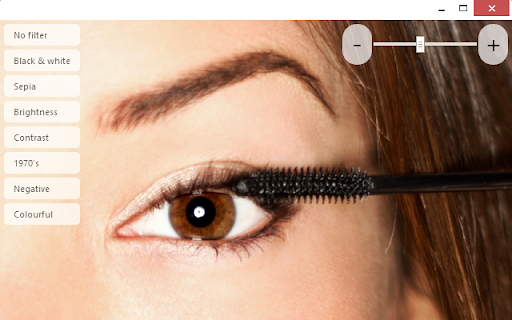
Use your camera as a mirror. This is a real Chrome web app that runs in its own window and that also works offline (it doesn't require internet connection). The mirror app has a zoom function and various predefined mirror (video) color filters, such as 1970s, Colorful, Black & White, Negative or Sepia. This app also allows take picture of current video state and save it as an image to the local file system.
WHY THIS APP?
• the Instant Mirror app is easier to find and launch than the default camera app (see the tips below)
• colour style filters you can choose from
• this app launches faster
• the app has a zoom function
• this is a real standalone HTML5 Chrome web app that behaves like a native app, no matter whether you run it on Chrome OS, Windows or Mac; it sits in its own window that can be resized, maximized to full screen, minimized to the task bar, just like any other app
TIPS
• create a shortcut to this app in your operating system's menu
• find a link to this app in the Chrome Apps launcher
REQUIREMENTS
Requires a build-in web camera or an external web camera connected. Video quality and resolution depends on your web camera.
TROUBLESHOOTING TIPS
If you are not getting video, please try the following steps:
• make sure the camera is not used by another app or program
• make sure the camera is set up correctly in your Chrome browser by navigating to: chrome://settings/content
• make sure the camera is plugged in and switched on



Reviews (8 cached)
★☆☆☆☆2020-02-23
Micahhh
My camera is on And I only see black
★☆☆☆☆2019-03-17
sue glenn
it wont work how do i deleat it it sucks
★☆☆☆☆2017-09-17
H M
it slows down my internet and my PC
★☆☆☆☆2017-03-25
Dell Lounsbery
It was grainy, dim, no way I could do my make-up with it.
★☆☆☆☆2014-05-07
Brandon Nozaki Miller
Does not recognize any of my cameras. Other apps do, as do websites. This is the only app that does not.
★★☆☆☆2020-06-27
Lady Lenoir
It don't work I looked at reviews saw it was good downloaded it and showed a black screen
★★☆☆☆2019-08-15
olive :p
it didn't work at all for me. there was no mirrior
★★★☆☆2014-07-08
s bailey
It looks the same as the camera on my Chromebook. No difference. The buttons are larger and clearer than the ones on the Acer Chromebook.
Permissions (3)
Permissions
storageℹ Can store data locally in your browser unlimitedStoragevideoCapture
Details
| Version | 1.5.1 |
| Updated | May 11, 2014 |
| Size | 173KiB |
| First Seen | Mar 27, 2026 |
Popular Extensions

Adobe Acrobat: PDF edit, convert, sign tools
by Adobe Inc.
331M
★ 4.40
workflow
331M
★ 4.40
workflow

Grammarly: AI Writing Assistant and Grammar Checker App
by Grammarly
42M
★ 4.50
communication
42M
★ 4.50
communication

Chrome Remote Desktop
by Chrome Remote Desktop Release Managers
38M
★ 3.14
workflow
38M
★ 3.14
workflow

Microsoft Single Sign On
by Microsoft
36M
★ 2.27
workflow
36M
★ 2.27
workflow

Cisco Webex Extension
by cisco.chromestore
23M
★ 2.34
social
23M
★ 2.34
social