
⚠️Not updated in over 2 years
Description
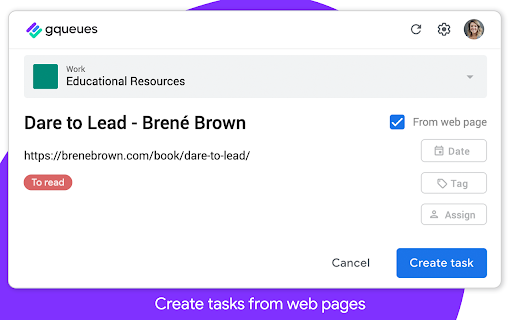
Capture your to-dos on the fly from anywhere on the web. Quickly create a new task to send right to your GQueues account, then get back to what you were doing.
Want to save an article for your team meeting? Come across a source that could be useful for research on a big project? Just remembered you still need to book a babysitter for this Saturday?
The GQueues Chrome Extension’s got you covered. Just log your thought and send it off to your GQueues inbox. If you select “From web page,” the URL of the site you’re on will be automatically added to the task so it’s easy to return to later.
No more getting derailed from your work at hand. No more opening tabs on tabs on tabs of pages you want to read. The Chrome Extension makes it easy to capture it all in one central location so it’s not forgotten.
---------------------------------------------------------------
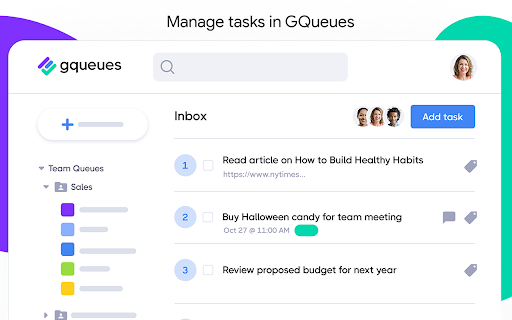
The GQueues Chrome Extension requires a GQueues account to work. GQueues is a task management app designed specifically for Google users.
With GQueues you get:
• Deep integration with Google Workspace including Chrome, Gmail, Calendar, and Drive
• Simple, intuitive interface
• Core task management including subtasks and repeating tasks
• Robust search and task filters
• Easy collaboration with shared folders and assignments for delegating work
• Mobile apps for Android and iOS
Get more information or sign up at https://www.gqueues.com

Reviews (3 cached)
★★☆☆☆2015-07-25
Stephen Fiksdal
Now requiring subscription; can't endorse it
★★☆☆☆2013-02-07
David Schoen
Needs more functionality (i.e. view task queues). Als shouldn't have to wait for it to poll the server before displaying a dialog to add a new task.
★★☆☆☆2012-08-20
Barb Stainman
Should let me review the list as well as add to it.
Permissions (3)
Permissions
activeTabℹ Can access the current tab when you click the extension contextMenusℹ Can add items to the right-click menu storageℹ Can store data locally in your browser
Details
| Version | 1.2.4 |
| Updated | Mar 20, 2023 |
| Size | 755KiB |
| First Seen | Mar 27, 2026 |
More by Boomerang



Popular in workflow

Adobe Acrobat: PDF edit, convert, sign tools
by Adobe Inc.
331M
★ 4.40
workflow
331M
★ 4.40
workflow

AdBlock — block ads across the web
by AdBlock
63M
★ 4.48
workflow
63M
★ 4.48
workflow

迅雷下载支持
by Shenzhen Xunlei Network Technology Co., Ltd.
59M
★ 2.77
workflow
59M
★ 2.77
workflow

Adblock Plus - free ad blocker
by eyeo GmbH
41M
★ 4.39
workflow
41M
★ 4.39
workflow

Chrome Remote Desktop
by Chrome Remote Desktop Release Managers
39M
★ 3.14
workflow
39M
★ 3.14
workflow
Popular Extensions
Adobe Acrobat: PDF edit, convert, sign tools
by Adobe Inc.
331M
★ 4.40
workflow
331M
★ 4.40
workflow
AdBlock — block ads across the web
by AdBlock
63M
★ 4.48
workflow
63M
★ 4.48
workflow
迅雷下载支持
by Shenzhen Xunlei Network Technology Co., Ltd.
59M
★ 2.77
workflow
59M
★ 2.77
workflow

Grammarly: AI Writing Assistant and Grammar Checker App
by Grammarly
42M
★ 4.50
communication
42M
★ 4.50
communication
Adblock Plus - free ad blocker
by eyeo GmbH
41M
★ 4.39
workflow
41M
★ 4.39
workflow