
⚠️Not updated in over 2 years
Description
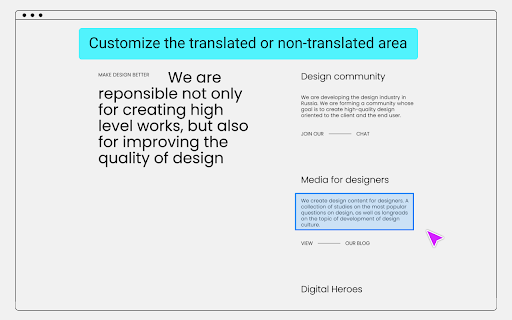
Google Translate usually translates all content, but sometimes parts of the content do not need to be translated, such as: code, terminology, name, ... etc.
Use introduction
Click the "Select Element" button to start the selection mode.
Press ESC key to exit the selection mode and refresh the page to take effect.
Mouse operation mode:
Left click
No translation, apply font style.
Middle click
Forced translation.
Right click
No translation, no font style.
Repeated clicks will deselect the area.
Press the button, along with the mouse wheel, you can adjust the selection range size.
Tips:
When the mouse button cooperates with the scroll wheel to adjust the range, click different mouse buttons to apply different settings.
Data is automatically kept in sync with Chrome, no need to worry about data loss.
Receive questions feedback email: higogle1@gmail.com


Reviews (1 cached)
★☆☆☆☆2022-10-18
Matthew Kowal
This is not working at all on the latest Chromium builds. The idea is good, for example with Russian script font to understand handwriting easier which looks a bit different than the computerized text.
Permissions (5)
Permissions
contextMenusℹ Can add items to the right-click menu declarativeContentℹ Can show the extension icon based on page content fontSettings scriptingℹ Can inject scripts into web pages storageℹ Can store data locally in your browser
Details
| Version | 3.0.5 |
| Updated | Feb 1, 2023 |
| Size | 54.99KiB |
| First Seen | Mar 27, 2026 |
Popular in developer

TouchEn PC보안 확장
by 라온시큐어
8M
★ 1.33
developer
8M
★ 1.33
developer

React Developer Tools
by Meta
5M
★ 3.95
developer
5M
★ 3.95
developer

Lighthouse
by lighthouse-extension-owners
1M
★ 4.42
developer
1M
★ 4.42
developer

Контур.Плагин
by kontur.extension
1M
★ 3.11
developer
1M
★ 3.11
developer

Similarweb - Website Traffic & SEO Checker
by Similarweb
1M
★ 4.66
developer
1M
★ 4.66
developer
Popular Extensions

Adobe Acrobat: PDF edit, convert, sign tools
by Adobe Inc.
331M
★ 4.40
workflow
331M
★ 4.40
workflow

Grammarly: AI Writing Assistant and Grammar Checker App
by Grammarly
42M
★ 4.50
communication
42M
★ 4.50
communication

Chrome Remote Desktop
by Chrome Remote Desktop Release Managers
38M
★ 3.14
workflow
38M
★ 3.14
workflow

Microsoft Single Sign On
by Microsoft
36M
★ 2.27
workflow
36M
★ 2.27
workflow

Cisco Webex Extension
by cisco.chromestore
23M
★ 2.34
social
23M
★ 2.34
social