
⚠️Not updated in over 2 years
Description
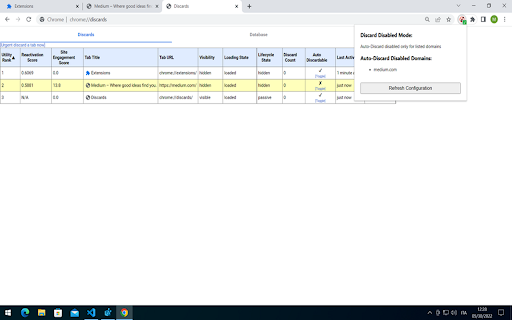
Not all domains or web applications benefit from Chrome's tabs auto-discarding feature, in an enterprise context many of those are state-rich, always connected mission critical applications (e.g. CTI applications, monitoring applications, etc.) which can be negatively impacted by such Chrome feature.
This extension has been developed to deal with Chrome tabs auto-discarding feature by providing a way to configure its behaviour over the tabs of a Chrome instance.
The extension monitors your tabs and can be configured to:
- turn off the extension (Chrome default behaviour)
- disable auto-discarding on all tabs (already opened and new tabs)
- disable auto-discard for specific domains (already opened and new tabs)
The extension's configuration can be provided in two ways (in order of precedence):
- by Chrome Policies (for enterprise Administrator/Users distributed via Windows Group Policy)
- by local configuration file
Configuration Parameters
------------------------------------
This extension can be configured with this two parameters :
- DiscardDisabledMode
This mandatory parameter controls the extension behaviour:
- EXTENSION_DISABLED
Disable the extension
- DISABLE_FOR_ALL_TABS (default extension mode)
Disable auto-discard for all tabs
- DISABLE_ONLY_FOR_DOMAINS
Disable auto-discard for specific domains (FQDN, e.g. medium.com, www.google.com)
- DiscardDisabledDomains
This optional parameter is specific for DiscardDisabledMode=DISABLE_ONLY_FOR_DOMAINS and contains the list of domains for which to disable auto-discarding:
- e.g. [ "medium.com", "www.google.com"]
If DiscardDisabledMode=DISABLE_ONLY_FOR_DOMAINS but the list is empty, the extension will behave like DiscardDisabledMode=DISABLE_FOR_ALL_TABS
Configuration Providers
------------------------------------
- Chrome Policies (for enterprise Administrator/Users distributed via Windows Group Policy)
The extension configuration can be provided machine-wide or for specific users by applying enterprise policies or GPO to the device registry under the following keys:
- Machine-Wide
HKEY_LOCAL_MACHINE\SOFTWARE\Policies\Google\Chrome\3rdparty\extensions\ndpjhokgnpdcldkklhhklkgabnjehfap\policy
- Specific User
HKEY_CURRENT_USER\SOFTWARE\Policies\Google\Chrome\3rdparty\extensions\ndpjhokgnpdcldkklhhklkgabnjehfap\policy
Depending on your choice, under the key create the two configuration parameters:
- DiscardDisabledMode (string/REG_SZ)
- DiscardDisabledDomains (string/REG_SZ)
IMPORTANT!!! Chrome Policies have precedence over the local configuration file.
- Local configuration file
The extension can be also configured by its local configuration file (config.json), located under the extension's installation folder (e.g. on Windows) :
- C:\Users\<current user>\AppData\Local\Google\Chrome\User Data\Default\Extensions\ndpjhokgnpdcldkklhhklkgabnjehfap\<extension version>\config.json
The configuration file has this structure (the json below shows the default configuration) :
{
"DiscardDisabledMode":"DISABLE_FOR_ALL_TABS",
"DiscardDisabledDomains":[]
}
- Configuration Refresh
----------------------------------
The extension's configuration is refreshed:
- manually
- by clicking the "Refresh Configuration" button on the extension popup
- automatically by the extension:
- when Chrome starts up
- every 60 minutes
- when the device is locked or screensaver is active for more than 2 minutes



Reviews (1 cached)
★☆☆☆☆2024-02-23
Mike Zou
When this extension is active, it sometimes opens an exact duplicate of the link that you clicked on.
Permissions (4)
Permissions
alarmsℹ Can schedule periodic background tasks idleℹ Can detect when you're away from the computer storageℹ Can store data locally in your browser tabsℹ Can see your open tabs and their URLs
Details
| Version | 1.0.4 |
| Updated | Jun 1, 2022 |
| Size | 35.28KiB |
| First Seen | Mar 31, 2026 |
Popular in developer

GoFullPage - Full Page Screen Capture
by GoFullPage
10M
★ 4.89
developer
10M
★ 4.89
developer

TouchEn PC보안 확장
by 라온시큐어
8M
★ 1.33
developer
8M
★ 1.33
developer

React Developer Tools
by Meta
5M
★ 3.95
developer
5M
★ 3.95
developer

Meta Pixel Helper
by Meta
4M
★ 3.91
developer
4M
★ 3.91
developer

ColorZilla
by colorzilla.com
4M
★ 4.59
developer
4M
★ 4.59
developer
Popular Extensions

Adobe Acrobat: PDF edit, convert, sign tools
by Adobe Inc.
331M
★ 4.40
workflow
331M
★ 4.40
workflow

AdBlock — block ads across the web
by AdBlock
62M
★ 4.48
workflow
62M
★ 4.48
workflow

迅雷下载支持
by Shenzhen Xunlei Network Technology Co., Ltd.
59M
★ 2.77
workflow
59M
★ 2.77
workflow

Grammarly: AI Writing Assistant and Grammar Checker App
by Grammarly
42M
★ 4.50
communication
42M
★ 4.50
communication

Adblock Plus - free ad blocker
by eyeo GmbH
41M
★ 4.39
workflow
41M
★ 4.39
workflow