
⚠️Not updated in over 2 years
Description
ChatGPT Prompt Saver: Preserve and Manage Your High-Quality Prompts
Tired of losing track of your thought-provoking ChatGPT prompts? Meet ChatGPT Prompt Saver, your ultimate tool for effortlessly storing and organizing high-quality prompts right in your browser. Experience a streamlined way to maintain your creative ideas and engaging conversation starters.
Features:
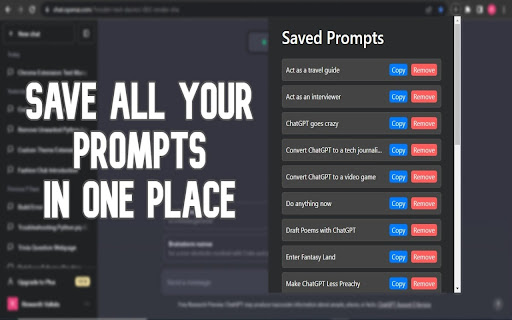
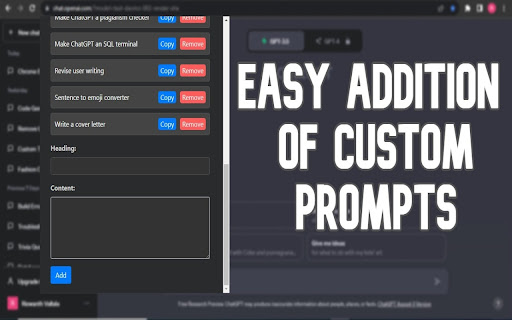
1. Effortless Prompt Capture: Seamlessly save your meticulously crafted ChatGPT prompts, creative brainstorming, and engaging conversation openers. The user-friendly interface makes preserving your prompts a breeze.
2. Custom Headings: Categorize your saved prompts with personalized headings. This ensures quick retrieval and easy reference, even when you have an extensive collection.
3. Dark Mode Enhancement: Immerse yourself in a visually pleasing experience, even during late-night brainstorming sessions, with the extension's stylish dark mode interface.
4. Instant Access: Access your stored prompt entries conveniently from your browser's toolbar. No need to switch applications or juggle between tabs.
5. Copy and Remove Functionality: Copy prompts to your clipboard for immediate use or remove entries with a simple click when they're no longer needed.
6. Pre-built Examples: Upon installation, discover a set of pre-built prompts showcasing the extension's capabilities. Easily tailor or delete them to match your preferences.
Why Choose ChatGPT Prompt Saver?
ChatGPT Prompt Saver simplifies the process of capturing and managing your creative prompts, brainstorming, and unique conversation initiators. Whether you're a writer, content creator, or simply enjoy generating engaging dialogues, ChatGPT Prompt Saver offers a convenient and reliable solution. Say farewell to losing your creative sparks and welcome an organized repository of prompts that's always accessible.
Getting Started:
Install the ChatGPT Prompt Saver extension from the Chrome Web Store.
Click the extension icon in your browser's toolbar to access the interface.
Begin saving your high-quality prompts effortlessly and experience the benefits of streamlined organization.
Elevate your creativity and stay organized by adding ChatGPT Prompt Saver to your browser today. Try it now to keep your valuable prompts right at your fingertips and fuel your imaginative journey!

Reviews (2 cached)
★★☆☆☆2026-03-16
Dan McGaw
Good intention, but missing many simple, obvious features. Can we get keyboard shortcuts? Previews or editing of saved prompts. I could give me, but dont want to type more :P
★★★☆☆2024-05-20
Claudio Varga
Useful but so primitive. No way to edit, or even see what your prompt is without copy/pasting or rewriting a new prompt. Would be great if you could see and edit an existing prompt.
Permissions (2)
Permissions
clipboardWriteℹ Can write to your clipboard storageℹ Can store data locally in your browser
Details
| Version | 1.0 |
| Updated | Aug 18, 2023 |
| Size | 16.47KiB |
| First Seen | Mar 26, 2026 |
Popular in developer

GoFullPage - Full Page Screen Capture
by GoFullPage
10M
★ 4.89
developer
10M
★ 4.89
developer

TouchEn PC보안 확장
by 라온시큐어
8M
★ 1.33
developer
8M
★ 1.33
developer

React Developer Tools
by Meta
5M
★ 3.95
developer
5M
★ 3.95
developer

Meta Pixel Helper
by Meta
4M
★ 3.91
developer
4M
★ 3.91
developer

ColorZilla
by colorzilla.com
4M
★ 4.59
developer
4M
★ 4.59
developer
Popular Extensions

Adobe Acrobat: PDF edit, convert, sign tools
by Adobe Inc.
331M
★ 4.40
workflow
331M
★ 4.40
workflow

AdBlock — block ads across the web
by AdBlock
62M
★ 4.48
workflow
62M
★ 4.48
workflow

迅雷下载支持
by Shenzhen Xunlei Network Technology Co., Ltd.
59M
★ 2.77
workflow
59M
★ 2.77
workflow

Grammarly: AI Writing Assistant and Grammar Checker App
by Grammarly
42M
★ 4.50
communication
42M
★ 4.50
communication

Adblock Plus - free ad blocker
by eyeo GmbH
41M
★ 4.39
workflow
41M
★ 4.39
workflow