
Comment Exporter for TikTok
v1.1.2 Updated Apr 1, 2025 2.34MiB
⚠️Requests 1 sensitive permission
Description
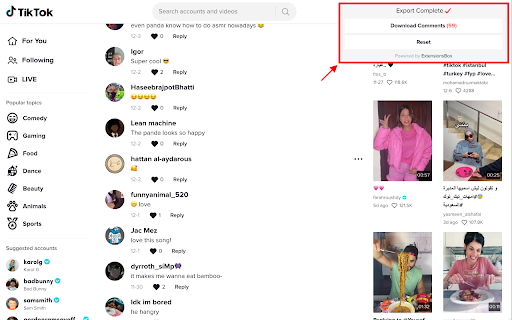
One click to export TikTok Comments.
Best TikTok tool made for people who want to export comments from TikTok video into CSV.
A smart helper tools for TikTok, after installing, you can one click to export TikTok comments to CSV file.
How it Works?
1. Add (install) this extension to your Chrome.
2. Click any TikTok video and copy link.
3. Paste the TikTok link and click the 'Export' button.
4. Done.
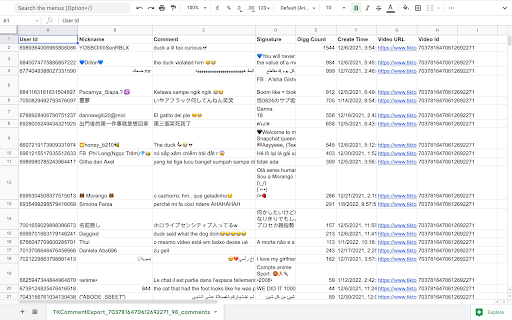
What columns you can export?
#User Id
#Comment Id
#Nickname
#Comment Text
#Signature
#Digg Count
#Create Time
#Video URL
#Video Id
Data Privacy
All data is processed in your local computer, it is never passing through our web server, no one knows what you exported.
FAQ
https://tkcommentexport.extensionsbox.com
Reviews (5 cached)
★☆☆☆☆2022-12-11
arowana đất thủ
this is a scam app, avoid it if you don't want to lose money
★☆☆☆☆2022-12-11
Minh On
This is a scam app, it's not available and will keep deducting your money. 🙏🙏🙏
★★☆☆☆2022-04-01
jason t
Pretty useless since it doesn't get sub-comments.
★★★☆☆2023-11-24
Geo B-o-x
This extension would be awesome if it also downloaded the replies to the comments. It currently only downloads the original comment, not any of the replies. Also, something is wrong with the comment created date/time. Mine always shows 1970-01-20 as the comment date. Fix these two issues and it'll be great!
★★★☆☆2023-03-21
Chip Hockey10
Emojis not work, they are exported in text format e.q. you are gorgeous beautiful very🥰🥰🥰🥰🥰🥰🥰🥰🥰
Permissions (3)
Permissions
identityℹ Can use your Google account identity storageℹ Can store data locally in your browser webRequestℹ Can observe and analyze network traffic
Details
| Version | 1.1.2 |
| Updated | Apr 1, 2025 |
| Size | 2.34MiB |
| First Seen | Mar 26, 2026 |
More by https://extensionsbox.com


Popular in social

Cisco Webex Extension
by cisco.chromestore
23M
★ 2.34
social
23M
★ 2.34
social

LINE
by LY Corporation
4M
★ 3.51
social
4M
★ 3.51
social

vidIQ Vision for YouTube
by vidIQ
3M
★ 4.48
social
3M
★ 4.48
social

Google Mail Checker
by Chrome Developer Relations
2M
★ 4.12
social
2M
★ 4.12
social

WA Web Plus by Elbruz Technologies
by Elbruz Technologies
2M
★ 4.57
social
2M
★ 4.57
social
Popular Extensions

Adobe Acrobat: PDF edit, convert, sign tools
by Adobe Inc.
331M
★ 4.40
workflow
331M
★ 4.40
workflow

Grammarly: AI Writing Assistant and Grammar Checker App
by Grammarly
42M
★ 4.50
communication
42M
★ 4.50
communication

Chrome Remote Desktop
by Chrome Remote Desktop Release Managers
38M
★ 3.14
workflow
38M
★ 3.14
workflow

Microsoft Single Sign On
by Microsoft
36M
★ 2.27
workflow
36M
★ 2.27
workflow
Cisco Webex Extension
by cisco.chromestore
23M
★ 2.34
social
23M
★ 2.34
social