
Able - Accessibility & ADA Compliance Checker
v1.0.1 Updated Mar 25, 2026 506KiB
✅Recently updated
Description
Able is an accessibility checker that audits any website for ADA and WCAG compliance in one click. Get results in plain language — not developer jargon — with specific fix suggestions you can act on immediately.
What makes Able different?
Most accessibility tools output cryptic rule IDs, DOM selectors, and failure summaries. Able translates all of that into language anyone can understand: "This text is hard to read against its background" instead of "color-contrast: Element has insufficient contrast ratio." Whether you're a designer, developer, product manager, or business owner checking your own site, the results make sense.
Free tier includes:
- One-click WCAG 2.1 AA audits on any webpage
- Visual score dashboard with severity breakdown
- Plain-language descriptions of every issue found
- Element highlighting — hover an issue to see it on the page
- 5 audits per month
Pro tier ($29 one-time) unlocks:
- Unlimited audits
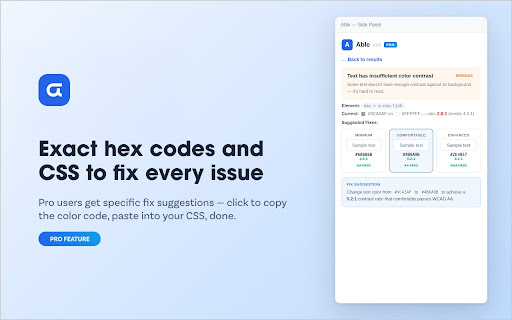
- Fix suggestion engine — specific hex codes, font sizes, and CSS snippets for every violation
- Before/after contrast preview with click-to-copy colors
- One-click PDF compliance reports — professional, branded, ready to share
- Priority email support
How it works:
1. Open any webpage and click the Able icon
2. Hit "Run Accessibility Audit" — results appear in under 3 seconds
3. See your score, browse issues by severity, and click any issue for details
4. Pro users get exact fix suggestions — copy the hex code, update your site, done
Built on axe-core — the same open-source accessibility engine trusted by Microsoft, Google, and government agencies. Able doesn't invent its own rules; it uses the industry standard and makes the output understandable.
Privacy first: Able runs entirely in your browser. No data is sent to any server. Your audits, results, and license key stay on your machine.
Why we need "Access to all websites": Able requires the "all sites" permission so it can inject the axe-core accessibility engine into whatever page you choose to audit. No data leaves your browser — the permission is used only to run the on-page audit when you click the button.




Reviews
Loading reviews...
Permissions (4)
Permissions
activeTabℹ Can access the current tab when you click the extension scriptingℹ Can inject scripts into web pages sidePanel storageℹ Can store data locally in your browser
Details
| Version | 1.0.1 |
| Updated | Mar 25, 2026 |
| Size | 506KiB |
| First Seen | Mar 28, 2026 |
More by UiuxCreative Media

Popular in accessibility

Read&Write for Google Chrome™
by Texthelp
17M
★ 3.44
accessibility
17M
★ 3.44
accessibility

360 Internet Protection
by qihoosafe
17M
★ 4.54
accessibility
17M
★ 4.54
accessibility

Screenshot reader™
by Texthelp
7M
★ 2.57
accessibility
7M
★ 2.57
accessibility

OrbitNote
by Texthelp
7M
★ 2.95
accessibility
7M
★ 2.95
accessibility

Volume Master
by Peta Sittek
6M
★ 4.81
accessibility
6M
★ 4.81
accessibility
Popular Extensions

Adobe Acrobat: PDF edit, convert, sign tools
by Adobe Inc.
331M
★ 4.40
workflow
331M
★ 4.40
workflow

AdBlock — block ads across the web
by AdBlock
62M
★ 4.48
workflow
62M
★ 4.48
workflow

Grammarly: AI Writing Assistant and Grammar Checker App
by Grammarly
42M
★ 4.50
communication
42M
★ 4.50
communication

Adblock Plus - free ad blocker
by eyeo GmbH
41M
★ 4.39
workflow
41M
★ 4.39
workflow

Chrome Remote Desktop
by Chrome Remote Desktop Release Managers
38M
★ 3.14
workflow
38M
★ 3.14
workflow