
⚠️Not updated in over 2 years ⚠️Below average rating
Description
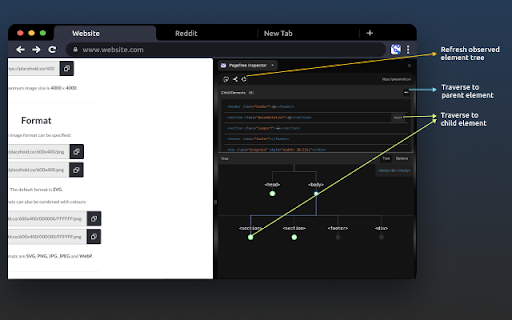
Visualize the distribution of DOM element nodes within the document tree of any web page.
You have the ability to generate interactive tree views for any element, just like inspecting an element using the DevTools element inspector.
Key Features:
🌳 Visualize Document Trees: See the organization of DOM nodes in any web page through an interactive tree representations.
🕵️♀️ Inspector Tool: Select any element to generate a dedicated interactive tree view, providing visual insight into its placement.
🌚 Dark Mode: Reduce eye strain during late-night sessions with our Dark Mode option for a more comfortable experience.
👆Interactive Navigation: Easily traverse parent, child, and sibling nodes within the DOM tree to grasp relationships.
🔄 Observable Updates: Keep up with document tree changes by refreshing and instantly viewing updates.
🌐 Customize Orientation: Tailor your visualization to your preference with horizontal or vertical tree orientations.
✒️ Path Rendering Options: Choose from various path rendering styles – diagonal, straight, elbow, or step – for a customized look.


Reviews
Loading reviews...
Permissions (5)
Permissions
activeTabℹ Can access the current tab when you click the extension contextMenusℹ Can add items to the right-click menu sidePanel storageℹ Can store data locally in your browser tabsℹ Can see your open tabs and their URLs
Details
| Version | 1.0 |
| Updated | Dec 14, 2023 |
| Size | 142KiB |
| First Seen | Mar 26, 2026 |
Popular in developer

TouchEn PC보안 확장
by 라온시큐어
8M
★ 1.33
developer
8M
★ 1.33
developer

React Developer Tools
by Meta
5M
★ 3.95
developer
5M
★ 3.95
developer

Lighthouse
by lighthouse-extension-owners
1M
★ 4.42
developer
1M
★ 4.42
developer

Контур.Плагин
by kontur.extension
1M
★ 3.11
developer
1M
★ 3.11
developer

Similarweb - Website Traffic & SEO Checker
by Similarweb
1M
★ 4.66
developer
1M
★ 4.66
developer
Popular Extensions

Adobe Acrobat: PDF edit, convert, sign tools
by Adobe Inc.
331M
★ 4.40
workflow
331M
★ 4.40
workflow

Grammarly: AI Writing Assistant and Grammar Checker App
by Grammarly
42M
★ 4.50
communication
42M
★ 4.50
communication

Chrome Remote Desktop
by Chrome Remote Desktop Release Managers
38M
★ 3.14
workflow
38M
★ 3.14
workflow

Microsoft Single Sign On
by Microsoft
36M
★ 2.27
workflow
36M
★ 2.27
workflow

Cisco Webex Extension
by cisco.chromestore
23M
★ 2.34
social
23M
★ 2.34
social