
⚠️Below average rating ⚠️Very few reviews for its user base
Description
This extension lets you summarize any website with artificial intelligence engines. It uses three different AI methods for generating the summary.
a. Online method using OpenAI API (https://openai.com/api/).
b. Offline method using Transformers.js (https://huggingface.co/facebook/bart-large-cnn).
c. Offline method using the built-in Gemini Nano (https://developer.chrome.com/docs/ai/summarizer-api).
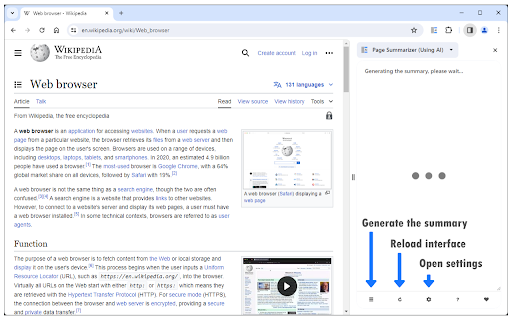
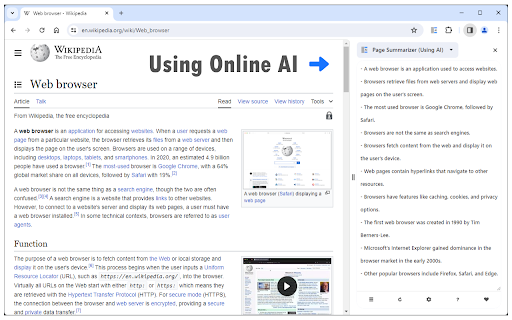
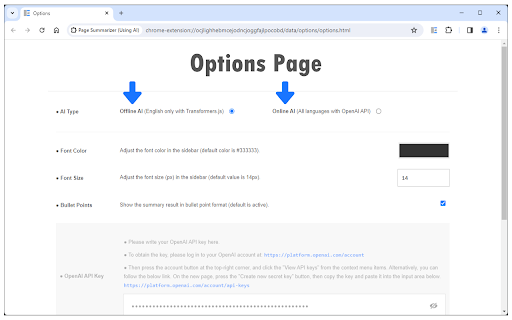
To work with this addon, please first open the options page and choose an AI method (at the top). Once you choose the AI method, navigate to a website where you want to generate the summary, then press the toolbar button (or the summarize button at the bottom of the sidebar). Wait for the extension to complete the operation (or download training data) and generate the summary. The result is then rendered in the browser sidebar. You can change the font color and size via the options page. Moreover, for online AI, there is also a field to add custom prompts for generating the summary. To re-generate or refresh the summary, please press the summarize or reload buttons in the sidebar footer section.
Note: for Online AI, this extension uses the OpenAI API to generate the summaries. Please read this (https://mybrowseraddon.com/privacy-policy/page-summarizer-using-ai.html) page to get more info about privacy policies.
Note: for Offline AI, when you choose any for the first time, it needs to download training data. So please be patient while the data is being downloaded to your machine. For Gemini Nano AI, please press the - download - button (appears when needed) at the bottom of the sidebar to start downloading the training data.
Note: both offline AI methods are rather slow and resource-intensive. Currently, Transformers.js only supports the English language for text summarization. Gemini Nano accepts other languages, but the output is currently English only. On the other hand, the OpenAI engine can generate a summary from any page, regardless of the language, and it is much faster than the offline methods. For OpenAI, please add your API key. To obtain the OpenAI API key, please visit this (https://platform.openai.com/account/api-keys) page.
If you have a feature request or found a bug to report, please fill out the bug report form on the addon's homepage (https://mybrowseraddon.com/page-summarizer-using-ai.html).

Reviews (3 cached)
★☆☆☆☆2024-10-10
Ross Dermont
Love the concept, but this app felt short. Decided to use GOAT Summarizer
★☆☆☆☆2024-07-05
ArchKeyboard 734
after using one time, automatically redirects to a paypal page. also doesnt even work well
★☆☆☆☆2023-11-06
C R
does not work. after doing everything, and not even using it once, a message appears: "You exceeded you current quota, please check your plan and billing detaisl." I mean, what?!
Permissions (3)
Permissions
scriptingℹ Can inject scripts into web pages sidePanel storageℹ Can store data locally in your browser
Details
| Version | 0.1.3 |
| Updated | Nov 11, 2025 |
| Size | 5.3MiB |
| First Seen | Mar 30, 2026 |
More by Lynn

Open in PDF Viewer
by Lynn
100K
★ 3.22
tools
100K
★ 3.22
tools

Proxy Switcher
by Lynn
40K
★ 3.86
tools
40K
★ 3.86
tools

Smart HTTPS
by Lynn
20K
★ 4.41
tools
20K
★ 4.41
tools

Disable Autoplay for YouTube™
by Lynn
20K
★ 3.13
tools
20K
★ 3.13
tools

Open in VLC™
by Lynn
10K
★ 3.54
tools
10K
★ 3.54
tools
Popular in tools

Browsec VPN - Free VPN for Chrome
by Browsec
8M
★ 4.44
tools
8M
★ 4.44
tools

Zotero Connector
by Zotero
8M
★ 3.96
tools
8M
★ 3.96
tools

AnyDoc Translator - Translate Web and PDF
by www.wps.com
7M
★ 4.58
tools
7M
★ 4.58
tools

WPS PDF - Read, Edit, Fill, Convert, and AI Chat PDF with Ease
by www.wps.com
7M
★ 4.45
tools
7M
★ 4.45
tools

Video DownloadHelper
by Aclap
5M
★ 4.43
tools
5M
★ 4.43
tools
Popular Extensions

Adobe Acrobat: PDF edit, convert, sign tools
by Adobe Inc.
322M
★ 4.40
workflow
322M
★ 4.40
workflow

AdBlock — block ads across the web
by AdBlock
62M
★ 4.48
workflow
62M
★ 4.48
workflow

迅雷下载支持
by Shenzhen Xunlei Network Technology Co., Ltd.
59M
★ 2.77
workflow
59M
★ 2.77
workflow

Grammarly: AI Writing Assistant and Grammar Checker App
by Grammarly
42M
★ 4.50
communication
42M
★ 4.50
communication

Adblock Plus - free ad blocker
by eyeo GmbH
40M
★ 4.39
workflow
40M
★ 4.39
workflow