
⚠️Requests 1 sensitive permission
Description
Smart HTTPS is an extension that helps you always use the secure HTTPS protocol if it is supported by the site's server.
It automatically changes the HTTP protocol to the secure HTTPS, and if loading errors occur, the extension will revert to the original HTTP protocol.
Key features
a. Automatically change all HTTP requests to the secure HTTPS.
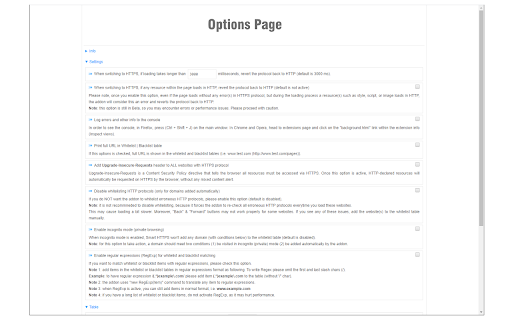
b. All websites (addresses) that do not support HTTPS are remembered to speed up the protocol-check process. Note that you can see and delete these items from the extension's Options page.
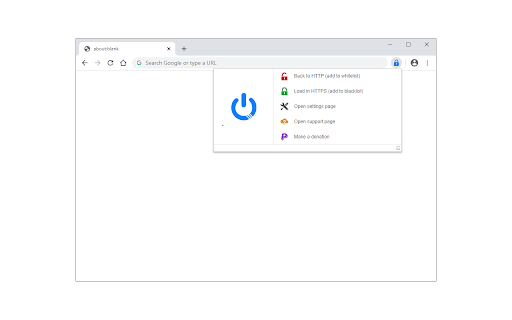
c. The toolbar button serves as the extension's ON|OFF switch. Blue indicates ON and Gray is OFF.
d. Add desired websites to the whitelist (see Options page).
Note: to report bugs, please visit the extension homepage (https://mybrowseraddon.com/smart-https.html) and find the bug report form.

Reviews (2 cached)
★☆☆☆☆2019-04-29
Tom Morris
latest update is corrupt and fails to enable and work properly
★★☆☆☆2018-07-09
Michael Kharitonov
Good idea, unfortunately this extension is buggy and abandoned. P.S. Rules disappearing and sometimes not working when open multiple tabs in a row!
Permissions (3)
Permissions
declarativeNetRequestℹ Can block or redirect network requests storageℹ Can store data locally in your browser webRequestℹ Can observe and analyze network traffic
Details
| Version | 0.3.5 |
| Updated | Jan 24, 2026 |
| Size | 112KiB |
| First Seen | Mar 28, 2026 |
More by Lynn

Open in PDF Viewer
by Lynn
100K
★ 3.22
tools
100K
★ 3.22
tools

Proxy Switcher
by Lynn
40K
★ 3.86
tools
40K
★ 3.86
tools

Open in VLC™
by Lynn
20K
★ 3.54
tools
20K
★ 3.54
tools

Disable Autoplay for YouTube™
by Lynn
20K
★ 3.14
tools
20K
★ 3.14
tools

Dark Theme for YouTube™
by Lynn
10K
★ 3.56
tools
10K
★ 3.56
tools
Popular in tools

Zotero Connector
by Zotero
8M
★ 3.96
tools
8M
★ 3.96
tools

Browsec VPN - Free VPN for Chrome
by Browsec
7M
★ 4.44
tools
7M
★ 4.44
tools

AnyDoc Translator - Translate Web and PDF
by www.wps.com
7M
★ 4.59
tools
7M
★ 4.59
tools

WPS PDF - Read, Edit, Fill, Convert, and AI Chat PDF with Ease
by www.wps.com
7M
★ 4.45
tools
7M
★ 4.45
tools

Video DownloadHelper
by Aclap
5M
★ 4.43
tools
5M
★ 4.43
tools
Popular Extensions

Adobe Acrobat: PDF edit, convert, sign tools
by Adobe Inc.
331M
★ 4.40
workflow
331M
★ 4.40
workflow

AdBlock — block ads across the web
by AdBlock
62M
★ 4.48
workflow
62M
★ 4.48
workflow

迅雷下载支持
by Shenzhen Xunlei Network Technology Co., Ltd.
59M
★ 2.77
workflow
59M
★ 2.77
workflow

Grammarly: AI Writing Assistant and Grammar Checker App
by Grammarly
42M
★ 4.50
communication
42M
★ 4.50
communication

Adblock Plus - free ad blocker
by eyeo GmbH
41M
★ 4.39
workflow
41M
★ 4.39
workflow