
✅Recently updated
Description
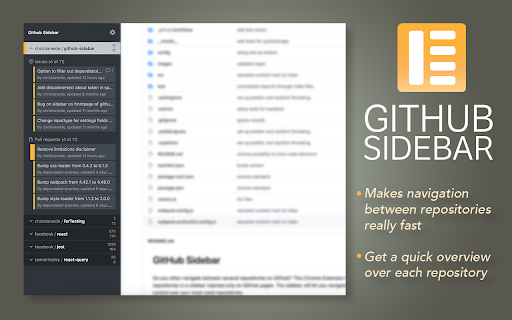
Do you often navigate between several repositories on GitHub? This Chrome Extension lets you bookmark repositories in a sidebar injected only on GitHub.com pages. The sidebar will let you navigate faster and give you better control over your most used repositories.
Features
- Easy to bookmark and navigate repositories
- Overview over active Pull requests or Issues for your repos
- Periodically checks for new or updated items
- Optional to show badge in GitHub favicon if new items
- Works across multiple tabs
- Color coding of items based on status (Approved, Changes Requested)
- Hide or show the panel whenever you like
Settings
- Repositories
Simply navigate to any Github repository you would like to add a shortcut to and press the button for *Add current repository*.
You can sort the order of repositories by simply drag&drop.
- Access Token
For all features of this extension to work, you will need to provide an access token from Github. This is not a requirement, but it will make the extension load data about issues and pull requests from your repositories. Please create an access token here https://github.com/settings/tokens/new?scopes=repo&description=Github%20sidebar%20browser%20extension to allow this extension to fetch necessary data from Github. The necessary scopes for the token is already selected if you follow the link above. All you need is to press "Generate Token", and copy/paste the token into the extension.
Note: The token is only saved to your browsers local *chrome.storage.local* and only used to communicate with Githubs API.
- Other settings
Should (hopefully) be pretty self-explanatory



Reviews
Loading reviews...
Permissions (3)
Permissions
alarmsℹ Can schedule periodic background tasks storageℹ Can store data locally in your browser tabsℹ Can see your open tabs and their URLs
Details
| Version | 4.1.0 |
| Updated | Mar 17, 2026 |
| Size | 107KiB |
| First Seen | Mar 28, 2026 |
Popular in developer

GoFullPage - Full Page Screen Capture
by GoFullPage
10M
★ 4.89
developer
10M
★ 4.89
developer

TouchEn PC보안 확장
by 라온시큐어
8M
★ 1.33
developer
8M
★ 1.33
developer

React Developer Tools
by Meta
5M
★ 3.95
developer
5M
★ 3.95
developer

Meta Pixel Helper
by Meta
4M
★ 3.90
developer
4M
★ 3.90
developer

ColorZilla
by colorzilla.com
4M
★ 4.59
developer
4M
★ 4.59
developer
Popular Extensions

Adobe Acrobat: PDF edit, convert, sign tools
by Adobe Inc.
322M
★ 4.40
workflow
322M
★ 4.40
workflow

AdBlock — block ads across the web
by AdBlock
62M
★ 4.48
workflow
62M
★ 4.48
workflow

迅雷下载支持
by Shenzhen Xunlei Network Technology Co., Ltd.
59M
★ 2.77
workflow
59M
★ 2.77
workflow

Grammarly: AI Writing Assistant and Grammar Checker App
by Grammarly
42M
★ 4.50
communication
42M
★ 4.50
communication

Adblock Plus - free ad blocker
by eyeo GmbH
40M
★ 4.39
workflow
40M
★ 4.39
workflow