Zone PDF: Edit and Convert PDFs icon

Zone PDF: Edit and Convert PDFs

by Zonepdf Inc.

v2.2 Updated Nov 8, 2022 19.19KiB
CWS
10K
Users
★ 2.38
13 reviews
#4383
of 165.3K
accessibility
#249 of 5.1K
⚠️Not updated in over 2 years ⚠️Below average rating

Description

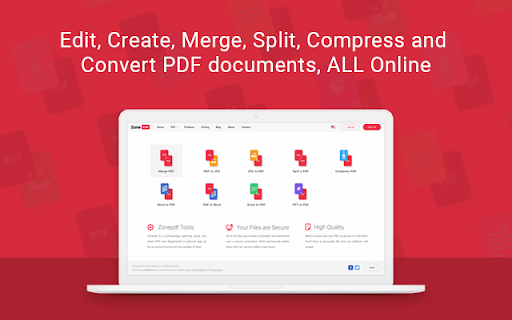
Edit, Create, Sign, Merge, Split, Compress, and Convert PDF documents. Zone PDF: the easy, fast, and convenient way to manage PDF files and more. Zone PDF features powerful integrations like Google Drive, Dropbox, and DocuSign. Whether you prefer to upload your documents through online storage, our drag-and-drop feature, or directly from your files, we’ve got you covered. ➔ Edit & Create Content Manage text and pages, insert images and drawings, erase existing content, and much more! ➔ Merge Files Merge an unlimited number of files, easy and secure! You can also reorder your files with our drag & drop feature. ➔ Split PDFs Split a single PDF into multiple documents; split all pages in a single document, or select a range of pages and save them as a single new document. ➔ Compress Files Compress a PDF into a small pdf file; it’s fast, easy, and it stays high-quality! ➔ Convert To and From Images Convert unlimited images to PDF, or PDF to images; rest assured, all of your pictures and documents will retain their original quality. ➔ Convert To and From Office PDF to Word, Excel or PPT - no matter the type of document you’re working with, it’s no problem. The conversion process is easy, fast and secure. ➔ Integrations Load files from Google Drive and Dropbox, or sync all files with a Google drive as your storage. Link your DocuSign account for a smooth and easy signing process. ➔ Team Management Create, Edit and Manage your teams through simple and intuitive interface. Invite users from your organization to collaborate on your next big project. Trusted by millions of users online, we keep all of your information safe and secure. All of your documents are deleted from our servers just hours after being uploaded. Find out how Zone PDF can make your work life simple and easy by giving you the tools you need to succeed in an online world.
Zone PDF: Edit and Convert PDFs screenshot 1Zone PDF: Edit and Convert PDFs screenshot 2Zone PDF: Edit and Convert PDFs screenshot 3Zone PDF: Edit and Convert PDFs screenshot 4

Reviews (7 cached)

★☆☆☆☆2025-07-07
hectic heroes

Avoid. $5/month Fee!!! Plus feaatures don't work and CORRUPT PDF!!! Avoid..

★☆☆☆☆2025-07-07
bloodys spammers

🤬👎💩👎🤬 AVOID! 👎💩 REQUIRES BUYING $500 KOFAX POWER PDF SOFTWARE!!! 👎💩 AVOID!!! 🤬👎💩👎🤬

★☆☆☆☆2025-04-10
ScienceGuy722

Part 1: The extension I'm pretty sure its sole purpose is to promote their website because this extension does literally nothing when clicked. Part 2: The service Yet another PDF editor that masquerades itself as being free because it lets you edit but only gives you 1 download before it hits you with a $1.99/month paywall.

★☆☆☆☆2023-10-23
Fernando Caiaffa

It doesn't work. Simple

★★☆☆☆2023-02-03
Christian Mercado

I don't usually write reviews, but this app pissed me off. You edit the PDF document, then when you save it, the words are not in the correct spot. So then you go back, correct it, and save it again. Then you realize that it's still messed up, so you go back.... and edit it again... and then when you go to save it --> its too late. You've used up your limit and now you have to purchase their subscription plan.

★★☆☆☆2022-03-30
Xana Spellmann Lavery

If you need to add one signature to one document, this will work for you. Editing was fine, a little quirky having to double tap every text box but it was fine. Then I downloaded my PDF and it skewed 4 lines of text so they were unreadable and overlapping. I adjusted them so that if they moved again they would move into the right place. Saved it again and it only fixed 2 lines. Tried to tweak it again but said I had reached my limit of downloading so I lost ALL my work. Would not use again.

★★★☆☆2020-12-11
Quan Nguyen

The extension was able to give users a quick and simple problem-solving solution towards pdf files. However, the copy-paste function wasn't working, and there's a limitation upon your edit on the document. The second problem that I was facing that I was unable to save the file, as well as export it in any means. As a result, I have lost all my progress spent editing the file. Please work on it

Details

Version 2.2
Updated Nov 8, 2022
Size 19.19KiB
First Seen Mar 28, 2026