
cssPicker - copy css from website
v1.2.6 Updated May 26, 2025 931KiB
⚠️Below average rating
Description
CSSPicker 🎨 - copy css from website & chat to code
- Support Convert html to React or Tailwind CSS component.
- Support Screenshot to code
How to Use?
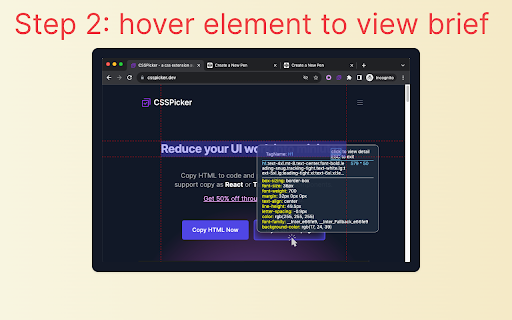
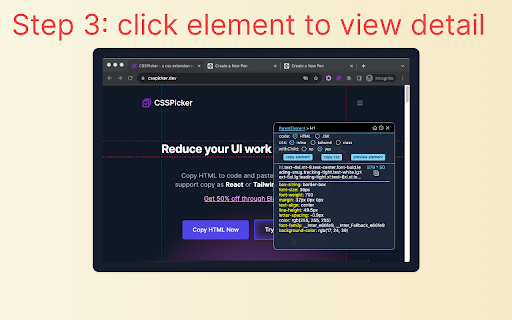
1.🌟 Click the extension icon.
2.🚀 click element and copy the HTML/JSX/Tailwind code.
3. click Screenshot to Code use AI generate code from element
Recent Update
- version 1.2.3: add ai chat and fix react + css code
- version 1.2.3: Optimize the algorithm for obtaining css
- version 1.2.2: adjust ui
- version 1.2.1: add default option
- version 1.2.0: AI powered Screenshot To Code
- version 1.1.5: support remember user options
- version 1.1.4: fix jsx converter, enable jsx converter for free.
- version 1.1.3: add media query option.
- version 1.1.2: copy css style, media query and pseudo class with all css option.
- version 1.1.1: copy as tailwind with media query and pseudo class.
- version 1.1.0: support media query and pseudo class with smartStyle option.
Key Features:
[*] support convert element imaget to code by AI
[1] copy HTML elements with CSS styles from website, even inside iframe!
[2] output the minimal amount of CSS code with media and pseudo class , exactly what you want!
[3] copy element as Tailwind css component
[4] copy element as React component
[5] copy element css selector without open devtools
[6] convert html to React
Introduction:
Effortlessly copy element with CSS styles on any webpage.
Inspect and convert CSS codes without opening dev tools.
Speed up web development and enhance efficiency.
Problems Solved:
This browser extension addresses the following issues:
- Frontend developers seeking quick access to style codes.
- Indie hackers looking to easily build pages from free templates.
- Developers grappling with writing CSS codes.
Who Should Use:
Frontend developers.
Indie hackers and entrepreneurs.
Anyone working with CSS codes.
FAQs:
❓ What does this extension do?
It allows you to instantly copy HTML and CSS for any element on a webpage.
❓ Does it work on all sites?
Yes, it works on any webpage built with any framework, such as React, Vue, WordPress, etc. Just click to copy! 🌐
❓ Is cssPicker free?
yes, we have free plan, which allows you to copy single element without children, this will cover basic usecase, if you want to copy element with children, try our paid plan!


Reviews (4 cached)
★☆☆☆☆2025-03-10
Evan Chan
Need to pay
★☆☆☆☆2024-12-14
Quang Huynh
Need to paid to copy all childs
★★☆☆☆2023-12-20
Aman Deep
Almost all useful stuff is behind a license, which isn't mentioned in description (At the time of this review) The free functionality is more or less browser built in? (Inspect element > Copy Element)
★★★☆☆2025-02-21
It's Osman Shikdar
nice
Permissions (4)
Permissions
activeTabℹ Can access the current tab when you click the extension scriptingℹ Can inject scripts into web pages storageℹ Can store data locally in your browser tabsℹ Can see your open tabs and their URLs
Details
| Version | 1.2.6 |
| Updated | May 26, 2025 |
| Size | 931KiB |
| First Seen | Mar 28, 2026 |
Popular in developer

TouchEn PC보안 확장
by 라온시큐어
8M
★ 1.33
developer
8M
★ 1.33
developer

React Developer Tools
by Meta
5M
★ 3.95
developer
5M
★ 3.95
developer

WhatFont
by Chengyin Liu
3M
★ 4.01
developer
3M
★ 4.01
developer

Lighthouse
by lighthouse-extension-owners
1M
★ 4.42
developer
1M
★ 4.42
developer

Контур.Плагин
by kontur.extension
1M
★ 3.11
developer
1M
★ 3.11
developer
Popular Extensions

Adobe Acrobat: PDF edit, convert, sign tools
by Adobe Inc.
331M
★ 4.40
workflow
331M
★ 4.40
workflow

Grammarly: AI Writing Assistant and Grammar Checker App
by Grammarly
42M
★ 4.50
communication
42M
★ 4.50
communication

Chrome Remote Desktop
by Chrome Remote Desktop Release Managers
38M
★ 3.14
workflow
38M
★ 3.14
workflow

Microsoft Single Sign On
by Microsoft
36M
★ 2.27
workflow
36M
★ 2.27
workflow

Cisco Webex Extension
by cisco.chromestore
23M
★ 2.34
social
23M
★ 2.34
social