⚠️Not updated in over 2 years
Description
Create your own personalized 4- color palette that you can use for your web pages, pick colors from a web page with the eyedropper, create color scales for chart, and map visualizations, experiment by blending colors.
Color Picker:
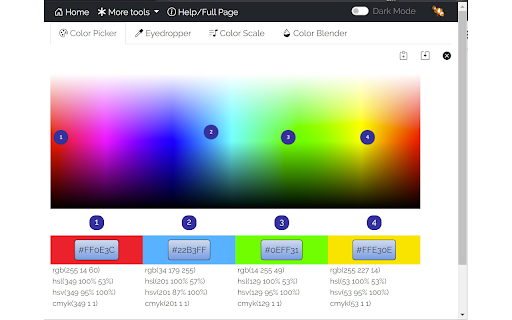
Use the color picker by clicking and dragging the markers around the palette. The color selections are shown together with their Hex code values in the boxes below the palette.
The color picker will also display the colors to different formats (i.e., HEX, RGB, HSV, HSL, CMYK).
Eyedropper:
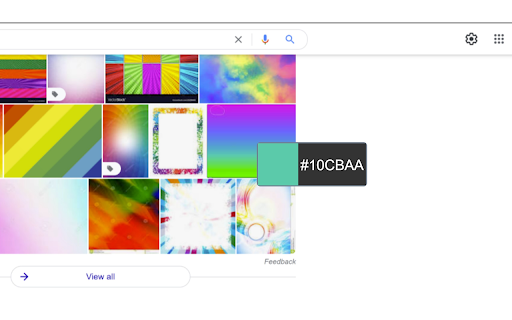
Use the Eyedropper by right-clicking on the page and selecting "Pick a color on the page". You can also use the Eyedropper button on the Eyedropper tab of the extension's popup.
Note that colors are picked from a snapshot of the viewable area of the page. Make sure you scroll to the area of the page that you want to select colors from before starting the eyedropper. Also note that some pages (e.g., chrome://, file://, urls) have security that prevent eyedropper from working. The Color Picker tracks a history of the colors you've selected with the eyedropper. You can see the history on the Color Picker's Eyedropper tab.
On hi-dpi (high resolution) screens the eyedropper snapshot may appear blurry.
Color Scale:
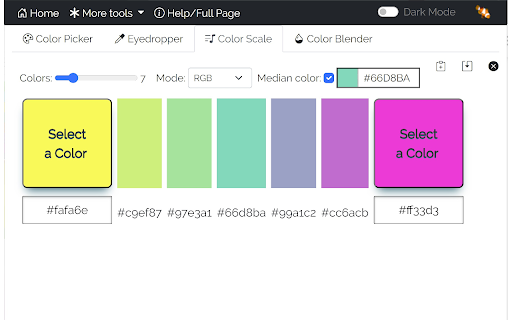
Use the color scale to create a set of visually pleasing colors that are evenly spaced. If you are creating any type of chart or map that relies on colors to visually distinguish elements (or data values) in your chart or map you'll find this very hard to do manually and the results will likely be not ideal - often leaving the viewer to guess the intent of the color. This tool will produce a pleasing color scale from the start and end colors you select. Select from different color modes to get your favorite colors.
Color Blender:
Use the color blender to blend two colors using RGB channel-wise blend functions.
You can also type or paste a Hex code into the text fields to get a particular color.
This tool is useful if you :
- to create a four color personalized 4-color palette
- find the color code of a color on a web page with the eyedropper
- to create a color scale from 3 to 25 colors for use in bar charts, maps, etc.
- blend two colors using different modes
Features:
- available as an icon on your Chrome toolbar
- remembers the current state so when you reopen the color picker you can carry on where you left off.
- convenient buttons to copy color codes to the clipboard and save codes to a text file
- A dark-mode option allows you to view the color picker with a dark background and white text
- provides links to other tools from LinangData from the More tools menu
- It's free!


Reviews (1 cached)
★☆☆☆☆2018-01-10
Maggie Mae
didn't work for me.
Permissions (4)
Permissions
activeTabℹ Can access the current tab when you click the extension contextMenusℹ Can add items to the right-click menu scriptingℹ Can inject scripts into web pages storageℹ Can store data locally in your browser
Details
| Version | 2.0.3 |
| Updated | Feb 27, 2023 |
| Size | 1.74MiB |
| First Seen | Mar 30, 2026 |
More by LinangData

Calculator
by LinangData
90K
★ 4.11
workflow
90K
★ 4.11
workflow

Grammar Checker
by LinangData
40K
★ 4.27
workflow
40K
★ 4.27
workflow

Exif Viewer
by LinangData
30K
★ 2.94
art
30K
★ 2.94
art

Photo Editor
by LinangData
10K
★ 5.00
art
10K
★ 5.00
art

XML Formatter
by LinangData
10K
★ 3.29
workflow
10K
★ 3.29
workflow
Popular in workflow

Adobe Acrobat: PDF edit, convert, sign tools
by Adobe Inc.
331M
★ 4.40
workflow
331M
★ 4.40
workflow

AdBlock — block ads across the web
by AdBlock
62M
★ 4.48
workflow
62M
★ 4.48
workflow

Adblock Plus - free ad blocker
by eyeo GmbH
41M
★ 4.39
workflow
41M
★ 4.39
workflow

Chrome Remote Desktop
by Chrome Remote Desktop Release Managers
38M
★ 3.14
workflow
38M
★ 3.14
workflow

Microsoft Single Sign On
by Microsoft
36M
★ 2.27
workflow
36M
★ 2.27
workflow
Popular Extensions
Adobe Acrobat: PDF edit, convert, sign tools
by Adobe Inc.
331M
★ 4.40
workflow
331M
★ 4.40
workflow
AdBlock — block ads across the web
by AdBlock
62M
★ 4.48
workflow
62M
★ 4.48
workflow

Grammarly: AI Writing Assistant and Grammar Checker App
by Grammarly
42M
★ 4.50
communication
42M
★ 4.50
communication
Adblock Plus - free ad blocker
by eyeo GmbH
41M
★ 4.39
workflow
41M
★ 4.39
workflow
Chrome Remote Desktop
by Chrome Remote Desktop Release Managers
38M
★ 3.14
workflow
38M
★ 3.14
workflow