
✅Recently updated
Description
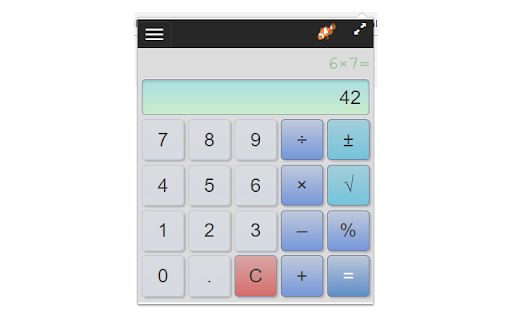
A simple calculator for basic arithmetic.
Adds a calculator icon to your browser toolbar. You can open the calculator while browsing any web page. It remembers your last calculation so you can close it at any time and reopen without losing your work.
Features:
• Compact and available when you need it right from the Chrome toolbar
• Remembers your previous calculation when re-opened
• A selectable history records your last 10 calculations
• Use the keyboard number pad for calculations
• Enter key for "=" and "c" for clear
• Del/Backspace key to edit calculation
• Copy results or calculations to the clipboard
• Re-sizable - remembers you setting when you close the calculator
• It's Free!
Functions (keyboard shortcuts):
• Number Pad or 0-9 for Number Entry
• Equals (= or Enter)
• Clear ("c")
• Delete (del/backspace) - removes last character you typed
• Copy to clipboard (ctrl-c)
• Divide (/)
• Times (*)
• Minus (-)
• Plus (+)
• Percent (% or F1).
Examples:
50x20% means 20 percent of 50 (or use the shorthand 50%20) = 10
10-20% means subtract 20% of 10 from 10 = 8
10+12% means add 12% of 10 to 10 = 11.2
• Square Root (F2).
Example, 9√ = 3, or 3+9√ = 9
• Square x²
Example, 9² = 81
• Reciprocal ⅟x
Example, ⅟4 = 0.25
• +/- (F3) - negates the value
• Parentheses to control order of calculations.
Example: (3+2)*4 = 20 without parenthesis the multiplication happens first: 3+2*4= 11
• Decimal point
Changes:
• 1.8.3 - Minor fixes
• 1.8.2 - Improved layout for history menu
• 1.8.0 - New functions squared and reciprocal, parenthesis to control order of calculations, user experience updates
• 1.7.9 - update to manifest V3

Reviews (7 cached)
★☆☆☆☆2020-10-16
Tony Connaghan
Sucks, can't add more than 3 rows at a time
★☆☆☆☆2017-04-20
Alex Storey
Installed this and now I get mouseover ads on sites I visit.
★☆☆☆☆2017-03-31
Jeff Oconnor
Can not add a %.
★☆☆☆☆2017-03-18
David Hudson
I tried to do perentage calculation, ie 13.37+5% don't produce an answer so must have a fault.
★★★☆☆2019-04-09
Mysterious Wolf
I WILL admit that it was a bit convenient just sitting there. But it was very basic and simple, and was a little slow when typing the numbers. It could have some improvements. Don't really recommend
★★★☆☆2018-09-09
Clifford Poe
Overall function is great, however you are limited to 21 total characters so you run out of space with a longer series of numbers.
★★★☆☆2017-10-13
Chidrup Mondal
Nice very good
Details
| Version | 1.8.3 |
| Updated | Mar 10, 2026 |
| Size | 2.29MiB |
| First Seen | Mar 25, 2026 |
More by LinangData

Grammar Checker
by LinangData
40K
★ 4.27
workflow
40K
★ 4.27
workflow

Exif Viewer
by LinangData
30K
★ 2.94
art
30K
★ 2.94
art
Color Picker
by LinangData
20K
★ 4.20
workflow
20K
★ 4.20
workflow

Photo Editor
by LinangData
10K
★ 5.00
art
10K
★ 5.00
art

XML Formatter
by LinangData
10K
★ 3.29
workflow
10K
★ 3.29
workflow
Popular in workflow

Adobe Acrobat: PDF edit, convert, sign tools
by Adobe Inc.
331M
★ 4.40
workflow
331M
★ 4.40
workflow

AdBlock — block ads across the web
by AdBlock
62M
★ 4.48
workflow
62M
★ 4.48
workflow

Adblock Plus - free ad blocker
by eyeo GmbH
41M
★ 4.39
workflow
41M
★ 4.39
workflow

Chrome Remote Desktop
by Chrome Remote Desktop Release Managers
38M
★ 3.14
workflow
38M
★ 3.14
workflow

Microsoft Single Sign On
by Microsoft
36M
★ 2.27
workflow
36M
★ 2.27
workflow
Popular Extensions
Adobe Acrobat: PDF edit, convert, sign tools
by Adobe Inc.
331M
★ 4.40
workflow
331M
★ 4.40
workflow
AdBlock — block ads across the web
by AdBlock
62M
★ 4.48
workflow
62M
★ 4.48
workflow

Grammarly: AI Writing Assistant and Grammar Checker App
by Grammarly
42M
★ 4.50
communication
42M
★ 4.50
communication
Adblock Plus - free ad blocker
by eyeo GmbH
41M
★ 4.39
workflow
41M
★ 4.39
workflow
Chrome Remote Desktop
by Chrome Remote Desktop Release Managers
38M
★ 3.14
workflow
38M
★ 3.14
workflow