
⚠️Not updated in over 2 years
Description
Tired of the confusing Infinite Campus grades UI and having to manually calculate the lowest grade you can get on an assignment?
Worry no longer! This handy extension aims to address 2 crucial oversights of Infinite Campus, a confusing UI and the inability to simulate your grade.
Features:
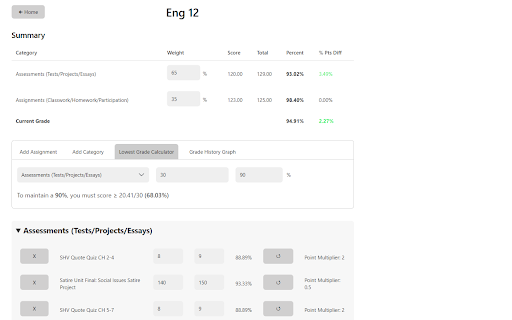
● Assignments for each class are sorted neatly by grading category with your current grade and category grades at the top of the page
● Simulate your grade by changing your score for past assignments, adding new assignments, or deleting past ones
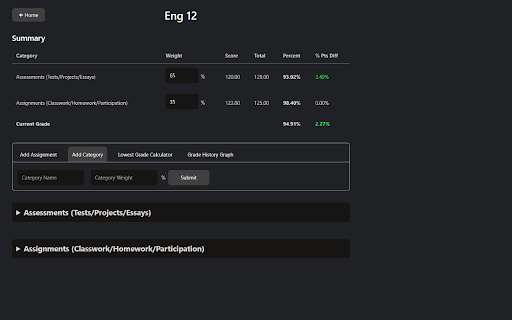
● Create new categories and change the weightage of existing ones
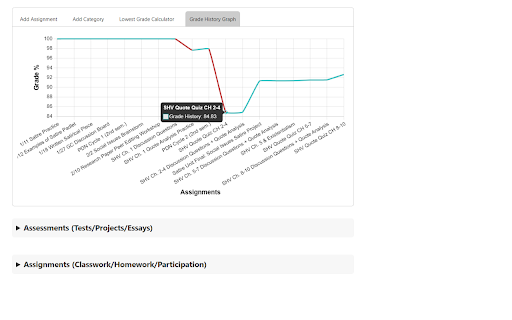
● Graph of how your grade has been changing throughout the semester
● Calculate the lowest grade you can get on an assignment to maintain a certain grade
● Light and Dark Mode
Usage:
1. Make sure you are signed in to FUSD Infinite Campus
2. After installing, click on the green Infinite Campus icon on the toolbar to open the home page
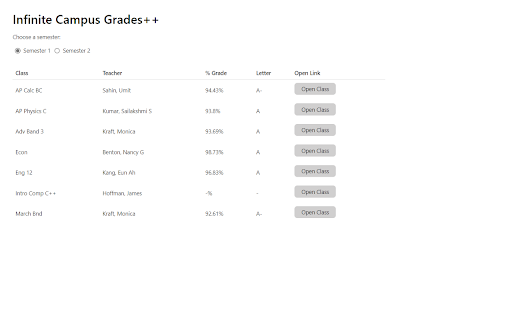
3. Here, you can see a list of your current classes and grades
● You can change the semester you are viewing by clicking the radio buttons below the title
4. If you click on the "Open Class" button next to each class entry, you will be brought to the class page
5. Here, you can see all your assignments and grades for the class. You can:
● Create new assignments and categories
● Update assignment scores using the input boxes next to each assignment
● Delete assignments
● Reset assignments to their original score
● Update category weightages using the input boxes in the summary table
6. The "Lowest Grade Calculator" tab allows you to calculate the lowest grade you can get on an assignment in order to maintain a certain grade
7. The "Grade History Graph" tab shows a graph of how your grade has changed during the semester
8. Enjoy!
Note: Calculated grades may be off by at most 0.01% due to rounding errors
To report any bugs, email appdev.micro@gmail.com or open an issue on GitHub (https://github.com/jonathanjma/Infinite-Campus) with a detailed description of the issue.

Reviews (1 cached)
★★★☆☆2024-05-01
Matthew
The only reason that im giving it a 3 is because i don't know how to switch to a different county
Permissions (1)
Permissions
storageℹ Can store data locally in your browser
Details
| Version | 2.6 |
| Updated | Jan 16, 2024 |
| Size | 92.33KiB |
| First Seen | Mar 31, 2026 |
Popular in education

Google Translate
by google-translate-chrome-extension-owners
38M
★ 4.24
education
38M
★ 4.24
education

Kami for Google Chrome™
by Kami
19M
★ 4.56
education
19M
★ 4.56
education

EndNote Click
by EndNote Click
5M
★ 4.06
education
5M
★ 4.06
education

Promethean® Screen Share
by classflow
4M
★ 2.98
education
4M
★ 2.98
education

Language Reactor
by Dioco
2M
★ 4.20
education
2M
★ 4.20
education
Popular Extensions

Adobe Acrobat: PDF edit, convert, sign tools
by Adobe Inc.
331M
★ 4.40
workflow
331M
★ 4.40
workflow

AdBlock — block ads across the web
by AdBlock
62M
★ 4.48
workflow
62M
★ 4.48
workflow

迅雷下载支持
by Shenzhen Xunlei Network Technology Co., Ltd.
59M
★ 2.77
workflow
59M
★ 2.77
workflow

Grammarly: AI Writing Assistant and Grammar Checker App
by Grammarly
42M
★ 4.50
communication
42M
★ 4.50
communication

Adblock Plus - free ad blocker
by eyeo GmbH
41M
★ 4.39
workflow
41M
★ 4.39
workflow