
⚠️Not updated in over a year
Description
Product Details: Chrome Extension MFA (Multi-Factor Authentication Assistant)
Overview
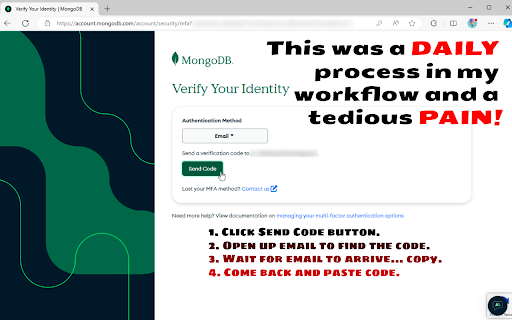
The Browser Extension MFA (Multi-Factor Authentication Assistant) is designed to streamline the often-tedious process of multi-factor authentication. It retrieves the MFA code sent to your email and automatically fills in your authentication form, saving you from the hassle of manually handling the following steps:
Clicking the "Send Code" button.
Opening your email to find the code.
Waiting for the email to arrive and copying the code.
Returning to paste the code into the form.
Maybe that doesn't sound like much, but I was getting hugely tired of developing into the evening while logged into MongoDB's Atlas UI and then starting the next morning only to find that I yet again needed to re-authenticate (which wouldn't be a problem if it weren't for the extra requirement of MFA...) One day I really dug into the settings searching for the toggle switch that would extend time login timeout but ultimately was unable to find any such life saver... I guess the joke will be on me if I find out that the setting does in fact exist. Regardless, this was a fun little project, so there's that.
Key Features
Automated MFA Code Retrieval: The extension uses OAuth (read-only access) to your specified Gmail address to fetch MFA codes. This ensures that the retrieval process is secure and seamless.
Email Forwarding Compatibility: You can set up email forwarding to a less privileged email account if it suits your security needs better.
Client-Side Operation: All operations are performed by default on the client side, with no backend server involvement, ensuring that your authentication credentials remain secure and private.
Short-Term Authentication: The extension maintains authentication with Google for up to an hour (yes, yes, I know... what's the point right... well actually it is still easier because autofill of passwords is already being done, so now it's just extra clicks, but see the next point...).
Long-Term Authentication (Optional): For those requiring longer offline access, a Cloudflare Worker is used to obtain a refresh token from Google, minimizing the need for frequent re-authentication and maintaining your development workflow with less interactivity.
Open Source: The code for this extension is open source, providing transparency and allowing you to verify the security of the extension. As well, it's my hope that others have different workflows but with the same shared pain-point because adding additional code for those should be a breeze.
How It Works
Setup: Install the Chrome Extension MFA (Multi-Factor Authentication Assistant) from the Chrome Web Store, Edge-Addons, Firefox, or via GitHub releases (side-loaded).
OAuth Authentication: Authorize the extension to access your Gmail account using OAuth. This access is read-only and only used to retrieve MFA codes.
Email Forwarding (Optional): If desired, set up email forwarding from your primary MFA email account to another less privileged email account for added security.
Automatic Code Retrieval: When an MFA code is sent to your email, the extension automatically retrieves it and fills in the authentication form for you.
Session Maintenance: The extension maintains authentication with Google for up to an hour. For longer periods, you can use the refresh token option with a Cloudflare Worker.
Security
Client-Side Operation: The extension operates entirely on the client side, with no backend server processing your authentication credentials.
Read-Only OAuth Access: The extension uses read-only access to your Gmail account, ensuring that it cannot alter or delete any emails.
Transparency: As an open-source project, the extension's code is available for review, allowing you to inspect and verify its security measures.
Benefits
Time-Saving: Eliminates the need to manually retrieve and enter MFA codes, saving you valuable time and reducing the risk of errors.
Increased Productivity: Streamlines your workflow, especially useful for developers and professionals who frequently need to authenticate.
Enhanced Security: By automating the process and reducing manual handling, it minimizes the risk of exposing your MFA codes to potential threats.
Getting Started
Install the Extension: Download and install the Browser Extension MFA (Multi-Factor Authentication Assistant) from the Chrome Web Store, Edge-Addons, Firefox, or via GitHub releases (side-loaded).
Configure Email Forwarding (Optional): If desired, set up email forwarding to another account.
Authorize Gmail Access: Follow the prompts to authorize the extension to access your Gmail account via OAuth.
Enjoy Seamless MFA: Let the extension handle the retrieval and input of MFA codes, enhancing your security and productivity.
Support and Feedback
For support, feedback, or to contribute to the project, visit our GitHub repository. Your input is valuable and helps us improve the extension for everyone.
Conclusion
The MFA (Multi-Factor Authentication Assistant) browser extension is a powerful tool designed to make multi-factor authentication effortless. With automated code retrieval, client-side operation, and optional long-term authentication, it enhances your security while saving you time. As an open-source project, it provides transparency and security you can trust. Install it today and experience the convenience and peace of mind it offers.


Reviews
Loading reviews...
Permissions (6)
Permissions
identityℹ Can use your Google account identity scriptingℹ Can inject scripts into web pages storageℹ Can store data locally in your browser system.display tabsℹ Can see your open tabs and their URLs webNavigationℹ Can monitor navigation events
Details
| Version | 1.1.3 |
| Updated | Oct 17, 2024 |
| Size | 71.74KiB |
| First Seen | Mar 31, 2026 |
More by June07

Node Inspector Manager (NIM)
by June07
10K
★ 4.41
developer
10K
★ 4.41
developer

DeJa
by June07
144
★ 1.00
entertainment
144
★ 1.00
entertainment

Node Inspector Manager (NIM)
by June07
128
★ 5.00
developer
128
★ 5.00
developer

Advoid
by June07
53
★ 0.00
entertainment
53
★ 0.00
entertainment

Incognegro
by June07
7
★ 0.00
tools
7
★ 0.00
tools
Popular in developer

GoFullPage - Full Page Screen Capture
by GoFullPage
10M
★ 4.89
developer
10M
★ 4.89
developer

TouchEn PC보안 확장
by 라온시큐어
8M
★ 1.33
developer
8M
★ 1.33
developer

React Developer Tools
by Meta
5M
★ 3.95
developer
5M
★ 3.95
developer

Meta Pixel Helper
by Meta
4M
★ 3.90
developer
4M
★ 3.90
developer

ColorZilla
by colorzilla.com
4M
★ 4.59
developer
4M
★ 4.59
developer
Popular Extensions

Adobe Acrobat: PDF edit, convert, sign tools
by Adobe Inc.
322M
★ 4.40
workflow
322M
★ 4.40
workflow

AdBlock — block ads across the web
by AdBlock
62M
★ 4.48
workflow
62M
★ 4.48
workflow

迅雷下载支持
by Shenzhen Xunlei Network Technology Co., Ltd.
59M
★ 2.77
workflow
59M
★ 2.77
workflow

Grammarly: AI Writing Assistant and Grammar Checker App
by Grammarly
42M
★ 4.50
communication
42M
★ 4.50
communication

Adblock Plus - free ad blocker
by eyeo GmbH
40M
★ 4.39
workflow
40M
★ 4.39
workflow