
Description
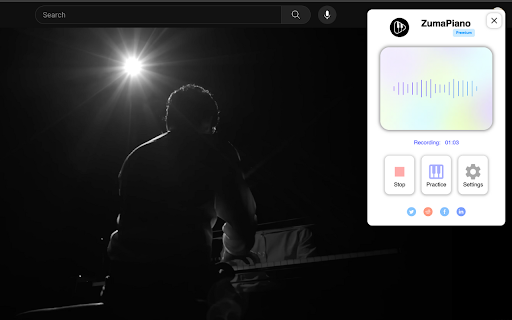
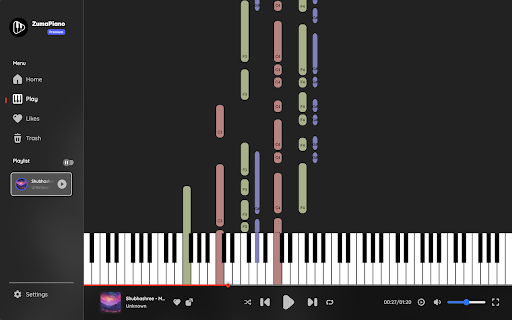
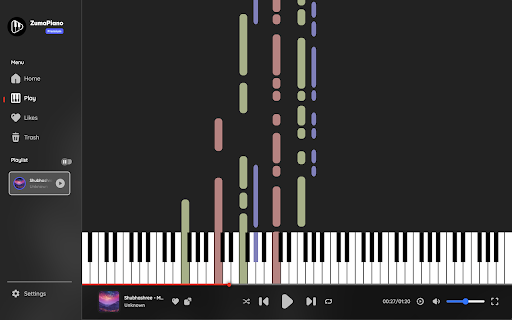
ZumaPiano uses AI to transcribe any piano audio on the internet into an interactive waterfall-style lesson. Whether the music is from YouTube, a website playing piano audio, your own recordings, or a MIDI upload, ZumaPiano transcribes it and converts it into notes you can slow down, loop, and practice with left or right hand separately.
WHAT ZUMAPIANO DOES
- Transcribes piano audio from YouTube into practice-ready waterfall lessons
- Records and transcribes piano from any website that can play audio, not just YouTube
- Upload MIDI files for instant, accurate transcription into a visual lesson
- Waterfall note display for intuitive visual learning
- Slow down or speed up the transcription playback
- Loop challenging parts for focused repetition
- Practice left hand, right hand, or both hands together
- Toggle note names on or off depending on your learning preference
- Control playback using voice commands (Play, Pause, Faster, Slower, Back, Forward)
- Save unlimited songs in your personal library with Premium
- Edit song titles, images, and information
- Group songs into playlists for structured practice
- Multi-language interface for learners worldwide
WHERE IT WORKS
ZumaPiano transcribes piano audio from:
- YouTube
- Spotify (clean piano tracks)
- SoundCloud piano covers
- Piano tutorial websites
- Blogs and pages with embedded piano audio
- Private teaching portals and shared video files
- Any webpage capable of playing a piano recording
If a browser tab can play piano audio, ZumaPiano can transcribe it.
WHO IT IS FOR
- Beginners learning their first piano songs
- Intermediate players needing slower, clear practice tools
- Advanced musicians drilling complex passages
- Teachers creating custom lessons for students
- Anyone who wants to learn piano songs not available as sheet music or tutorials
HOW IT WORKS
From any website:
1) Play a piano piece on the webpage.
2) Open the ZumaPiano extension and press Record.
3) After AI transcription, open the generated lesson and practice using waterfalls, tempo control, and looping.
From a MIDI file:
1) Open ZumaPiano and select Upload MIDI.
2) Choose your MIDI file.
3) The transcription appears instantly with full practice controls.
FREE VS PREMIUM
Free mode includes two songs in your library and core practice tools. Premium unlocks unlimited songs, playlists, advanced features, and priority transcription.
FAQ
Does ZumaPiano only work with YouTube?
No. ZumaPiano can transcribe piano audio from any website.
Is it suitable for beginners?
Yes. Waterfall notes, tempo adjustment, and looping make it ideal for new learners.
Does it generate sheet music?
No. ZumaPiano focuses on interactive waterfall-style lessons rather than sheet music.
Does it work on mobile?
The Chrome extension works on desktop (Windows, Mac, Linux, ChromeOS). Mobile support is planned.
PRIVACY AND SECURITY
No login required. ZumaPiano processes only the audio or files you choose. It does not access browsing history or personal data.
Install ZumaPiano to transcribe and learn any piano song from anywhere on the internet.


Reviews (2 cached)
★☆☆☆☆2026-03-27
INFINITE
Why is this unavailable for Korean IPs? I tried using a VPN just in case, and it works fine
★☆☆☆☆2025-03-30
Stephanie Hettich
not easy as 1 2 and 3. no songs, no keyboard included, and its never working. sorry, but please don't install this.
Permissions (7)
Permissions
activeTabℹ Can access the current tab when you click the extension offscreen scriptingℹ Can inject scripts into web pages storageℹ Can store data locally in your browser tabCaptureℹ Can capture tab audio/video tabsℹ Can see your open tabs and their URLs unlimitedStorage
Details
| Version | 2.5 |
| Updated | Nov 25, 2025 |
| Size | 7.27MiB |
| First Seen | Mar 31, 2026 |
Popular in education

Google Translate
by google-translate-chrome-extension-owners
38M
★ 4.24
education
38M
★ 4.24
education

Kami for Google Chrome™
by Kami
19M
★ 4.56
education
19M
★ 4.56
education

EndNote Click
by EndNote Click
5M
★ 4.06
education
5M
★ 4.06
education

Equatio - Math made digital
by Texthelp
5M
★ 3.89
education
5M
★ 3.89
education

Promethean® Screen Share
by classflow
4M
★ 2.98
education
4M
★ 2.98
education
Popular Extensions

Adobe Acrobat: PDF edit, convert, sign tools
by Adobe Inc.
331M
★ 4.40
workflow
331M
★ 4.40
workflow

AdBlock — block ads across the web
by AdBlock
63M
★ 4.48
workflow
63M
★ 4.48
workflow

迅雷下载支持
by Shenzhen Xunlei Network Technology Co., Ltd.
59M
★ 2.77
workflow
59M
★ 2.77
workflow

Grammarly: AI Writing Assistant and Grammar Checker App
by Grammarly
42M
★ 4.50
communication
42M
★ 4.50
communication

Adblock Plus - free ad blocker
by eyeo GmbH
41M
★ 4.39
workflow
41M
★ 4.39
workflow