
⚠️Requests 2 sensitive permissions ⚠️Very few reviews for its user base
Description
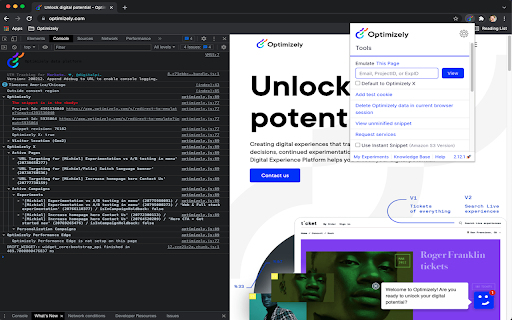
This extension reads Optimizely JavaScript data and state for any snippet that you have access to in your Optimizely account. Visit the website your snippet is installed on and it prints useful debugging information to the JavaScript console. The messages include information about what experiments are running on the page and what experiment and variation you are currently bucketed into.
The extension also enables you to use a non-cached version of your Optimizely snippet or even swap to use a different snippet you own on that page. These are useful tools for reducing wait time when debugging and trying out staging content on a production site.
Here are the steps to setup the extension:
- Turn on the extension by clicking on the Optimizely logo to the right of the address bar.
- Login to your Optimizely account when prompted. This fetches the list of projects and snippets you have permission to view with the extension.
- Open the Chrome JavaScript console to see the messages.
- On Windows and Linux, press Control-Shift-J.
- On Mac, press Command-Option-J.
- Navigate to a site where your snippet is installed to see the console log populate with Optimizely information.
- You will need to enable developer mode in order to use certain features
The terms of the applicable agreement between you and Optimizely (including the online terms of service located at the following URL, https://www.optimizely.com/terms/ ) shall govern your access, installation and/or usage of this Optimizely Assistant Extension.
You can learn more about the extension in our Knowledge Base at https://help.optimizely.com/QA_Campaigns_and_Experiments/The_Optimizely_Chrome_extension.

Reviews (1 cached)
★★☆☆☆2018-11-29
Mike Deverell
As an engineer, I had this installed for years and never actually used it. It has a lot of features that I never use, and lacks the one feature that I need a lot: the ability to select which variations I'm in. So, I'm finally just uninstalling this extension. There's another extension in the Chrome Web Store with twice as many users that *does* allow you to easily choose your variation, so I use it instead. I won't name it since I'm not here to advertise for it, but I hate having to use a 3rd-party extension and will reinstall this official one instead in the event that they implement a way to easily change between variations.
Permissions (10)
Permissions
activeTabℹ Can access the current tab when you click the extension cookiesℹ Can read and modify browser cookies declarativeNetRequestℹ Can block or redirect network requests identityℹ Can use your Google account identity scriptingℹ Can inject scripts into web pages storageℹ Can store data locally in your browser tabsℹ Can see your open tabs and their URLs userScripts webNavigationℹ Can monitor navigation events webRequestℹ Can observe and analyze network traffic
Details
| Version | 3.1.2 |
| Updated | Apr 17, 2025 |
| Size | 515KiB |
| First Seen | Apr 1, 2026 |
Popular in developer

GoFullPage - Full Page Screen Capture
by GoFullPage
10M
★ 4.89
developer
10M
★ 4.89
developer

TouchEn PC보안 확장
by 라온시큐어
8M
★ 1.33
developer
8M
★ 1.33
developer

React Developer Tools
by Meta
5M
★ 3.95
developer
5M
★ 3.95
developer

Meta Pixel Helper
by Meta
4M
★ 3.91
developer
4M
★ 3.91
developer

ColorZilla
by colorzilla.com
4M
★ 4.59
developer
4M
★ 4.59
developer
Popular Extensions

Adobe Acrobat: PDF edit, convert, sign tools
by Adobe Inc.
331M
★ 4.40
workflow
331M
★ 4.40
workflow

AdBlock — block ads across the web
by AdBlock
63M
★ 4.48
workflow
63M
★ 4.48
workflow

迅雷下载支持
by Shenzhen Xunlei Network Technology Co., Ltd.
59M
★ 2.77
workflow
59M
★ 2.77
workflow

Grammarly: AI Writing Assistant and Grammar Checker App
by Grammarly
42M
★ 4.50
communication
42M
★ 4.50
communication

Adblock Plus - free ad blocker
by eyeo GmbH
41M
★ 4.39
workflow
41M
★ 4.39
workflow