
Description


Reviews (31 cached)
The Wordup extension is making my Chrome browser very sluggish. I wish it were simpler; there's no need to underline every word. It would be better to just let users highlight a word to add it to their "I want to learn" list. I had no choice but to remove it from Chrome.
I was so fascinated by the WordUp app that I installed the Windows desktop application too. It's quite convenient to use when you have to read something on a laptop. There is a sync option, quite rudimental though, since it only allows to agree to word tags ("Should learn/already knew") made in mobile application. Then I installed the Chrome extension and liked it very much at first because it highlighted all the known and unknown words on web pages. I was intrigued. So I thought that in the meantime I'd tag all the unknown words in the application and finally would be golden. However I proved wrong. No matter how meticulously you try to tag word using this browser extension it only sync them occasionally. Second. When you scroll page down the extension still highlights the same words. I gave up fighting with it. It's too slow. Now I use it just as an indicator that some of the words in the app are untagged. So I try to find them manually in the app and tag them.
Wordup is an awesome app, but the extension is not synced with the app at all. The main feature of this extension doesn't work, and it's unbearably slow!
When I click on "Should learn" on the search page or other items, It does not update on the word map in the application. please fix and update it.
not working
I cant sign in in desktop app!!! it has only sign up!!!
Pleae add an option to run only on selected sites if I choose from my browser settings a single website it doesn't show any gif images
I have several serious issues with this extension: First, I doesn't support all the sites. In many of the sites I visit on a daily basis, it fails to parse the page and read the words. Second, there is a bug in the word definition page. When I press on the definition button, it opens a popup window with the definition in english, and there is supposed to be an option to swipe left to the definition in my language, but because of a bug, it's impossible to get to this page. Whenever I'm trying to swipe, it starting good but after half a second it moving to a white page.
It doesn't work due to authorization issue. It seems the verification link (e.g. https://auth.wordupapp.co/ext/verify/123456789) is not available and leads to 404 status code.
I don't like the idea of how this extension works in the webpages. The pages looks so unclean. Btw, I am unable to copy the meanings and definitions. sucks!
I can't sync devices. Why? I have received the message: "Restore operation failed. Please try again".
1. Dead slow 2. clicking "should learn" in chrome does not synchronize to the mobile app 3. it shows different identification numbers in chrome and in mobile !!!!!!!!!!!!!!!!!!!!!!!!!
Please fix the bug that clicking "should learn" in chrome does not synchronize to the mobile app.
Wordup App and the synergy idea of the extension may be good, but the extension decrease the browser performance a lot!
Please, add some customization options. Blue lines are irretating.
Hi, unfortunately I couldn't find a way to activate the extension... As far as I'm concerned, the suggested "Authorise access" place on your app doesn't exist. Checked both the Windows and IOS versions. How can I activate the extension then? Best regards, Itamar.
1. For anyone struggling to sync words across devices, you need to click 'Sync' on both the extension webpage and the mobile device. This is why I rate this extension 3 stars. 2. On the other hand, the performance is quite slow and not responsive but still acceptible.
The bubble is so laggy. Need add more feature!
image and gifs are different with app.
where I can find my chosen 'should learn' words by extension?
why i do not see should learn words in my application
When I sync with my phone, my should learn word gone from browser... Please fix this. I want to see witch word I'm learning now on browser to.
I'm fond of this extension. However I want to turn off the extension on the speciifc sites. So it'd be nice if you would add the feature to switch for On/Off.
it is pretty useful app. however i encounter some issue when I use the chrome extension. first, after the first time I log in my account when I install the extension, I can not access to the login page anymore. Not through the icon. it is an issue because I want to sync between my multiple devices. then I managed to navigate to the login page via using google history function, I click on sync and I got a deadlock. It doesn't react to my order. and I tried to log out and i got a crash. please fix that issue, thank you!
It stopped to work suddenly. It doesn't underline any words...
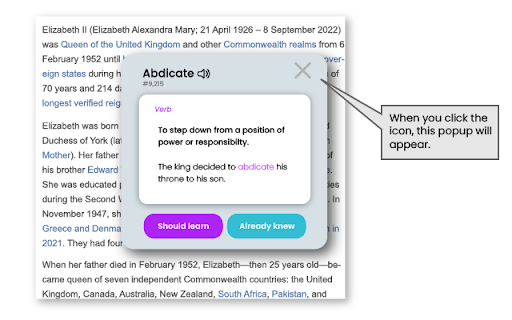
When I click a word, the explanation doesn't open, there is only an loading icon.
how can I use this how can I search for a word meaning I cant access to the search bar
Hey, First, Thanks for this innovative Idea, But the implementation and communications could be a lot better, I wanted to subscribe but when I faced with a bug in this extension (It does not work now afer some days without any error, Just does not show the meaning) and also I have a problem with splash loading time of the app on android, So when you need to know a meaning of word instantly, You feels like WASTING, It's disturbing, So you can not rely on this app as an dictionary app. At the end you can not turn the extension off for some websites because if You do it, It will not work.
I have a problem with syncing the extension with the app. The first time after adding the extension the "Try sync" button works fine, but after that, it doesn't work. Not syncing causes missing some data on the app and if I want to sync the extension, I have to remove it from my Chrome and add it again. It's really bothering.
Why the extension overrides some p elements fonts to sans-sarif?!
Great idea, but inconvenient to use; can't sync automatically; can't even find a way to sync manually after closed the welcome page!
Permissions (4)
Permissions
Details
| Version | 2.4 |
| Updated | Jan 4, 2024 |
| Size | 3.37MiB |
| First Seen | Apr 1, 2026 |
Popular in education





Popular Extensions




