Control for Transmission icon

Control for Transmission

by Jackie(Guokai) Han

v1.0.6 Updated Feb 20, 2026 90.61KiB
CWS
4K
Users
★ 4.42
24 reviews
#11748
of 207.1K
workflow
#3347 of 31.8K

Description

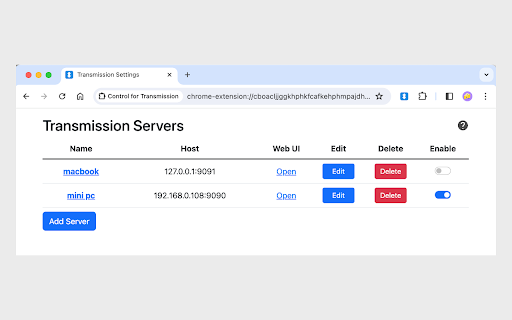
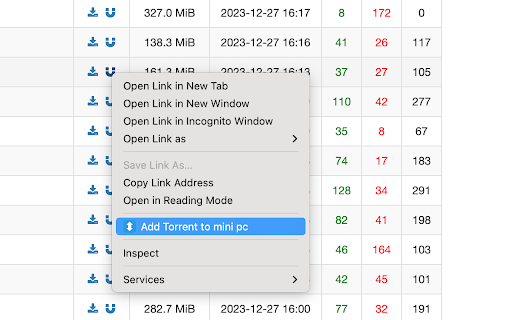
Overview A concise, lightweight and high-performance Transmission Manager and Web Extension. It supports managing multiple remote or local Transmission at the same time, as well as adding magnet links from BitTorrent websites. Features: 1. Concise, lightweight and high-performance: Removed some not commonly used functions; The installation package size is small; Fast page loading, low CPU and memory usage. 2. Support simultaneous management of download tasks in multiple remote Transmissions. 3. Support adding download tasks by right-clicking on magnet links in Web pages. 4. This extension doesn't require "Read and change all your data on all websites" permission. Config Transmission: In the option page, you can configure one or more remote or local Transmissions. Add download tasks from web pages: Right-click a magnet link (or select a text that is a magnet link and right-click it), then add it from the context menu. Transmission Web Console: 1. Support filtering and searching. 2. Add a torrent: select a .torrent file or enter a magnet link. 3. Single torrent management: start, stop, delete. 4. Batch torrent management: select one or multiple torrents by mouse and keyboard shortcuts. 5. View and manage torrent files: double click a torrent. 6. In the settings, you can adjust sorting, update frequency, and other options. 7. Clicking the extension icon supports two behaviors: open in popup or a browser tab. Note: This extension is developed and implemented by the extension author based on the RPC API provided by Transmission. It's not a transmissionbt project.
Control for Transmission screenshot 1Control for Transmission screenshot 2Control for Transmission screenshot 3Control for Transmission screenshot 4

Reviews (3 cached)

★☆☆☆☆2025-11-22
Robert Ross

Honestly kinda stinks compared to the one I previously used that has since been forcibly removed when Chrome changed extension structure. You can barely do anything with it. You cannot view or control the contents of a torrent or selectively pick what you want from it. You cannot ask for more peers. You cannot check the torrent integrity. You cannot prioritize downloads. All it does is the most basic play/pause/delete. Better than nothing, but honestly pretty limited and the right click action to add a torrent or magnet ALWAYS fails.

★☆☆☆☆2023-12-21
Axel Magagnini

The extension itself looks great and was really easy to setup, but apparently it does not play well with Chrome Remote Desktop for some reason. If I enable this extension, I cannot connect to my remote work computer so it's a show stopper. EDIT: I am a developer and did try to get it working but it just consistently made CRD timeout connections each time I enabled it and worked as soon as I disabled it. I disabled all my other extensions to confirm and this was the only one that caused trouble. I have no idea why it would be related, but it definitely is. "Works in my machine" is not acceptable, sorry.

★★★☆☆2025-03-07
Maksim Krautsou

Nice extension, but what it misses is that 'right click' menu option does not work with 'torrent links' (it seems like working only with magnet links). EDIT 4/10/2025: still cannot open torrent files with context menu, keep getting 'Failed to Add Torrent'.

Permissions (5)

Permissions

activeTab Can access the current tab when you click the extension contextMenus Can add items to the right-click menu notifications Can show desktop notifications scripting Can inject scripts into web pages storage Can store data locally in your browser

Details

Version 1.0.6
Updated Feb 20, 2026
Size 90.61KiB
First Seen Mar 31, 2026

More by Jackie(Guokai) Han

Popular in workflow

Popular Extensions