
⚠️Not updated in over 2 years ⚠️Below average rating
Description
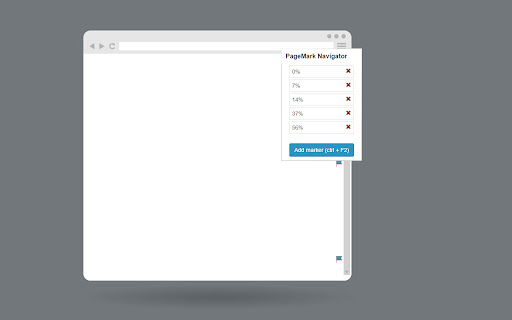
Say goodbye to repetitive scrolling and welcome effortless navigation within your web pages. You can effortlessly move between important positions, saving time and effort. Mark by pressing ctrl + F2 and then jump between marked positions by pressing F2, you can also add new markers and navigate between them from the extension menu.
This extension is designed in a way that you won't have to do any extra step to save and navigate between markers.
Saved positions are marked by a little flag icon close to the scrollbar and can be removed at any time from the extension menu.
You can see all the markers for a specific page by opening the extension menu on that page.
Here are some examples of how you can use the extension:
Bookmark Your Position:
Mark your current position on a page before scrolling down. This way, you can easily return to the marked position later without forgetting where you were.
Compare Multiple Regions:
Easily compare different regions on a page by marking their positions. This allows you to jump between the marked points and analyze the content or data efficiently.
Test Dynamic Elements:
Efficiently test multiple dynamic elements interacting with each other. Mark their positions to quickly navigate and interact with each element during testing and experimentation.
Create Shortcuts for Frequently Visited Positions:
Set up shortcuts to instantly scroll to specific positions you frequently visit on a particular page. Save time by avoiding manual scrolling to essential sections whenever you open that page.
Keyboard Shortcuts:
- CTRL + F2: put a marker on the current position
- F2: jump to the next marker
Upcoming Features:
- settings page
- ability to jump between tabs
- ability to hide/show marker icons
- ability to name markers
- ability to remove marker using keyboard shortcut
- ability to resize markers
- ability to change the keyboard shortcuts
- separate markers page
Don't hesitate to let me know if you have any suggestions.

Reviews
Loading reviews...
Permissions (2)
Permissions
storageℹ Can store data locally in your browser tabsℹ Can see your open tabs and their URLs
Details
| Version | 1.0 |
| Updated | Jul 18, 2023 |
| Size | 181KiB |
| First Seen | Mar 31, 2026 |
More by mondersky



Popular in workflow

Adobe Acrobat: PDF edit, convert, sign tools
by Adobe Inc.
331M
★ 4.40
workflow
331M
★ 4.40
workflow

AdBlock — block ads across the web
by AdBlock
63M
★ 4.48
workflow
63M
★ 4.48
workflow

迅雷下载支持
by Shenzhen Xunlei Network Technology Co., Ltd.
59M
★ 2.77
workflow
59M
★ 2.77
workflow

Adblock Plus - free ad blocker
by eyeo GmbH
41M
★ 4.39
workflow
41M
★ 4.39
workflow

Chrome Remote Desktop
by Chrome Remote Desktop Release Managers
39M
★ 3.14
workflow
39M
★ 3.14
workflow
Popular Extensions
Adobe Acrobat: PDF edit, convert, sign tools
by Adobe Inc.
331M
★ 4.40
workflow
331M
★ 4.40
workflow
AdBlock — block ads across the web
by AdBlock
63M
★ 4.48
workflow
63M
★ 4.48
workflow
迅雷下载支持
by Shenzhen Xunlei Network Technology Co., Ltd.
59M
★ 2.77
workflow
59M
★ 2.77
workflow

Grammarly: AI Writing Assistant and Grammar Checker App
by Grammarly
42M
★ 4.50
communication
42M
★ 4.50
communication
Adblock Plus - free ad blocker
by eyeo GmbH
41M
★ 4.39
workflow
41M
★ 4.39
workflow