
✅Highly rated
Description
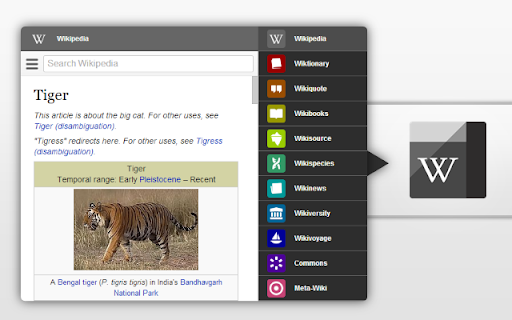
Black Menu for Wikipedia lets you access the best of the Wikipedia Universe, in a simple, easy, and convenient way.
This extension has a comprehensive menu of Wikimedia Foundation projects. You can access them by browsing through the black menu entries. By clicking the menu entry of your choice, you'll go to the corresponding Wikimedia Foundation project in a new tab.
Wikipedia – The primary page, containing a search box which lets you access the vast collection of Wikipedia articles right inside Black Menu for Wikipedia. This page also features today's featured Wikipedia article and recent news reported by Wikipedia.
Wiktionary – Search for thousands of words featured in the Wiktionary dictionary and thesaurus. This page also features Wiktionary the word of the day.
Wikiquote – Browse Wikiquote's broad collection of quotes using the search bar or search for quotes by categories. This page also features the Wikiquote quote of the day.
Wikibooks – The Wikibooks page includes an overview of the Wikibooks project and a search bar to search and access an array of 2,600+ books.
Wikisource – Browse through the ample library of Wikisource texts using the search bar at the top of the page. The Wikisource page also include the featured text of the month, new texts, and Wikisource highlights. You can also browse through texts by categories and author.
Wikispecies – Search through Wikispecies' collection of organisms using the search bar at the top of the page. A featured author and the species of the week are also displayed on this page.
Wikinews – Check up on the news as reported by Wikipedia. If you want to look through the news archives, just use the search bar at the top of the Wikinews page.
Wikiversity – This page includes a introduction to Wikiversity and the search bar at the top of this page lets you search through Wikiversity's extensive assortment of educational resources.
Wikivoyage – Explore the world using the free worldwide travel guide that anyone can edit. Search for travel guides by continent or use the search bar at the top of the page. Also look for itineraries, phrasebooks, travel topics and other topics. The Wikivoyage page also features the destination of the month, a destination off the beaten path and the featured travel topic.
Commons – Search for and view all the media files Wikipedia Commons has to offer using the search bar. Also browse through media files by topic, location, type, author, license and source. This page also features the Commons' picture of the day.
Meta-Wiki – This page includes an introduction to Meta-Wiki, the global community site for Wikimedia projects and the Wikimedia movement. Use the search bar to browse through various projects and pages.


Reviews (1 cached)
★☆☆☆☆2013-08-29
dennis j
My ESET-NOD security would not allow me to download due to spyware/adware piggybacking on Wiki info
Permissions (2)
Permissions
sidePanel storageℹ Can store data locally in your browser
Details
| Version | 6.7.4 |
| Updated | Jan 10, 2026 |
| Size | 87.59KiB |
| First Seen | Mar 25, 2026 |
Popular in education

Google Translate
by google-translate-chrome-extension-owners
38M
★ 4.24
education
38M
★ 4.24
education

Kami for Google Chrome™
by Kami
19M
★ 4.56
education
19M
★ 4.56
education

EndNote Click
by EndNote Click
5M
★ 4.06
education
5M
★ 4.06
education

Promethean® Screen Share
by classflow
4M
★ 2.98
education
4M
★ 2.98
education

Language Reactor
by Dioco
2M
★ 4.20
education
2M
★ 4.20
education
Popular Extensions

Adobe Acrobat: PDF edit, convert, sign tools
by Adobe Inc.
331M
★ 4.40
workflow
331M
★ 4.40
workflow

AdBlock — block ads across the web
by AdBlock
62M
★ 4.48
workflow
62M
★ 4.48
workflow

迅雷下载支持
by Shenzhen Xunlei Network Technology Co., Ltd.
59M
★ 2.77
workflow
59M
★ 2.77
workflow

Grammarly: AI Writing Assistant and Grammar Checker App
by Grammarly
42M
★ 4.50
communication
42M
★ 4.50
communication

Adblock Plus - free ad blocker
by eyeo GmbH
41M
★ 4.39
workflow
41M
★ 4.39
workflow