
Description
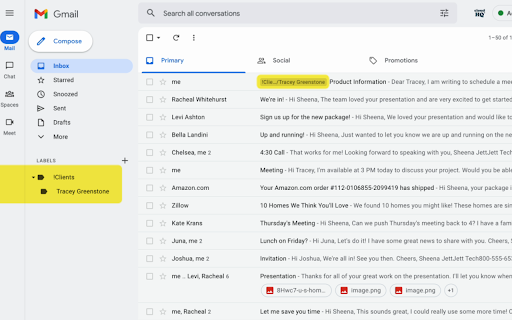
Auto Label for Gmail by cloudHQ categorizes email messages by client email address and/or domain name, and automatically creates filters and catalogs them inside one of 6 Gmail Labels.
This extension is a unique app because it not only filters and labels new emails, but also automatically organizes all your old email exchanges with that email address and/or domain name.
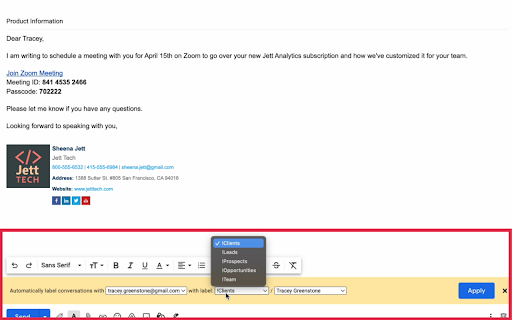
These are the 6 Gmail Labels that this app organizes for your inbox:
1. Clients
2. Leads
3. Prospects
4. Opportunities
5. Team
6. Suppliers
~~~~~~WHY 6 GMAIL LABELS?~~~~~~
Here's why we think you need these 6 Gmail Label categories:
1. Clients: are your current clients.
2. Leads: are possible prospects who are not yet qualified.
3. Prospects: are qualified leads where your contact person makes buying decisions.
4. Opportunities: are when your contact considers your product/service.
5. Team: are your internal team that you work with.
6. Suppliers: are your external team that you hired.
With these 6 Gmail Labels, you're ready to catalog and organize your inbox to be the most productive self you can be while working in Gmail.
~~~~~~HOW TO USE IT~~~~~~
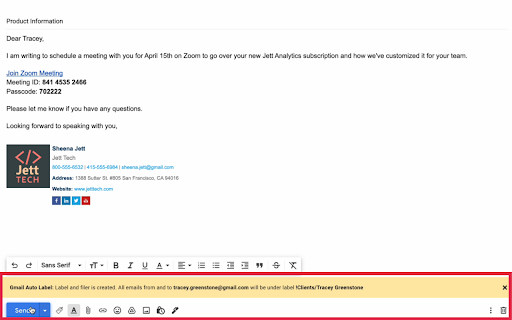
This extension allows you to create filters and labels for any recipient or domain with one click.
Here is how to use it:
1. Compose your email
2. Enter your recipient's email address
3. Click on the "Gmail Auto Label" button and select the label name for this email recipient or recipients' domain
Website: https://www.gmail-auto-label.com
Pricing: FREE
Support page: https://support.cloudhq.net/category/browser-extensions/gmail-auto-label/
Blog: https://blog.cloudhq.net
Google Gmail is a trademark of Google LLC. Use of this trademark is subject to Google Permissions.
cloudHQ is trademark of CloudHQ LLC. https://www.cloudhq.net/trademark


Reviews (2 cached)
★★★☆☆2022-09-02
Rob Bell
Would be better if I could also generate rules based on already sent mail.
★★★☆☆2022-04-05
davyn arscott
This extension is a great idea with limitations that need to be addressed for it to work effectively. When you select a parent label from the drop menu, they are not synced with your existing parent labels and there are only 5 parent labels to choose from. There is no way of editing the drop menu parent labels, so if you want to use this, you will have to live with the 5 parent labels they have provided. Also, I cannot find support on this as it's not an official CloudHq app.... it's just offered by CloudHq.
Permissions (3)
Permissions
background scriptingℹ Can inject scripts into web pages storageℹ Can store data locally in your browser
Details
| Version | 1.0.1.2 |
| Updated | Nov 29, 2025 |
| Size | 580KiB |
| First Seen | Mar 24, 2026 |
More by cloudHQ

Gmail™ Email Templates by cloudHQ
by cloudHQ
200K
★ 4.17
communication
200K
★ 4.17
communication

Save Emails as PDF by cloudHQ
by cloudHQ
100K
★ 4.26
workflow
100K
★ 4.26
workflow

Multi Email Forward by cloudHQ
by cloudHQ
80K
★ 4.08
communication
80K
★ 4.08
communication

Auto BCC for Gmail™ by cloudHQ
by cloudHQ
60K
★ 4.24
communication
60K
★ 4.24
communication

Backup and Sync Google Drive to other clouds
by cloudHQ
50K
★ 4.24
workflow
50K
★ 4.24
workflow
Popular in communication

Grammarly: AI Writing Assistant and Grammar Checker App
by Grammarly
42M
★ 4.50
communication
42M
★ 4.50
communication

Loom – Screen Recorder & Screen Capture
by Loom
8M
★ 4.58
communication
8M
★ 4.58
communication

QuillBot: AI Writing and Grammar Checker Tool
by quillbot
5M
★ 4.69
communication
5M
★ 4.69
communication

DeepL: translate and write with AI
by team-browser-extensions
4M
★ 4.73
communication
4M
★ 4.73
communication

Email Tracker by Mailtrack®
by Mailsuite
3M
★ 4.42
communication
3M
★ 4.42
communication
Popular Extensions

Adobe Acrobat: PDF edit, convert, sign tools
by Adobe Inc.
331M
★ 4.40
workflow
331M
★ 4.40
workflow

AdBlock — block ads across the web
by AdBlock
63M
★ 4.48
workflow
63M
★ 4.48
workflow

迅雷下载支持
by Shenzhen Xunlei Network Technology Co., Ltd.
59M
★ 2.77
workflow
59M
★ 2.77
workflow
Grammarly: AI Writing Assistant and Grammar Checker App
by Grammarly
42M
★ 4.50
communication
42M
★ 4.50
communication

Adblock Plus - free ad blocker
by eyeo GmbH
41M
★ 4.39
workflow
41M
★ 4.39
workflow