
Description
Font Detective is a sleek, user-friendly Chrome extension designed for anyone who wants to quickly identify the font properties of text on any website. Whether you're a web designer, developer, content creator, or typography enthusiast, Font Detective provides instant, comprehensive font details with just a hover of your cursor.
Key Features
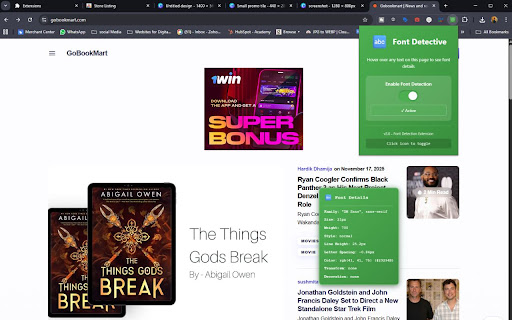
This extension gives you detailed typographic information of any text on a webpage simply by hovering over it. You instantly see font family, size, weight, style, line height, letter spacing, color (in RGB and HEX), text transformation, and text decoration. These details pop up in a stylish tooltip that follows your cursor for convenience.
One of the standout features of this extension is the easy-to-use toggle switch within the popup. You can quickly enable or disable the font detection feature with a single click, directly from the extension icon on your Chrome toolbar. This toggle state is remembered across browsing sessions, providing a seamless experience.
Intuitive and Attractive Interface
Font Detective offers a beautiful user interface enhanced with attractive gradient icons in multiple sizes, ensuring it looks great in any Chrome toolbar. When activated, the tooltip appears with a modern translucency effect and clear visual hierarchy for effortless readability. The popup window for settings is designed with a consistent green gradient theme and includes a status indicator that clearly states whether the extension is active or inactive.
Practical for Professionals and Enthusiasts
Web developers can use Font Detective to efficiently inspect typography without digging through developer tools. Designers can review font applications in real time without switching tools. Content creators and bloggers can verify font consistency and styling across articles. Typography lovers get an easy way to explore fonts on their favorite sites.
Installation and Usage
Installing Font Detective is simple and quick. After downloading the extension package, install it through Chrome’s “Load unpacked” option in developer mode. Once installed, just hover over any text on any website to see the font details appear automatically in the tooltip.
To toggle the detection on and off, click the extension icon to open the popup. Flip the switch to activate or deactivate the font detection instantly. The extension automatically saves your preference, so it will stay as you left it even after restarting your browser.
Why Choose Font Detective?
Comprehensive Font Details: Covers all essential font metrics in one hover.
Seamless Toggle: Control your extension easily without navigating menus.
Elegant Design: Gradient themes and smooth animations for an awesome UX.
Cross-Site Compatibility: Works flawlessly on any webpage.
Lightweight and Efficient: Minimal impact on browser performance.
Font Detective is the perfect tool for anyone serious about typography on the web. Its elegant design combined with powerful functionality makes font inspection effortless and enjoyable.
Reviews
Loading reviews...
Permissions (2)
Permissions
activeTabℹ Can access the current tab when you click the extension storageℹ Can store data locally in your browser
Details
| Version | 2.0 |
| Updated | Nov 21, 2025 |
| Size | 10.42KiB |
| First Seen | Mar 24, 2026 |
More by shashishekhar45

AI Email Writer for Professionals
by shashishekhar45
14
★ 5.00
tools
14
★ 5.00
tools

Amazon Price Tracker
by shashishekhar45
13
★ 5.00
shopping
13
★ 5.00
shopping

ProCraft Resume AI - Extension
by shashishekhar45
7
★ 5.00
tools
7
★ 5.00
tools

SEO Snapshot
by shashishekhar45
4
★ 0.00
developer
4
★ 0.00
developer

FocusGuard
by shashishekhar45
3
★ 0.00
tools
3
★ 0.00
tools
Popular in developer

GoFullPage - Full Page Screen Capture
by GoFullPage
10M
★ 4.89
developer
10M
★ 4.89
developer

TouchEn PC보안 확장
by 라온시큐어
8M
★ 1.33
developer
8M
★ 1.33
developer

React Developer Tools
by Meta
5M
★ 3.95
developer
5M
★ 3.95
developer

Meta Pixel Helper
by Meta
4M
★ 3.90
developer
4M
★ 3.90
developer

ColorZilla
by colorzilla.com
4M
★ 4.59
developer
4M
★ 4.59
developer
Popular Extensions

Adobe Acrobat: PDF edit, convert, sign tools
by Adobe Inc.
322M
★ 4.40
workflow
322M
★ 4.40
workflow

AdBlock — block ads across the web
by AdBlock
62M
★ 4.48
workflow
62M
★ 4.48
workflow

迅雷下载支持
by Shenzhen Xunlei Network Technology Co., Ltd.
59M
★ 2.77
workflow
59M
★ 2.77
workflow

Grammarly: AI Writing Assistant and Grammar Checker App
by Grammarly
42M
★ 4.50
communication
42M
★ 4.50
communication

Adblock Plus - free ad blocker
by eyeo GmbH
40M
★ 4.39
workflow
40M
★ 4.39
workflow