Owl Reminder for Google Calendar™ icon

Owl Reminder for Google Calendar™

by peterchen.vc

v2.4 Updated May 22, 2018 414KiB
CWS
5K
Users
★ 3.70
64 reviews
#6068
of 114.2K
Other
Category
⚠️Not updated in over 2 years

Description

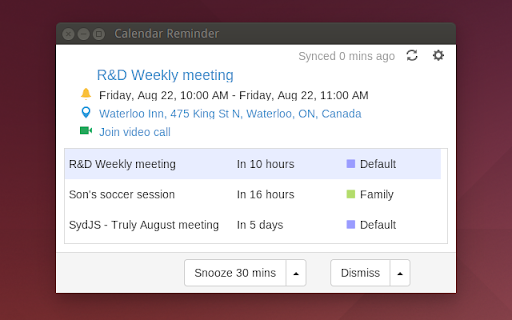
Owl Reminder can connect your Google Calendar and provide desktop notification for events. Compared with existing solutions it has several advantages: 1. Instant push notification while most other solutions use infrequent polling which can have long delay. 2. Caches events offline so reminder still works even if there is no internet connection. 3. A simple to-do list kind of UI with snooze and dismiss buttons. People can use it as simple task management tool. 4. Supports rich notification with snooze, location and hangout buttons for extra convenience. Update History: v2.3 Fix several bugs reported by users v2.2 Fix online/connect status bug v2.1 Sync dismiss status across multiple signed devices v2.0 Fix sorting issue v1.9 Improve network efficiency v1.8 Improve push notification efficiency v1.7 Fixed all-day event display and add offline-supported flag v1.6 Fixed an issue with invalid/expired token v1.5 Add ™ in Google Calendar v1.4 Improve online/offline status detection v1.3 Fixed a small bug where storage mismatch from previous version causes wrong online and idle status. v1.2 Disable notification when idle. Solve background polling issue. v1.1 Add push notification support v1.0 UI tweaks in option page; Fix connect status bug v0.9 Add rich notification button for snooze, location and hangout chat v0.8 Support Windows re-sizing; Show all-day event differently v0.7 Update the icon and name v0.6 Update the UI with color icons v0.5 Show hangout video link if available; Skip updating if device is locked or idle for a while. v0.4 Fix calendarId URL encoding bug. Privacy Policy: Our app does not collect or share any of your personal information or credentials. We use Google Calendar API to access and retrieve the calendar events and utilize Chrome Identity API to provide the secure user authentication. About Chromeism.com We are interested in everything about Chrome and Chromebook!
Owl Reminder for Google Calendar™ screenshot 1Owl Reminder for Google Calendar™ screenshot 2Owl Reminder for Google Calendar™ screenshot 3

Reviews (13 cached)

★☆☆☆☆2020-09-30
Mary Gwozdz

Useless - I can't sign in to my Google Calendar. It says "Sign in with Google temporarily disabled for this app. This app has not been verified yet by Google in order to use Google Sign In."

★☆☆☆☆2016-03-14

Alert noise is not customizable and the sound is not distinguishable .

★☆☆☆☆2015-11-22
Albert Dyke

won't run...

★☆☆☆☆2015-07-02
Nicole Smith

i hate it it don't work and it don't even let u make u own reminders

★☆☆☆☆2015-01-13
Adrian Aringhe

It doesn`t connet with my Google Calendar x(

★★☆☆☆2016-09-15
Ali Rahebi

it's great in that it connects to G calendar, but it does not display any deadlines beyond 7 days. This limit is just arbitrary and has made the otherwise ok app useless to me.

★★☆☆☆2016-05-31
Josh

It only gives the notification IF you press the reset button on the exact time or after :(

★★☆☆☆2016-05-18

This extention seems to work intermittently. For instance, today I opened Chrome, and I saw three reminders: one from 2 months ago, one from a few weeks ago, and one from yesterday. I definitely did not get an Owl reminder about yesterday's appointment. I got plenty of Google Calendar reminders, though, along with Google Now reminders. This extention is unreliable and redundant.

★★☆☆☆2016-04-07
Brooke Stein

When i would go to click it...it would send me back here like I din't add it

★★★☆☆2016-10-17
Ashik Mahmud (আশিক)

cant open it

★★★☆☆2016-08-19
Joel

The app is beautiful and the notifications worked great. One small caveat for me though. Not all my events in Google Calendar require notifications. In fact, some of my events in Google Calendar have notifications but not all do. It would be nice if Owl Reminder only notified me when there was a notification on the events. Also, it would be nice if there were more notification sounds. Perhaps a choice of four or five. Otherwise, a good app.

★★★☆☆2016-01-20
Chris Simpson

Seamless integration with my account and multiple calendars but cannot help notice one blaring feature that would seem like a basic part of the app, adding notifications. Would love to use this app but I need to be able to add as well as view/modify my events.

★★★☆☆2015-05-27
Bryanna Broderick

It would have been amazing, except I don't know how to work the thing!

Permissions (9)

Permissions

alarms Can schedule periodic background tasks contextMenus Can add items to the right-click menu gcm identity Can use your Google account identity idle Can detect when you're away from the computer notifications Can show desktop notifications storage Can store data locally in your browser

Host Permissions

https://accounts.google.com/* Can access accounts.google.com websites https://www.googleapis.com/* Can access www.googleapis.com websites

Details

Version 2.4
Updated May 22, 2018
Size 414KiB
First Seen Mar 26, 2026
