
⚠️Requests 3 sensitive permissions ✅Recently updated
Description
SuperSurf gives AI coding agents direct control of your Chrome browser through the Model Context Protocol (MCP). Connect any MCP-compatible assistant — Claude, Cursor, Windsurf — and let it navigate pages, fill forms, capture screenshots, inspect network traffic, and run JavaScript, all through a secure localhost-only WebSocket. No data ever leaves your machine.
The extension pairs with a local Node.js server (supersurf-mcp on npm) that handles the MCP handshake and tool routing. Built for developers who want their AI to see and interact with the real web — real cookies, real sessions, real browser profiles. Open source under Apache-2.0.
WHY EXTENSION-BASED?
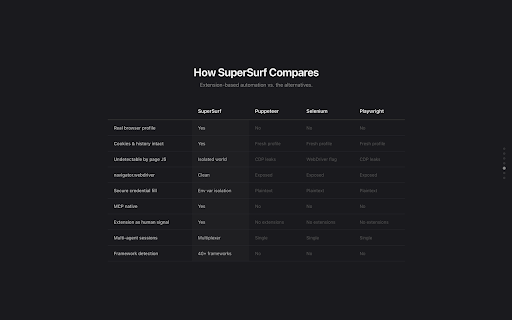
Unlike tools that spin up headless browsers, SuperSurf operates inside your real browser profile. Page interaction runs through Chrome's content script isolated world — invisible to page JavaScript. No CDP fingerprints, no VM script artifacts, no detectable automation flags. The extension itself is a human signal to anti-bot systems.
30+ TOOLS INCLUDED
- Navigation & tab management
- Click, type, hover, scroll, drag, key press
- Accessibility tree snapshots & element lookup
- Full-page and element screenshots
- PDF export
- Network request monitoring & inspection
- Console message capture
- Form filling & secure credential injection
- CSS style inspection
- JavaScript evaluation
- Performance metrics (FCP, LCP, CLS, TTFB)
- File downloads
- Multi-agent session multiplexing
SECURE BY DESIGN
- Localhost-only WebSocket — no external connections
- Credentials injected extension-side from environment variables — your AI agent never sees raw passwords
- Zero runtime dependencies in the extension — browser APIs only
- 100% open source — read every line at github.com/LiquidBuiltIt/Supersurf
PLATFORM SUPPORT
Currently supports macOS and Linux. Windows is not yet supported — if you'd like to see it, vote here: https://github.com/LiquidBuiltIt/Supersurf/issues/1
GETTING STARTED
1. Install this extension
2. Run: npx supersurf-mcp@latest (or add to your MCP client config)
3. Your AI agent now has a browser
Full docs and source: github.com/LiquidBuiltIt/Supersurf


Reviews
Loading reviews...
Permissions (11)
Permissions
activeTabℹ Can access the current tab when you click the extension alarmsℹ Can schedule periodic background tasks debuggerℹ Can use Chrome's debugging protocol on other tabs downloadsℹ Can manage and monitor downloads managementℹ Can manage other installed extensions scriptingℹ Can inject scripts into web pages storageℹ Can store data locally in your browser tabGroupsℹ Can organize tabs into groups tabsℹ Can see your open tabs and their URLs webNavigationℹ Can monitor navigation events webRequestℹ Can observe and analyze network traffic
Details
| Version | 1.5.0 |
| Updated | Mar 25, 2026 |
| Size | 968KiB |
| First Seen | Mar 28, 2026 |
More by startupidea81

Popular in developer

TouchEn PC보안 확장
by 라온시큐어
8M
★ 1.33
developer
8M
★ 1.33
developer

React Developer Tools
by Meta
5M
★ 3.95
developer
5M
★ 3.95
developer

WhatFont
by Chengyin Liu
3M
★ 4.01
developer
3M
★ 4.01
developer

Lighthouse
by lighthouse-extension-owners
1M
★ 4.42
developer
1M
★ 4.42
developer

Контур.Плагин
by kontur.extension
1M
★ 3.11
developer
1M
★ 3.11
developer
Popular Extensions

Adobe Acrobat: PDF edit, convert, sign tools
by Adobe Inc.
331M
★ 4.40
workflow
331M
★ 4.40
workflow

Grammarly: AI Writing Assistant and Grammar Checker App
by Grammarly
42M
★ 4.50
communication
42M
★ 4.50
communication

Chrome Remote Desktop
by Chrome Remote Desktop Release Managers
38M
★ 3.14
workflow
38M
★ 3.14
workflow

Microsoft Single Sign On
by Microsoft
36M
★ 2.27
workflow
36M
★ 2.27
workflow

Cisco Webex Extension
by cisco.chromestore
23M
★ 2.34
social
23M
★ 2.34
social