
⚠️Not updated in over a year
Description
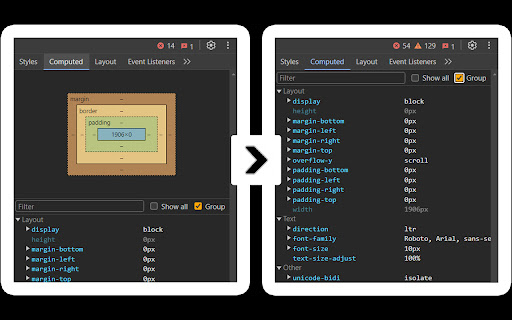
Slimmer DevTools hides the "Metrics" panel in DevTools.
For many developers, this box is rarely useful but takes up valuable space, allowing only a few CSS properties to be visible at a time. Slimmer DevTools removes it, letting you see more properties at once and work more efficiently.
### Enable/Disable
To enable, open `DevTools (F12) > Experiments` and activate "Allow extensions to load custom stylesheets," then restart DevTools.
To toggle Slimmer DevTools on or off, go to Chrome extensions and adjust as needed.
### Built for Simplicity
Designed to reduce clutter in DevTools – inspired by this [StackOverflow thread](https://stackoverflow.com/questions/66691662/is-there-a-way-to-hide-the-box-model-graphic-in-chrome-developer-tools).
Reviews
Loading reviews...
Details
| Version | 0.9.8 |
| Updated | Feb 21, 2025 |
| Size | 598KiB |
| First Seen | Mar 27, 2026 |
Popular in developer

TouchEn PC보안 확장
by 라온시큐어
8M
★ 1.33
developer
8M
★ 1.33
developer

React Developer Tools
by Meta
5M
★ 3.95
developer
5M
★ 3.95
developer

WhatFont
by Chengyin Liu
3M
★ 4.01
developer
3M
★ 4.01
developer

Lighthouse
by lighthouse-extension-owners
1M
★ 4.42
developer
1M
★ 4.42
developer

Контур.Плагин
by kontur.extension
1M
★ 3.11
developer
1M
★ 3.11
developer
Popular Extensions

Adobe Acrobat: PDF edit, convert, sign tools
by Adobe Inc.
331M
★ 4.40
workflow
331M
★ 4.40
workflow

Grammarly: AI Writing Assistant and Grammar Checker App
by Grammarly
42M
★ 4.50
communication
42M
★ 4.50
communication

Chrome Remote Desktop
by Chrome Remote Desktop Release Managers
38M
★ 3.14
workflow
38M
★ 3.14
workflow

Microsoft Single Sign On
by Microsoft
36M
★ 2.27
workflow
36M
★ 2.27
workflow

Cisco Webex Extension
by cisco.chromestore
23M
★ 2.34
social
23M
★ 2.34
social