
Description
### LockMate: Your Ultimate Screen Lock Extension for Privacy and Security
Overview:
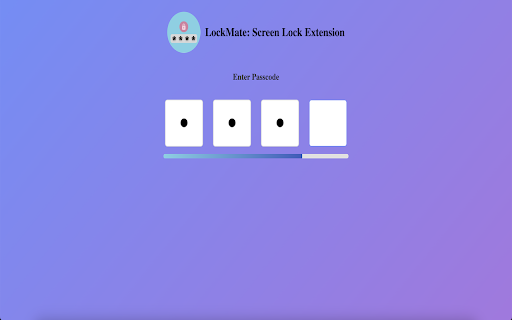
Meet LockMate, your ultimate companion for top-notch browser privacy and security. Packed with powerful features, LockMate ensures your private browsing sessions are safe from prying eyes. Whether you're stepping away from your device or locking specific domains, LockMate has got you covered.
Key Features:
1. Enable/Disable Passcode:
- Customizable Security: Easily toggle the passcode feature to suit your needs. Set up a unique passcode to lock and unlock your private domains, ensuring only you have access.
2. Passcode Configuration:
- Simple Setup: Create or modify your passcode through an intuitive interface. Set a passcode that's easy to remember but tough to guess, giving you peace of mind.
3. Private Domains List:
- Manage Your Privacy: Keep track of all privatized domains with an easy-to-view list. Quickly view, edit, or manage the domains you've locked, ensuring your sensitive browsing activities are always under control.
4. Privatize Domains via Popup:
- Quick and Easy Locking: Lock any domain directly from the extension popup by clicking the LockMate icon and hitting the lock button. Secure your private domains in just a few clicks.
5. Right-Click Privacy Control:
- Convenient Access: Instantly privatize the current page or domain with a simple right-click. This functionality provides immediate control over your privacy without disrupting your browsing flow.
6. Auto-Lock for Idle Browsers:
- Enhanced Privacy Protection: If your browser is idle for 15 seconds, LockMate automatically locks all open privatized domains. This ensures your sensitive information remains secure even when you step away.
7. 🔒 Private Session (NEW)
Start an anonymous session with a single click. While active, no history, cookies, cache, or download logs will be tracked. When ending the session, LockMate prompts you to selectively clear data — such as browsing history, cache, cookies, and downloads — giving you total control without using Incognito Mode.
What's New:
- Private Session Mode: Anonymous browsing without leaving Chrome. Choose what to erase when you’re done — no need to switch to Incognito anymore.
- Private Domain History Shield: Disable history tracking for privatized domains. Once activated, any domain you've marked as private will no longer leave a trace in your browsing history, ensuring a higher level of privacy.
- Refined Auto-Lock Feature: Enhanced auto-lock mechanism with improved performance, guaranteeing seamless protection even when multiple tabs are open.
Why Choose LockMate?
- Ultimate Privacy: LockMate shields your private browsing sessions from prying eyes, ensuring your sensitive information remains confidential.
- User-Friendly: The intuitive interface allows you to easily manage your privacy settings, including passcode customization and domain locking.
- Customizable Security: Tailor your security settings to your specific privacy needs. Whether you're locking domains on-the-fly or automatically when idle, LockMate offers the flexibility you need.
- Lightweight & Efficient: LockMate operates seamlessly in the background without slowing down your browser.
Get Started with LockMate:
1. Install: Add LockMate from the Chrome Web Store.
2. Set Up Passcode: Configure a personalized passcode to lock and unlock your private domains.
3. Privatize Domains: Lock any domain through the popup or right-click function to ensure your sensitive browsing activities remain private.
4. Enjoy Enhanced Privacy: Let LockMate automatically protect your private domains when the browser is idle and ensure no history is tracked for those domains.
Stay Protected with LockMate:
LockMate is designed for privacy-conscious users who want to ensure their online activities remain confidential and secure. With customizable settings and automatic protections, LockMate guarantees continuous privacy, even when you step away from your device.
Privacy-Centric Design:
- No History Tracking: With the option to stop history tracking for privatized domains, LockMate keeps your sensitive information completely private.
- User Empowerment: Control your privacy with customizable security features and domain management.
- Continuous Protection: LockMate’s auto-lock ensures that even during idle times, your private domains are protected.
Engage with LockMate:
- Community Support: Join a growing community of privacy-conscious users. Share your feedback and help us shape future features to enhance privacy and security.
- Regular Updates: Stay up-to-date with frequent updates that improve performance, add features, and reinforce security.
Conclusion:
LockMate: Screen Lock Extension is more than just a screen lock tool; it’s a comprehensive solution for maintaining privacy while browsing. With features like passcode protection, domain privatization, auto-lock, and history tracking control, LockMate gives you complete control over your online privacy, helping you browse the web with peace of mind.


Reviews
Loading reviews...
Permissions (7)
Permissions
activeTabℹ Can access the current tab when you click the extension browsingDataℹ Can delete browsing history and data contextMenusℹ Can add items to the right-click menu idleℹ Can detect when you're away from the computer storageℹ Can store data locally in your browser tabsℹ Can see your open tabs and their URLs webNavigationℹ Can monitor navigation events
Details
| Version | 1.1.1 |
| Updated | Jul 22, 2025 |
| Size | 589KiB |
| First Seen | Mar 30, 2026 |
Popular in tools

Zotero Connector
by Zotero
8M
★ 3.96
tools
8M
★ 3.96
tools

Browsec VPN - Free VPN for Chrome
by Browsec
7M
★ 4.44
tools
7M
★ 4.44
tools

AnyDoc Translator - Translate Web and PDF
by www.wps.com
7M
★ 4.59
tools
7M
★ 4.59
tools

Microsoft Bing Homepage & Search for Chrome
by Microsoft Corporation
4M
★ 3.72
tools
4M
★ 3.72
tools

IE Tab
by Blackfish Software
4M
★ 4.31
tools
4M
★ 4.31
tools
Popular Extensions

Adobe Acrobat: PDF edit, convert, sign tools
by Adobe Inc.
331M
★ 4.40
workflow
331M
★ 4.40
workflow

AdBlock — block ads across the web
by AdBlock
62M
★ 4.48
workflow
62M
★ 4.48
workflow

Grammarly: AI Writing Assistant and Grammar Checker App
by Grammarly
42M
★ 4.50
communication
42M
★ 4.50
communication

Chrome Remote Desktop
by Chrome Remote Desktop Release Managers
38M
★ 3.14
workflow
38M
★ 3.14
workflow

Microsoft Single Sign On
by Microsoft
36M
★ 2.27
workflow
36M
★ 2.27
workflow