
✅Recently updated
Description
As an Adobe Experience Manager (AEM) content author, developer, or administrator, transitioning between pages, the Touch UI Editor, Classic UI Editor, Page Properties, and CRX/DE Lite can become repetitive. This involves manually copying the URL and making subsequent changes to reach the desired destination. Over time, navigating through AEM using this manual approach consumes a significant amount of unnecessary time.
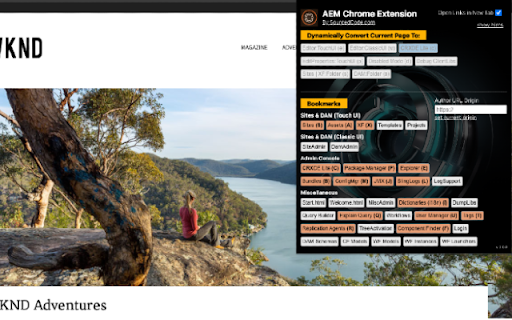
The AEM Chrome Extension streamlines this process, saving you time by providing easy navigation within AEM—from the Touch UI Editor, Classic UI Editor, Page Properties, and CRX/DE Lite—with a single click on a button or hotkey! This tool allows you to efficiently navigate through the AEM console, ultimately saving you considerable time in the long run.
Main Features:
+ Dynamic Quick Links
From any page under /content/* you can swiftly and quickly navigate to Touch UI Editor, Classic UI Editor, Page Properties, Disabled Mode, Debug Clientlibs Mode, and CRX/DE Lite. On any other page, you can quickly navigate to CRXDE Lite directly to the targeted page or node.
+ Dynamic Quick Links (Hotkey)
Ability to quickly navigate through Dynamic Quick Links:
- "e" - switches currentContext to editor.html for Touch UI.
- "w" - switches currentContext to editor for Classic AEM.
- "c" - switches currentContext to CRX/DE console.
- "p" - switches currentContext to pageProperties editor page.
- "d" - switches currentContext to disabled mode for XF and Sites Content.
- "s" - switches currentContext to Sites or XF folder.
- "a" - switches currentContext to DAM folder (but you must be inside of a DAM asset).
+ Bookmark's Quick Links
This tool also has many useful bookmarks. The bookmarks will allow navigating through AEM's core features quickly. Bookmark links are relative paths from the current origin. Make sure to set the Author Url Origin if you have a designated author environment.
+ Bookmark's Quick Links (Hotkey)
Ability to quickly navigate through bookmarks quick links by holding SHIFT + :
- "S" - switches currentContext to AEM Sites
- "A" - switches currentContext to DAM assets
- "X" - switches currentContext to Experience Fragments
- "C" - switches currentContext to CRX/DE Lite
- "P" - switches currentContext to Package Manager
- "E" - switches currentContext to Explorer
- "B" - switches currentContext to OSGI > Bundles
- "M" - switches currentContext to OSGI > Config Manager
- "J" - switches currentContext to OSGI > JMX
- "I" - switches currentContext to i18n
- "Q" - switches currentContext to Explain Query Tool
- "U" - switches currentContext to User Manager
- "T" - switches currentContext to Tags
- "R" - switches currentContext to Replication Agents
- "F" - switches currentContext to Component Finder
If "Beta" features are enabled:
- "1" switches current author mode to Production
- "2" switches current author mode to Staging
- "3" switches current author mode to Development
- "4" switches current author mode to Local
Other Features:
+ Open New Tab
Enabling this option will ensure that all quick links that are clicked will open a new tab within the browser.
+ Hide Hints
Enabling this option will hide the hinted text in the Chrome extension, giving you a much cleaner layout while using the AEM Chrome Extension tool.
Release V 0.0.15.1
===============================
+ Bug fixing
Release V 0.0.15
===============================
+ Author Environment Label Identifier - the ability to see Production, Staging, Development label based on the current context of the user
+ Bug fixing
Release V 0.0.14.8
===============================
+ New Features
++ Dispatcher to Author URL - the ability to switch from author editor url to dispatcher URL. For example, author.prod -> dispatcher URL
++ Author Switcher - the ability to switch from author url to author url. For example. Switch from author.prod -> author.stage to author.dev; maintaining the same context
++ Dispatcher URL Switcher - the ability to switch from registered dispatcher url to Production, Staging, and/or Development Url
++ Supporting more website structures
Release V 0.0.13
===============================
+ Supporting Beta Features
Release V 0.0.12
===============================
+ Ensure browser's back button is working as expected
+ Performance Improvements & included more unit tests
+ Supporting Beta Features
Release V 0.0.11
===============================
+ Performance Improvements & included more unit tests
Release V 0.0.10
===============================
+ Removal of "chrome_url_overrides"
+ Performance Improvements of Framework
Release V 0.0.9
===============================
+ Complete Project Upgrade (Deprecated Framework)
+ Unit Tests all Passing
+ Manifest V3
+ Added Quick Link to AEM Developer (Chat) GPT
Release V 0.0.8
===============================
+ Shift + Hotkey to navigate to Bookmark's Quick Links.
+ General Bug Fixes.
+ AEMaaCS Support Bug Fixes.
+ Performance Fixes.
Release V 0.0.7
===============================
+ Hotkeys are now visible by default (without the need of clicking on the "show hints".
+ Bug Fixes.
+ Performance Fixes.
Release V 0.0.6
===============================
+ Hotkeys Supported (in show hints).
+ New quick links, just quick reference OOTB features from AEM.
+ Indicator when the "origin" has been set.
+ Bug Fixes.
+ Performance Fixes.
Release V 0.0.5
===============================
+ Bug Fixes.
+ Performance Fixes.
Release V 0.0.4
===============================
+ Updated Name of the extension name from "AEM Quick Links" to "AEM Chrome Extension - SourcedCode".
+ Added Version Indicator.
+ Bug Fixes.
+ Performance Fixes.
Release V 0.0.3
===============================
+ DAM navigation support
- in CRXDE /content/dam assets with file extension, can open properties page.
- in CRXDE /content/dam assets with file extension, can navigate to DAM parent folder.
- in CRXDE /content/dam folder can navigate to DAM parent folder.
- in AEM console, from properties page, can navigate to CRXDE console.
- in AEM console, from properties page, can navigate to DAM parent folder.
+ (CTRL + Click) or (CMD + Click) (open new tab support)
+ Bug Fixes
+ Performance Fixes
--------------------------------------------------------------------------------
*This tool mainly supports Sites and DAM, but will work for most other parts for the AEM console.


Reviews
Loading reviews...
Permissions (4)
Permissions
activeTabℹ Can access the current tab when you click the extension scriptingℹ Can inject scripts into web pages storageℹ Can store data locally in your browser windows
Details
| Version | 0.0.15.1 |
| Updated | Mar 24, 2026 |
| Size | 645KiB |
| First Seen | Mar 27, 2026 |
Popular in developer

GoFullPage - Full Page Screen Capture
by GoFullPage
10M
★ 4.89
developer
10M
★ 4.89
developer

TouchEn PC보안 확장
by 라온시큐어
8M
★ 1.33
developer
8M
★ 1.33
developer

React Developer Tools
by Meta
5M
★ 3.95
developer
5M
★ 3.95
developer

Meta Pixel Helper
by Meta
4M
★ 3.91
developer
4M
★ 3.91
developer

ColorZilla
by colorzilla.com
4M
★ 4.59
developer
4M
★ 4.59
developer
Popular Extensions

Adobe Acrobat: PDF edit, convert, sign tools
by Adobe Inc.
331M
★ 4.40
workflow
331M
★ 4.40
workflow

AdBlock — block ads across the web
by AdBlock
63M
★ 4.48
workflow
63M
★ 4.48
workflow

迅雷下载支持
by Shenzhen Xunlei Network Technology Co., Ltd.
59M
★ 2.77
workflow
59M
★ 2.77
workflow

Grammarly: AI Writing Assistant and Grammar Checker App
by Grammarly
42M
★ 4.50
communication
42M
★ 4.50
communication

Adblock Plus - free ad blocker
by eyeo GmbH
41M
★ 4.39
workflow
41M
★ 4.39
workflow