
⚠️Not updated in over 2 years ⚠️Requests 1 sensitive permission
Description
You must have the Dashcam desktop app installed in order for this extension to function properly.
To download visit http://dashcam.io
----
Dashcam - Capture the steps to reproduce ever bug, every time.
Why double-back when you can capture it the first time? Playback and share exactly what happened with Dashcam's desktop replay buffer.
The fastest way to add context
Don't stop to record a screencast or schedule a meeting. Dashcam creates a library of desktop highlights you can share instantly.
Adding a replay takes 30 seconds. Recording a screencast takes 15 minutes, and meetings can be over an hour! Avoid the hassle by attaching a replay instead!
Squash the bugs - Don't reproduce bugs, capture them first time and resolve them faster.
Ship features quicker - Demonstrating how things work is a quick and way to help teammates review changes.
Collaborate remotely - No more saying “it works on my machine”—share videos directly from the source.
Centralize team knowledge - Quickly share the steps a user, support agent, or teammate can take to resolve an issue.
Partner with product owners - Demo products in development with product owners to clarify requirements and discuss trade-offs.
Pair development and design - Keep everyone on the same page with async video handoffs and updates.
Everyone can understand a replay.
Works everywhere you do
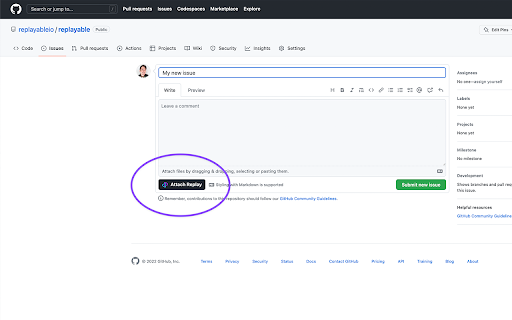
It doesn't get faster than this. Instantly embed replays within the development tools you already use.
Capture footage of everything that happens on your desktop.
Rest easy knowing that you've got a visual backup of everything that happens on your computer. Create instant-replays or find specific events in the 3-day long buffer.
Edit, publish, and share in seconds.
Isolate the relevant parts of your clip and keep private stuff a secret. All footage is stored locally and must be manually reviewed before uploading.
Enhance your contributions with video replays.
Say goodbye to demo days. Fix bugs and ship features faster by providing collaborators with the context they need.
Won't impact your system performance.
Dashcam won't fill up your disk and is performant enough to run in the background.
1%Total CPU of 16" 2021 M1 MacBook Pro
2 GB HDD - 1 hour rolling buffer at 10 FPS
Works where you do
Capture instant replays of virtually any app and share anywhere.
Desktop App
Capture everything that happens on your screen.
Cloud Publishing
Instantly share replays with your team and community.
Markdown Sharing
Embed replays with rich previews anywhere markdown is supported.
GIF Previews
Share a rich preview when video isn't supported.
HTML Embeds
Embed the full replay anywhere HTML is supported.
CLI Integration
Quickly file bugs and open pulls with one shell command.

Reviews
Loading reviews...
Permissions (3)
Permissions
scriptingℹ Can inject scripts into web pages webNavigationℹ Can monitor navigation events webRequestℹ Can observe and analyze network traffic
Details
| Version | 0.2.2 |
| Updated | Aug 9, 2023 |
| Size | 88.25KiB |
| First Seen | Mar 31, 2026 |
More by ian


Popular in developer

GoFullPage - Full Page Screen Capture
by GoFullPage
10M
★ 4.89
developer
10M
★ 4.89
developer

TouchEn PC보안 확장
by 라온시큐어
8M
★ 1.33
developer
8M
★ 1.33
developer

React Developer Tools
by Meta
5M
★ 3.95
developer
5M
★ 3.95
developer

Meta Pixel Helper
by Meta
4M
★ 3.91
developer
4M
★ 3.91
developer

ColorZilla
by colorzilla.com
4M
★ 4.59
developer
4M
★ 4.59
developer
Popular Extensions

Adobe Acrobat: PDF edit, convert, sign tools
by Adobe Inc.
331M
★ 4.40
workflow
331M
★ 4.40
workflow

AdBlock — block ads across the web
by AdBlock
63M
★ 4.48
workflow
63M
★ 4.48
workflow

迅雷下载支持
by Shenzhen Xunlei Network Technology Co., Ltd.
59M
★ 2.77
workflow
59M
★ 2.77
workflow

Grammarly: AI Writing Assistant and Grammar Checker App
by Grammarly
42M
★ 4.50
communication
42M
★ 4.50
communication

Adblock Plus - free ad blocker
by eyeo GmbH
41M
★ 4.39
workflow
41M
★ 4.39
workflow