
⚠️Below average rating
Description
Grammar Checker (Offline) is an extension that lets you check American English grammar for any input text.
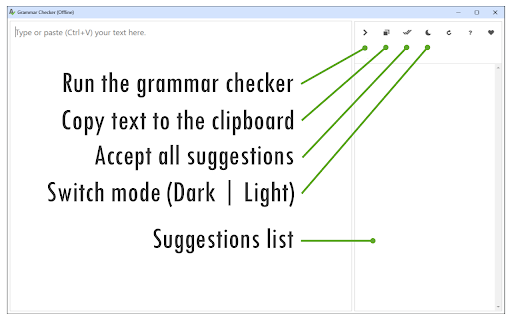
To work with this addon, please open the app interface by pressing the toolbar button. By default, the interface opens in a standalone window. However, you can also open it in a separate tab or in a toolbar pop-up. To do so, right-click the toolbar button and choose the desired context from the context menu. Once the app interface is open, please write or paste a text; you can also drag a ".txt" file into the text area on the left side. Then, wait for the app to perform the grammar checks; you can see the grammar suggestions on the right side. For a reasonable-length text (a page or two), the time required to perform the check is usually around a few seconds. You can review each grammar suggestion and either accept or dismiss the item.
Note 1: This extension uses two different AI engines for grammar check. The first one is the local Harper.js engine (https://github.com/Automattic/harper), and the second one is the built-in Gemini Nano AI (https://developer.chrome.com/docs/ai/proofreader-api). To activate Gemini Nano, please mark the checkbox in the top-right corner of the interface. When you run the app for the first time, Gemini Nano needs to download training and language data. Please be patient while it is loading, as the data is quite large (~3.5GB). Once the app is fully loaded, it can work fully Offline and does NOT rely on any servers to send or receive text.
Note 2: If the built-in Gemini Nano AI is not activated in your browser, the app will notify you, and you need to manually enable it by setting the following flags to Enabled:
chrome://flags/#proofreader-api-for-gemini-nano
chrome://flags/#optimization-guide-on-device-model
chrome://flags/#prompt-api-for-gemini-nano-multimodal-input
Note 3: This app is still a work in progress; therefore, you might see some bugs or performance issues when working with this addon.
If you have a feature request or found a bug to report, please fill out the bug report form on the addon's homepage (https://mybrowseraddon.com/grammar-checker.html).

Reviews
Loading reviews...
Permissions (2)
Permissions
contextMenusℹ Can add items to the right-click menu storageℹ Can store data locally in your browser
Details
| Version | 0.1.2 |
| Updated | Nov 26, 2025 |
| Size | 4.34MiB |
| First Seen | Mar 30, 2026 |
More by Yubi

Easy Video Downloader
by Yubi
200K
★ 2.92
workflow
200K
★ 2.92
workflow

Magnifying Glass (Hover Zoom)
by Yubi
100K
★ 4.39
tools
100K
★ 4.39
tools

Change Geolocation (Location Guard)
by Yubi
60K
★ 3.08
tools
60K
★ 3.08
tools

Canvas Fingerprint Defender
by Yubi
50K
★ 3.72
privacy
50K
★ 3.72
privacy

Copy As Plain Text
by Yubi
30K
★ 4.14
tools
30K
★ 4.14
tools
Popular in tools

Zotero Connector
by Zotero
8M
★ 3.96
tools
8M
★ 3.96
tools

Browsec VPN - Free VPN for Chrome
by Browsec
7M
★ 4.44
tools
7M
★ 4.44
tools

AnyDoc Translator - Translate Web and PDF
by www.wps.com
7M
★ 4.58
tools
7M
★ 4.58
tools

WPS PDF - Read, Edit, Fill, Convert, and AI Chat PDF with Ease
by www.wps.com
7M
★ 4.45
tools
7M
★ 4.45
tools

Video DownloadHelper
by Aclap
5M
★ 4.43
tools
5M
★ 4.43
tools
Popular Extensions

Adobe Acrobat: PDF edit, convert, sign tools
by Adobe Inc.
331M
★ 4.40
workflow
331M
★ 4.40
workflow

AdBlock — block ads across the web
by AdBlock
63M
★ 4.48
workflow
63M
★ 4.48
workflow

迅雷下载支持
by Shenzhen Xunlei Network Technology Co., Ltd.
59M
★ 2.77
workflow
59M
★ 2.77
workflow

Grammarly: AI Writing Assistant and Grammar Checker App
by Grammarly
42M
★ 4.50
communication
42M
★ 4.50
communication

Adblock Plus - free ad blocker
by eyeo GmbH
41M
★ 4.39
workflow
41M
★ 4.39
workflow