Magnifying Glass (Hover Zoom) icon

Magnifying Glass (Hover Zoom)

by Yubi

v0.1.8 Updated Feb 9, 2026 41.08KiB
CWS
100K
Users
★ 4.39
57 reviews
#1098
of 207.1K
tools
#183 of 64.4K

Description

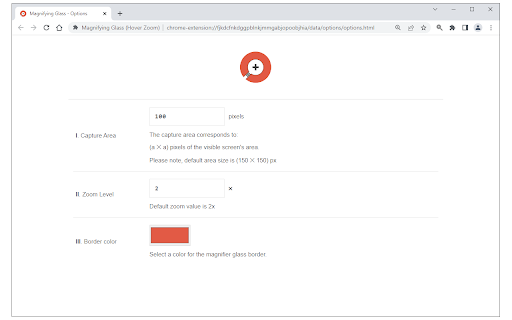
Magnifying Glass (Hover Zoom) is a lite addon that enables you to magnify a portion of a webpage with a click of a button. Please click on the toolbar button once to see the magnifying glass. Then move your mouse to see the magnified page within a circular section. If you want to hide the magnifier, simply click on the toolbar button once or click anywhere on the page. This addon has also an options page to adjust the magnifier zoom level and coverage area. Moreover, the toolbar button serves as an ON|OFF switch to turn the addon ON or OFF. Note 1: when you install the addon, it is turned off. Please click on the toolbar button once to activate the addon. The toolbar icon is red when the addon is active and grey when it is inactive. Note 2: if you want to change the zoom level, please visit the addon's options page. To report bugs, please fill out the bug report form on the addon's homepage (https://mybrowseraddon.com/magnifying-glass.html).
Magnifying Glass (Hover Zoom) screenshot 1Magnifying Glass (Hover Zoom) screenshot 2

Reviews (4 cached)

★★☆☆☆2025-04-22
Bertus van Heusden

Magnifies by lowering the resolution so the usefulness is limited. Requests permissions it doesn't need for such limited functionality. Will disappear with any click so it is quite efemere.

★★☆☆☆2020-11-14
john butler

Doesn't work, I click the magnifying glass and a pop up box appears saying "s zoom"

★★☆☆☆2020-08-27
Marvin Gage

No button will show in my toolbar so not working in latest Chrome for me.

★★★☆☆2022-03-01
Nikki Volodin

This is probably one of the better magnifying glasses to use on the the web especially on a Chromebook. However it would be so much easier to use if the mouse pointer was at the end or around end of the circle. Having it in the middle, makes it difficult to direct and see where your pointing it off too and makes it difficult to "steer". Also usually we read paragraphs, and their in rectangular form, so changing the magnifier to a rectangle or square would be so much more convenient for reading purposes.

Permissions (3)

Permissions

activeTab Can access the current tab when you click the extension scripting Can inject scripts into web pages storage Can store data locally in your browser

Details

Version 0.1.8
Updated Feb 9, 2026
Size 41.08KiB
First Seen Mar 31, 2026