
⚠️Very few reviews for its user base
Description
Send HubSpot templates with your Gmail™ email address, and import them to Gmail™ for easier access!
This extension allows you to:
✅ Import HubSpot® email templates to Gmail™
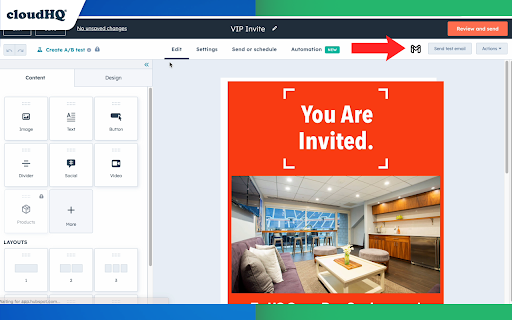
✅ Send your HubSpot template via Gmail™ without leaving the HubSpot® editor
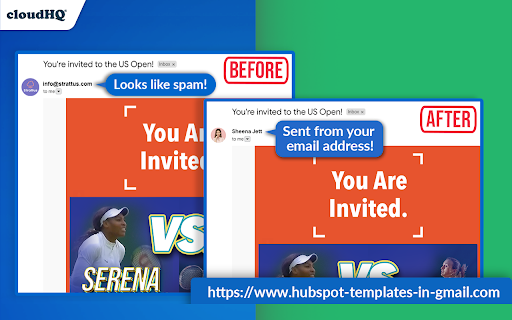
✅ No more sending emails from impersonal "no-reply@url.com" email address; they are sent from your email address.
✅ After importing your HubSpot email templates into Gmail, you can access them in your new Gmail email template library without ever leaving Gmail.
If you're in sales, run a small business, work in design or marketing, or simply need access to your HubSpot templates, this app gets the job done. It serves as an efficient solution for you to send superior, custom-tailored emails with the ease of Gmail.
~~~ Key Features ~~~
🌟 Import your HubSpot templates directly into Gmail.
🌟 Send your HubSpot templates using your Gmail address, without ever leaving HubSpot.
🌟 Unlimited template storage for Premium Plan users.
🌟 Quick and easy installation, works in Chrome browser without consuming space on your computer.
🌟 5-Star ratings by our highly satisfied users.
How it works from Hubspot:
1) Install the extension
2) Navigate to your HubSpot email templates manager
3) Select the template you wish to send in Gmail
4) An icon labelled "Gmail" will be visible next to your template. Click on it, and the selected template will populate your Gmail email composition window.
5) Finally, dispatch your email from your personal Gmail address, all while remaining within HubSpot.
How it Works from Gmail:
6) Once you imported your Hubspot template to Gmail, you can access them from there.
7) Compose a new email
8) On the bottom of your email, click on the "Email Template" icon
9) You will see a pop up of your email template library. Select one to download into your compose window of Gmail.
10) Send!
~~~~~~~~~~~~~~~~~
cloudHQ's HubSpot Templates in Gmail is ideally suited for:
🎯 **Sales Professionals** requiring their email templates within Gmail for easier client communication.
🎯 **Business Owners** valuing the simplicity of sending personalized emails straight from their Gmail account.
🎯 **Designers and Marketers** who prefer crafting visually engaging emails from their Gmail interface without the need to leave HubSpot. Additionally, it's great to keep people out of your email designs in Hubspot who can sometimes accidentally ruin them. That saves you time from having to redo them. They can access your designer templates from their Gmail accounts instead.
🎯 **Anyone** seeking a streamlined method to use their HubSpot templates sent from their Gmail address.
No more switching between platforms or impersonal emails. Start improving your productivity with HubSpot Templates for Gmail™ by cloudHQ today!
cloudHQ. Helping your productivity, 1 click at a time.
cloudHQ website: https://www.cloudhq.net/
App website: https://www.hubspot-templates-in-email.com
Pricing: https://www.hubspot-templates-in-email.com/pricing
Support page: https://support.cloudhq.net/?s=hubspot
Blog: https://blog.cloudhq.net
Gmail is a trademark of Google LLC. Use of this trademark is subject to Google Permissions.
HubSpot is a trademark of HubSpot. Use of this trademark is subject to HubSpot Permissions.
cloudHQ is trademark of cloudHQ LLC. https://www.cloudhq.net/trademark


Reviews
Loading reviews...
Permissions (4)
Permissions
background scriptingℹ Can inject scripts into web pages storageℹ Can store data locally in your browser tabsℹ Can see your open tabs and their URLs
Details
| Version | 1.0.2.10 |
| Updated | Nov 29, 2025 |
| Size | 888KiB |
| First Seen | Mar 26, 2026 |
More by cloudHQ

Gmail™ Email Templates by cloudHQ
by cloudHQ
200K
★ 4.17
communication
200K
★ 4.17
communication

Save Emails as PDF by cloudHQ
by cloudHQ
100K
★ 4.26
workflow
100K
★ 4.26
workflow

Multi Email Forward by cloudHQ
by cloudHQ
80K
★ 4.08
communication
80K
★ 4.08
communication

Auto BCC for Gmail™ by cloudHQ
by cloudHQ
60K
★ 4.24
communication
60K
★ 4.24
communication

Backup and Sync Google Drive to other clouds
by cloudHQ
50K
★ 4.24
workflow
50K
★ 4.24
workflow
Popular in communication

Grammarly: AI Writing Assistant and Grammar Checker App
by Grammarly
42M
★ 4.50
communication
42M
★ 4.50
communication

Loom – Screen Recorder & Screen Capture
by Loom
8M
★ 4.58
communication
8M
★ 4.58
communication

QuillBot: AI Writing and Grammar Checker Tool
by quillbot
5M
★ 4.69
communication
5M
★ 4.69
communication

DeepL: translate and write with AI
by team-browser-extensions
4M
★ 4.73
communication
4M
★ 4.73
communication

Email Tracker by Mailtrack®
by Mailsuite
3M
★ 4.42
communication
3M
★ 4.42
communication
Popular Extensions

Adobe Acrobat: PDF edit, convert, sign tools
by Adobe Inc.
322M
★ 4.40
workflow
322M
★ 4.40
workflow

AdBlock — block ads across the web
by AdBlock
62M
★ 4.48
workflow
62M
★ 4.48
workflow

迅雷下载支持
by Shenzhen Xunlei Network Technology Co., Ltd.
59M
★ 2.77
workflow
59M
★ 2.77
workflow
Grammarly: AI Writing Assistant and Grammar Checker App
by Grammarly
42M
★ 4.50
communication
42M
★ 4.50
communication

Adblock Plus - free ad blocker
by eyeo GmbH
40M
★ 4.39
workflow
40M
★ 4.39
workflow