
Title & Meta Description Checkers - cmlabs SEO Tools
v1.0.1 Updated May 16, 2024 3.57MiB
⚠️Not updated in over a year
Description
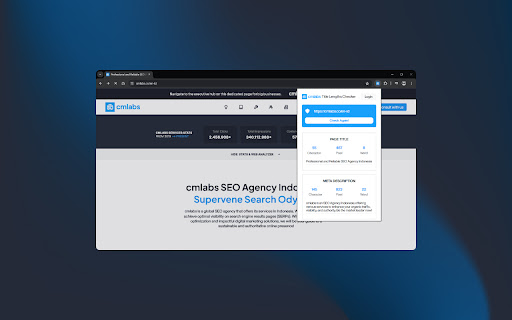
Writing titles and meta descriptions in SEO practices is an important thing that needs to be done properly. In this case, the Title and Meta Description Checker tool helps you adjusting the length of the characters and the pixels of the title and description that will be displayed later on the SERP.
With this tool, you can ensure your title and description are written according to SEO guidelines, relevant, concise, and interesting to users. Download and try now!
Features & Benefits
Here are some of its functions you should know about:
- This tool is available for free.
- Helping the search engine algorithm and users identify documents on a website
- Simplify website address naming.
- Make it easier for users to recognize the address with easy-to-remember URL characters.
- Increase the page ranking on the SERP.
- Determine the conversion value of CTR.
How to Use
1. Open Title and Meta Description Checker
Once you open it, you will be welcomed by the display of two columns, which are Page Title and Meta Description. On the upper side, you will see the column to input your website’s URL.
2. Choose the Modes
There are two available modes provided by the tool, which are manual and bot. Manual mode can be used to adjust the title and description according to your needs. In this mode, you can write or copy texts and adjust them according to the SEO principles.
On the other hand, the bot mode will display the title and description based on the data from the website’s URL you input in the designated column. You just need to copy the URL of the site or page. Afterward, you can click on the Crawl URL button to get the result of the title tag and meta description automatically.
3. Fulfill the Column
After choosing the mode, you can input the text in the column. You can copy the text and paste it in the respective places for the title and description. Aside from that, you can write and edit the text right away.
4. Adjust the Title Tag and Meta Description
To write the title, the criteria of the characters should generally be adjusted according to SEO principles which consist of 50-60 characters. As for the pixel itself, the title should not be more than 500 pixels.
As for the meta description, the text should consist of 50-150 characters. The pixel length of the description should not be longer than 900.
If the writing of the title and description already comply with the SEO principles, the indicator light will turn green. However, if it doesn’t, the light will stay white.
Help & Support
We value your feedback! If you have any suggestions for improving the Title and Meta Description Checker or encounter any issues while using the tool, please don't hesitate to let us know. Our support team is here to help. Reach us by email at:
marketing@cmlabs.co
dev@cmlabs.co


Reviews
Loading reviews...
Permissions (2)
Permissions
storageℹ Can store data locally in your browser tabsℹ Can see your open tabs and their URLs
Details
| Version | 1.0.1 |
| Updated | May 16, 2024 |
| Size | 3.57MiB |
| First Seen | Mar 29, 2026 |
More by cmlabs Developer

Mobile Friendly Test - cmlabs Tools
by cmlabs Developer
4K
★ 5.00
developer
4K
★ 5.00
developer

SSL Checker - cmlabs SEO Tools
by cmlabs Developer
398
★ 5.00
developer
398
★ 5.00
developer

Heading Tags Checker - cmlabs Tools
by cmlabs Developer
304
★ 4.44
developer
304
★ 4.44
developer

HTTP Header Checker - cmlabs SEO Tools
by cmlabs Developer
276
★ 5.00
developer
276
★ 5.00
developer

Pagespeed Test - cmlabs SEO Tools
by cmlabs Developer
271
★ 5.00
developer
271
★ 5.00
developer
Popular in developer

GoFullPage - Full Page Screen Capture
by GoFullPage
10M
★ 4.89
developer
10M
★ 4.89
developer

TouchEn PC보안 확장
by 라온시큐어
8M
★ 1.33
developer
8M
★ 1.33
developer

React Developer Tools
by Meta
5M
★ 3.95
developer
5M
★ 3.95
developer

Meta Pixel Helper
by Meta
4M
★ 3.91
developer
4M
★ 3.91
developer

ColorZilla
by colorzilla.com
4M
★ 4.59
developer
4M
★ 4.59
developer
Popular Extensions

Adobe Acrobat: PDF edit, convert, sign tools
by Adobe Inc.
331M
★ 4.40
workflow
331M
★ 4.40
workflow

AdBlock — block ads across the web
by AdBlock
62M
★ 4.48
workflow
62M
★ 4.48
workflow

迅雷下载支持
by Shenzhen Xunlei Network Technology Co., Ltd.
59M
★ 2.77
workflow
59M
★ 2.77
workflow

Grammarly: AI Writing Assistant and Grammar Checker App
by Grammarly
42M
★ 4.50
communication
42M
★ 4.50
communication

Adblock Plus - free ad blocker
by eyeo GmbH
41M
★ 4.39
workflow
41M
★ 4.39
workflow