
Description
Struggling with JavaScript debugging and console errors in the browser? Tired of losing your valuable data in the tiny console window when you refresh the website?
But don’t worry, Hover Console is here to simplify your coding life. This advanced JavaScript debugger empowers developers to analyze code effectively. Get started today and experience the difference for yourself. Your code deserves the best debugging companion, and Hover Console Extension is just a click away!
🟩 Current Features:
🟢 Supercharged JS Debugger:
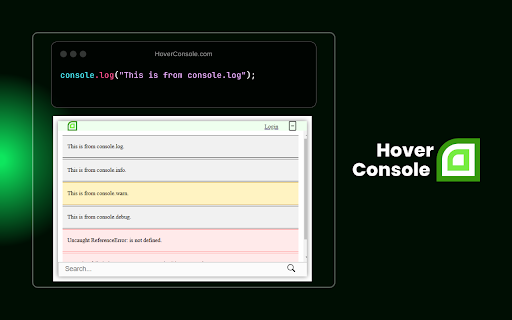
↳ Say goodbye to deciphering complex console logs. Hover Console supports all data types, including text, numbers, arrays, and JSON objects, making debugging more intuitive and efficient.
🟢 AI-Powered Error Resolution:
↳ Hover Console leverages AI to analyze your code and automatically suggest solutions for errors. It doesn’t just identify the problem but provides intelligent, context-aware recommendations, helping you fix bugs faster and with greater confidence.
🟢 Tabular Data Display:
↳ Visualize your data in a structured, easy-to-read format with console.table(). No more scrolling through endless logs—your data is organized and presented clearly in table form.
🟢 Panel Position Control:
↳ Tailor your experience by moving the panel where you want it - side, bottom, or your choice!
🟢 Domain-Specific Panel Toggle:
↳ Sick of cluttered panels? Hide or show it for a specific domain. Your preferences stick, keeping debugging clean and hassle-free, without affecting other websites.
🟩 What’s New:
↳ Enhanced JS debugger integration for easier error tracking and data visualization.
↳ More precise AI-driven suggestions tailored to common JavaScript debugging challenges.
↳ Improved performance for real-time debugging in complex JavaScript environments.
🟩 What's Coming Next:
↳ Our commitment to enhancing your JavaScript debugging experience in the browser doesn't stop here. More powerful JS debugger features are on the way to make Hover Console even more indispensable for JavaScript developers.
Install "Hover Console" and elevate your JavaScript debugging to a whole new level. Say hello to a more efficient, organized, and enjoyable coding journey with Hover Console by your side.
Get started with the ultimate JavaScript debugger today and experience the difference!
🟩 Should you encounter any issues or have valuable suggestions:
🌎 Join our community: https://fb.com/groups/813948899701642/
✉️ Email us: info@hoverconsole.com
💬 Chat with us: hoverconsole.com


Reviews
Loading reviews...
Permissions (2)
Permissions
storageℹ Can store data locally in your browser tabsℹ Can see your open tabs and their URLs
Details
| Version | 0.27 |
| Updated | Apr 25, 2025 |
| Size | 223KiB |
| First Seen | Mar 26, 2026 |
Popular in developer

TouchEn PC보안 확장
by 라온시큐어
8M
★ 1.33
developer
8M
★ 1.33
developer

React Developer Tools
by Meta
5M
★ 3.95
developer
5M
★ 3.95
developer

Lighthouse
by lighthouse-extension-owners
1M
★ 4.42
developer
1M
★ 4.42
developer

Контур.Плагин
by kontur.extension
1M
★ 3.11
developer
1M
★ 3.11
developer

Similarweb - Website Traffic & SEO Checker
by Similarweb
1M
★ 4.66
developer
1M
★ 4.66
developer
Popular Extensions

Adobe Acrobat: PDF edit, convert, sign tools
by Adobe Inc.
331M
★ 4.40
workflow
331M
★ 4.40
workflow

Chrome Remote Desktop
by Chrome Remote Desktop Release Managers
38M
★ 3.14
workflow
38M
★ 3.14
workflow

Microsoft Single Sign On
by Microsoft
36M
★ 2.27
workflow
36M
★ 2.27
workflow

Cisco Webex Extension
by cisco.chromestore
24M
★ 2.34
social
24M
★ 2.34
social

Kami for Google Chrome™
by Kami
19M
★ 4.56
education
19M
★ 4.56
education