
⚠️Not updated in over 2 years
Description
npSURFER lets you browse websites without clicking the mouse. You just use your number pad.
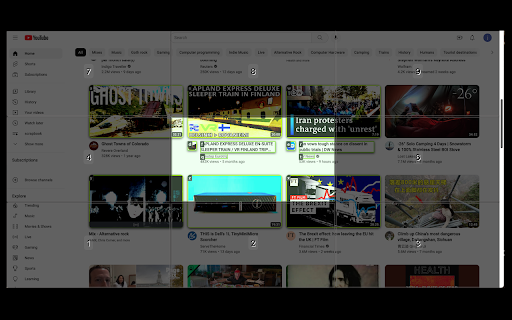
When you press a numberpad key, a grid appears on top the web page and it is divided into cells corresponding to the numberpad keys. For any number key that is pressed, that is the cell that is highlighted on the overlayed grid. This isolates for you the area where the hyperlink is located that you want to click. Within that cell, all of the links are labeled with key labels ('a','s','d','f', etc.). Press the key (like 'f') for the link that you want to click.
Watch the video demo to see it in action.
npSURFER works for conventionally-coded websites like Google, YouTube, Twitter, but is not without occasional glitches when the websites are coded differently.
Future releases:
--- Address incompatibility with websites that make use of the shadow DOM, like MSN.com.


Reviews
Loading reviews...
Details
| Version | 0.0.0.6 |
| Updated | Dec 6, 2022 |
| Size | 210KiB |
| First Seen | Mar 29, 2026 |
Popular in workflow

Adobe Acrobat: PDF edit, convert, sign tools
by Adobe Inc.
331M
★ 4.40
workflow
331M
★ 4.40
workflow

AdBlock — block ads across the web
by AdBlock
62M
★ 4.48
workflow
62M
★ 4.48
workflow

Chrome Remote Desktop
by Chrome Remote Desktop Release Managers
38M
★ 3.14
workflow
38M
★ 3.14
workflow

Microsoft Single Sign On
by Microsoft
36M
★ 2.27
workflow
36M
★ 2.27
workflow

MetaMask
by metamask
13M
★ 2.68
workflow
13M
★ 2.68
workflow
Popular Extensions
Adobe Acrobat: PDF edit, convert, sign tools
by Adobe Inc.
331M
★ 4.40
workflow
331M
★ 4.40
workflow
AdBlock — block ads across the web
by AdBlock
62M
★ 4.48
workflow
62M
★ 4.48
workflow

Grammarly: AI Writing Assistant and Grammar Checker App
by Grammarly
42M
★ 4.50
communication
42M
★ 4.50
communication
Chrome Remote Desktop
by Chrome Remote Desktop Release Managers
38M
★ 3.14
workflow
38M
★ 3.14
workflow
Microsoft Single Sign On
by Microsoft
36M
★ 2.27
workflow
36M
★ 2.27
workflow